> ## Documentation Index
> Fetch the complete documentation index at: https://documentation.idenfy.com/llms.txt
> Use this file to discover all available pages before exploring further.
# Create AML Profile
> Learn how to run a single AML check against a person or company using the iDenfy API, including request parameters and response handling.
**Requirements**
* **API** key pair
* Services **enabled** on your environment (done by iDenfy staff)
* Credits **for each** service used
## AML Check Flow
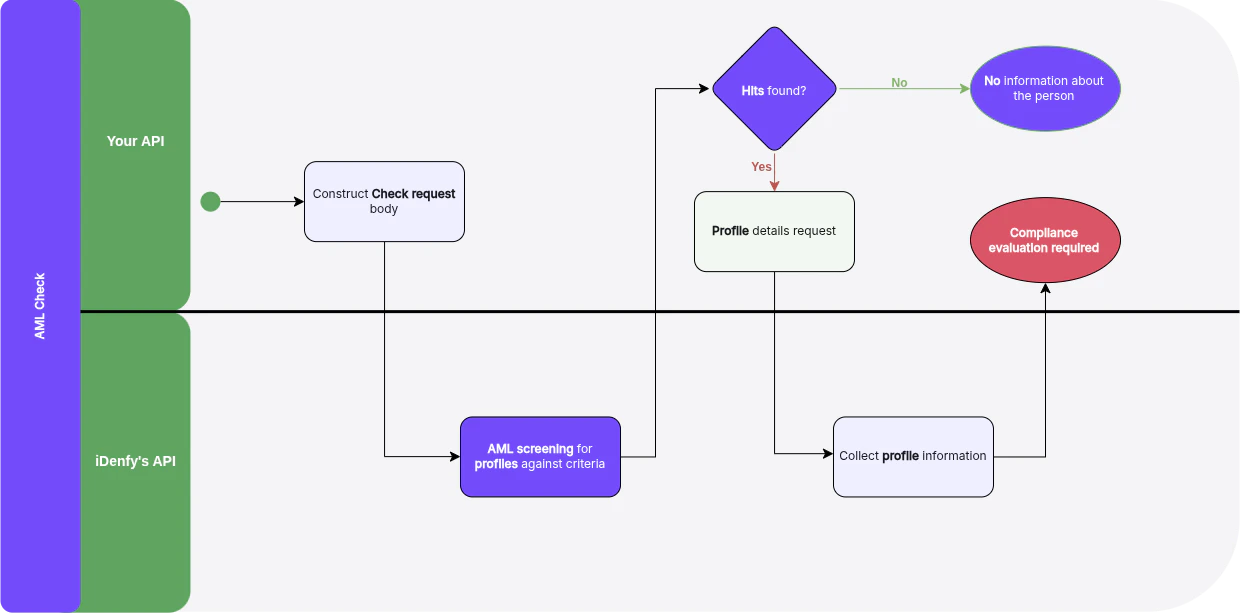 You can find more explanation in the [Help Center](/guides/dashboard/aml/aml-key-terms-concepts).
## Create AML Check
For full request and response schemas, see the [**API Reference**](/api-reference/aml-checks/create-aml-check).
Use the AML check creation endpoint to screen a person or company. The API will return matched profiles from sanctions, PEPs, and adverse media databases based on your configured filters.
You can find more explanation in the [Help Center](/guides/dashboard/aml/aml-key-terms-concepts).
## Create AML Check
For full request and response schemas, see the [**API Reference**](/api-reference/aml-checks/create-aml-check).
Use the AML check creation endpoint to screen a person or company. The API will return matched profiles from sanctions, PEPs, and adverse media databases based on your configured filters.