> ## Documentation Index
> Fetch the complete documentation index at: https://documentation.idenfy.com/llms.txt
> Use this file to discover all available pages before exploring further.
# Retrieve AML Profile
> Retrieve AML screening results and matched profiles for a completed check via the iDenfy API, including sanctions and PEP hit details.
**Requirements**
* **API** key pair
* A previous [AML check](/aml/create-profile) that returned profiles
## AML Check Flow — Retrieve Profile
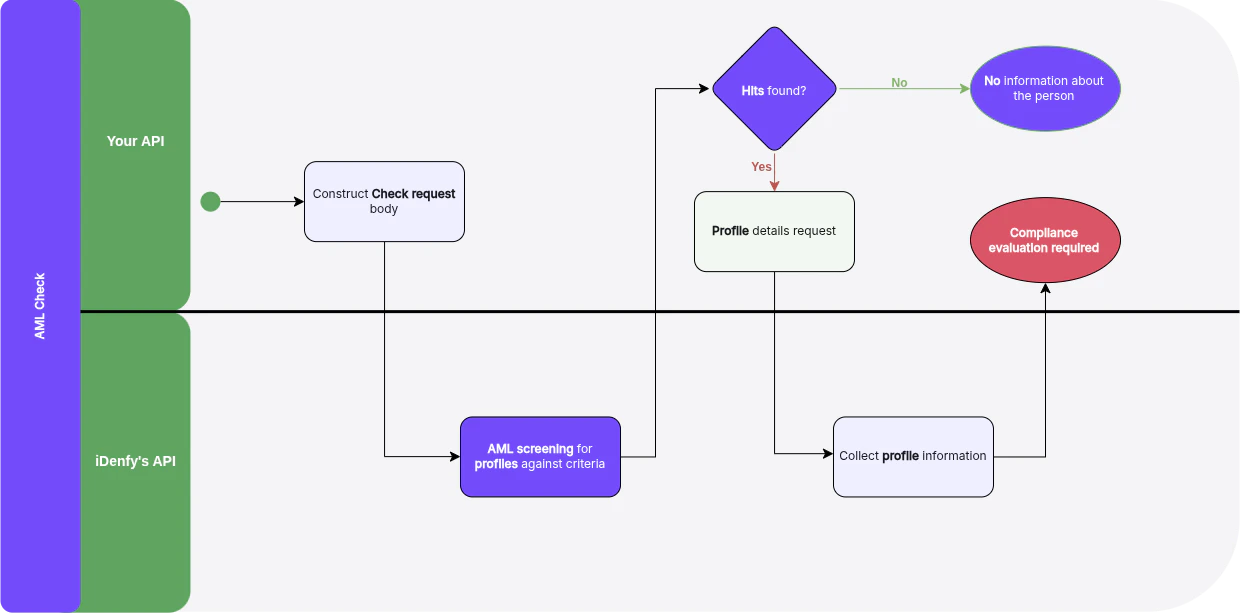 You can find more explanation in the [Help Center](/guides/dashboard/aml/aml-key-terms-concepts).
Information inside profiles is not filtered by check filters. Profile information will contain all conditions and data regardless of the filters applied during the check.
## Retrieve Profile
For full request and response schemas, see the [**API Reference**](/api-reference/aml-checks/retrieve-aml-check-profile).
Use the profile retrieval endpoint to get detailed information about a matched AML profile, including all associated sanctions, PEP entries, and adverse media records.
You can find more explanation in the [Help Center](/guides/dashboard/aml/aml-key-terms-concepts).
Information inside profiles is not filtered by check filters. Profile information will contain all conditions and data regardless of the filters applied during the check.
## Retrieve Profile
For full request and response schemas, see the [**API Reference**](/api-reference/aml-checks/retrieve-aml-check-profile).
Use the profile retrieval endpoint to get detailed information about a matched AML profile, including all associated sanctions, PEP entries, and adverse media records.