> ## Documentation Index
> Fetch the complete documentation index at: https://documentation.idenfy.com/llms.txt
> Use this file to discover all available pages before exploring further.
# Age Estimation Dashboard
> Create age estimation sessions from the iDenfy dashboard and browse results with status filter groupings, session detail views, and document step-up links.
Age Estimation sessions created via the API or the dashboard can be browsed from the dashboard's Age Estimation section. Viewing session data requires the **View age estimation data** permission, which is enabled for all partners by default; creating sessions requires the `MANAGE_AGE_ESTIMATION` permission on your manager account.
For what the statuses and outcomes below mean, see the [Age Estimation Overview](/guides/dashboard/age-estimation/overview#statuses-and-outcomes).
## Creating a Session
**Create new** on the Age Estimation page opens the **New estimation** form, split across two tabs: **General settings** and **Verification redirects**. Between them you set the age requirement, when to fall back to ID verification, and how each session behaves.
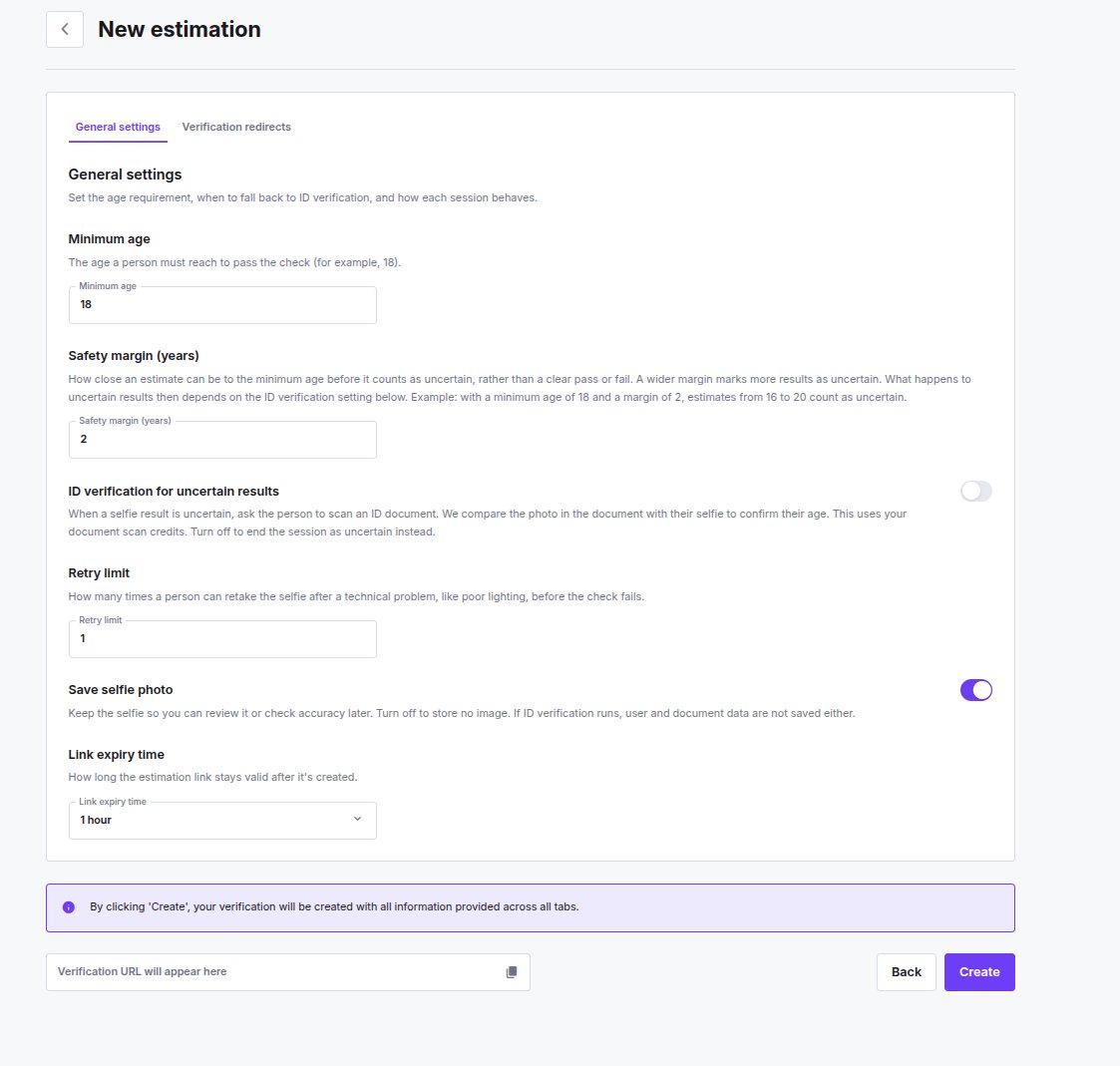 ### General Settings
| Setting | Description |
| ----------------------------------------- | -------------------------------------------------------------------------------------------------------------------------------------------------------------------------------------------------------------------------------------------------------------------------------------------------------------------------------------------------------------------------------------- |
| **Minimum age** | The age a person must reach to pass the check, for example 18. Accepts 1--120. |
| **Safety margin (years)** | How close an estimate can be to the minimum age before it counts as uncertain, rather than a clear pass or fail. A wider margin marks more results as uncertain, and what happens to them then depends on the ID verification setting below. With a minimum age of 18 and a margin of 2, estimates from 16 to 20 count as uncertain. Accepts 0--20, and cannot exceed the minimum age. |
| **ID verification for uncertain results** | When on, an uncertain result asks the person to scan an ID document, and the photo in the document is compared with their selfie to confirm their age. The check is charged as an Age Estimation Document Scan from your [Age Estimation finances](/guides/dashboard/age-estimation/billing). Turn it off to end the session as **Uncertain** instead. |
| **Retry limit** | How many times a person can retake the selfie after a technical problem, such as poor lighting, before the check fails. Accepts 1--3. |
| **Save selfie photo** | Keep the selfie so you can review it or check accuracy later. Turn it off to store no image -- and if ID verification runs, the user and document data aren't saved either. |
| **Link expiry time** | How long the estimation link stays valid after it's created, chosen from a preset list. |
### Verification Redirects
| Setting | Description |
| ----------------------------------------------- | ------------------------------------------------------------------------------------------------------------------------------------------------------------------- |
| **Success / Underage / Uncertain redirect URL** | Where to send the person after each outcome. Leave empty to show the standard result screen. |
| **Webhook URL** | Where to send the final result. Falls back to your account's Age Estimation notification URL when empty -- see [Age Estimation Webhooks](/age-estimation/webhooks). |
**Create** submits both tabs at once -- the session is created with everything entered across General settings and Verification redirects. The verification URL then appears in the bar at the bottom of the page, with a button to copy it.
## Session List
Sessions are grouped by their final status:
| Group | Meaning |
| ------------------- | ------------------------------------------------------------------------------------------ |
| **Results** | Completed sessions with outcome **Success** or **Underage**. |
| **Needs Attention** | Outcome **Uncertain** / **Face Mismatch** / **Attempts Exceeded**, or a technical failure. |
| **In Progress** | Awaiting or undergoing capture, not yet expired. |
| **Expired** | Lapsed without a result. |
Each row shows the session ID, its status and outcome, the estimated age, and the creation date. Sessions can be filtered by client ID and creation date, sorted by creation date, and searched by session ID or client reference. A session that escalated to a document check can also be found by its step-up scan reference.
## Session Detail
Opening a session shows:
* **Result** -- status, outcome, and the estimated age.
* **Settings** -- the session ID, when it was created and when it expires, plus the session's configuration: minimum age, safety margin, step-up mode, retry limit, and whether the selfie was saved.
* **Media** -- the analysed selfie, when saving photos was enabled for that session. If **Save selfie photo** was off, **Selfie storage is off** is shown in its place.
* **ID verification** -- if the session escalated to a document check, a block showing the check method, its result, and when it ran. That verification is billed as an Age Estimation Document Scan from your [Age Estimation finances](/guides/dashboard/age-estimation/billing), so it won't appear against your document scan usage. With **Save selfie photo** on, the block links through to the underlying identity verification, so you can review the document and any fraud flags raised on it. With it off, the block shows the check details only and does not link through -- the document and personal data were used to establish the age and nothing was stored. Such verifications also stay out of the identity verification review list and are never sent to manual review.
* **Estimated age** -- not shown when the age came from a document step-up rather than the AI estimate, since the document gives an exact date of birth.
Fields that have no value yet -- on a session that is still pending, or one that expired without a result -- are shown as **—**.
A step-up document that was accepted but flagged for possible fraud still resolves the age estimation session normally (**Success** / **Underage**). The fraud flag is not shown on the age estimation session itself -- open the linked identity verification to review it.
## Related topics
- [Age Estimation Overview](/guides/dashboard/age-estimation/overview.md)
- [Age Estimation Webhooks](/age-estimation/webhooks.md)
- [Age Estimation Billing](/guides/dashboard/age-estimation/billing.md)
- [Age estimation result](/api-reference/webhooks/age-estimation-result.md)
- [Age Verification](/guides/dashboard/kyc/age-verification.md)
### General Settings
| Setting | Description |
| ----------------------------------------- | -------------------------------------------------------------------------------------------------------------------------------------------------------------------------------------------------------------------------------------------------------------------------------------------------------------------------------------------------------------------------------------- |
| **Minimum age** | The age a person must reach to pass the check, for example 18. Accepts 1--120. |
| **Safety margin (years)** | How close an estimate can be to the minimum age before it counts as uncertain, rather than a clear pass or fail. A wider margin marks more results as uncertain, and what happens to them then depends on the ID verification setting below. With a minimum age of 18 and a margin of 2, estimates from 16 to 20 count as uncertain. Accepts 0--20, and cannot exceed the minimum age. |
| **ID verification for uncertain results** | When on, an uncertain result asks the person to scan an ID document, and the photo in the document is compared with their selfie to confirm their age. The check is charged as an Age Estimation Document Scan from your [Age Estimation finances](/guides/dashboard/age-estimation/billing). Turn it off to end the session as **Uncertain** instead. |
| **Retry limit** | How many times a person can retake the selfie after a technical problem, such as poor lighting, before the check fails. Accepts 1--3. |
| **Save selfie photo** | Keep the selfie so you can review it or check accuracy later. Turn it off to store no image -- and if ID verification runs, the user and document data aren't saved either. |
| **Link expiry time** | How long the estimation link stays valid after it's created, chosen from a preset list. |
### Verification Redirects
| Setting | Description |
| ----------------------------------------------- | ------------------------------------------------------------------------------------------------------------------------------------------------------------------- |
| **Success / Underage / Uncertain redirect URL** | Where to send the person after each outcome. Leave empty to show the standard result screen. |
| **Webhook URL** | Where to send the final result. Falls back to your account's Age Estimation notification URL when empty -- see [Age Estimation Webhooks](/age-estimation/webhooks). |
**Create** submits both tabs at once -- the session is created with everything entered across General settings and Verification redirects. The verification URL then appears in the bar at the bottom of the page, with a button to copy it.
## Session List
Sessions are grouped by their final status:
| Group | Meaning |
| ------------------- | ------------------------------------------------------------------------------------------ |
| **Results** | Completed sessions with outcome **Success** or **Underage**. |
| **Needs Attention** | Outcome **Uncertain** / **Face Mismatch** / **Attempts Exceeded**, or a technical failure. |
| **In Progress** | Awaiting or undergoing capture, not yet expired. |
| **Expired** | Lapsed without a result. |
Each row shows the session ID, its status and outcome, the estimated age, and the creation date. Sessions can be filtered by client ID and creation date, sorted by creation date, and searched by session ID or client reference. A session that escalated to a document check can also be found by its step-up scan reference.
## Session Detail
Opening a session shows:
* **Result** -- status, outcome, and the estimated age.
* **Settings** -- the session ID, when it was created and when it expires, plus the session's configuration: minimum age, safety margin, step-up mode, retry limit, and whether the selfie was saved.
* **Media** -- the analysed selfie, when saving photos was enabled for that session. If **Save selfie photo** was off, **Selfie storage is off** is shown in its place.
* **ID verification** -- if the session escalated to a document check, a block showing the check method, its result, and when it ran. That verification is billed as an Age Estimation Document Scan from your [Age Estimation finances](/guides/dashboard/age-estimation/billing), so it won't appear against your document scan usage. With **Save selfie photo** on, the block links through to the underlying identity verification, so you can review the document and any fraud flags raised on it. With it off, the block shows the check details only and does not link through -- the document and personal data were used to establish the age and nothing was stored. Such verifications also stay out of the identity verification review list and are never sent to manual review.
* **Estimated age** -- not shown when the age came from a document step-up rather than the AI estimate, since the document gives an exact date of birth.
Fields that have no value yet -- on a session that is still pending, or one that expired without a result -- are shown as **—**.
A step-up document that was accepted but flagged for possible fraud still resolves the age estimation session normally (**Success** / **Underage**). The fraud flag is not shown on the age estimation session itself -- open the linked identity verification to review it.
## Related topics
- [Age Estimation Overview](/guides/dashboard/age-estimation/overview.md)
- [Age Estimation Webhooks](/age-estimation/webhooks.md)
- [Age Estimation Billing](/guides/dashboard/age-estimation/billing.md)
- [Age estimation result](/api-reference/webhooks/age-estimation-result.md)
- [Age Verification](/guides/dashboard/kyc/age-verification.md)