> ## Documentation Index
> Fetch the complete documentation index at: https://documentation.idenfy.com/llms.txt
> Use this file to discover all available pages before exploring further.
# AML Check
> Run a single AML screening check against sanctions, PEPs, and adverse media databases from the iDenfy dashboard with step-by-step guide.
For detailed explanations of AML terms, datasets, and filters, visit [AML - Key Terms & Concepts](/guides/dashboard/aml/aml-key-terms-concepts)
## Dashboard Navigation for AML Check
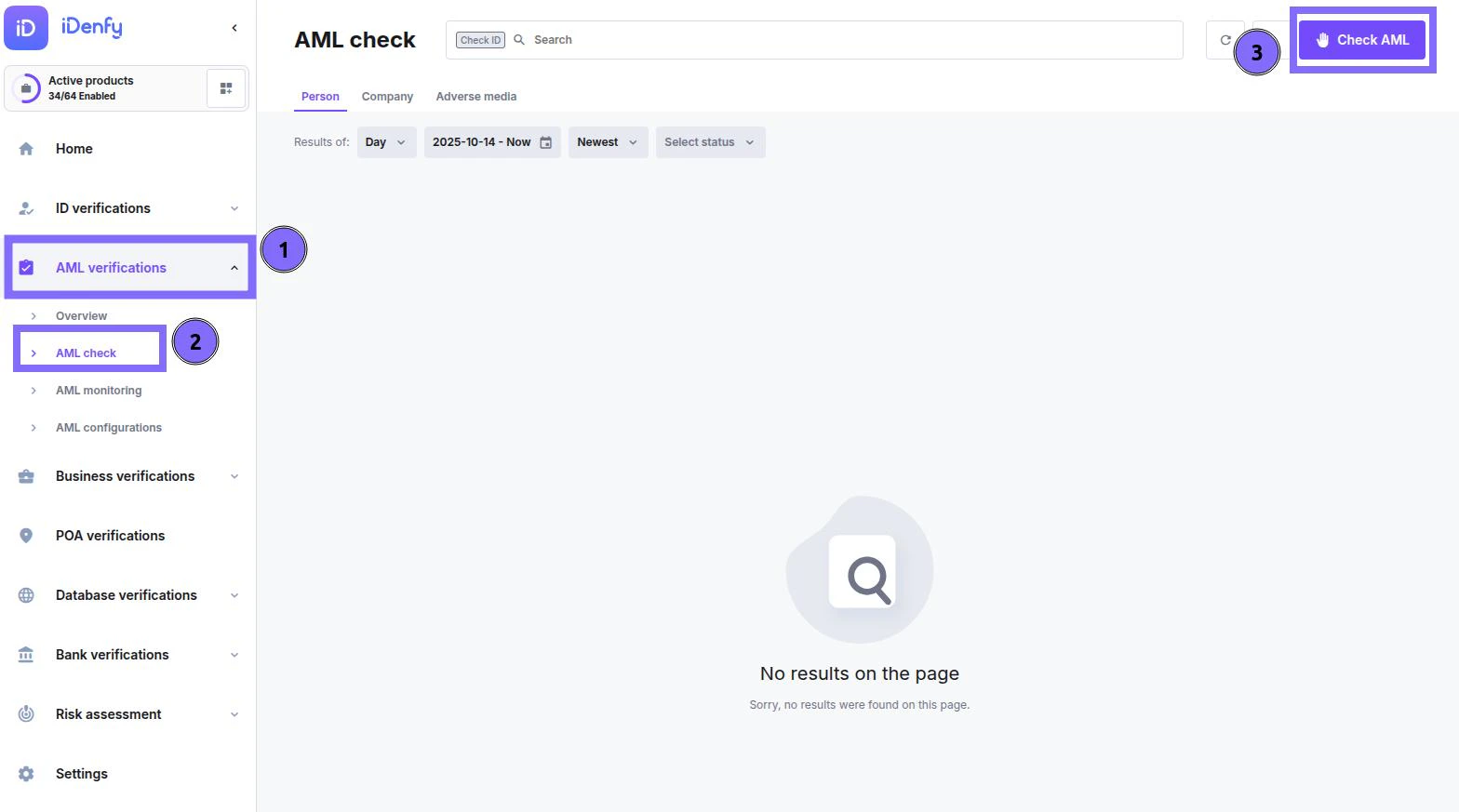
1. In the dashboard, navigate to the ***AML verifications*** section
2. Select ***AML check***
3. In the top right corner, *click* ***Check AML***
 ***
## AML Check — Quick Guide
Use this form to create a new AML (Anti-Money Laundering) check for a person or company.
It screens your subject against selected datasets such as **Sanctions**, **PEPs**, and others.
***
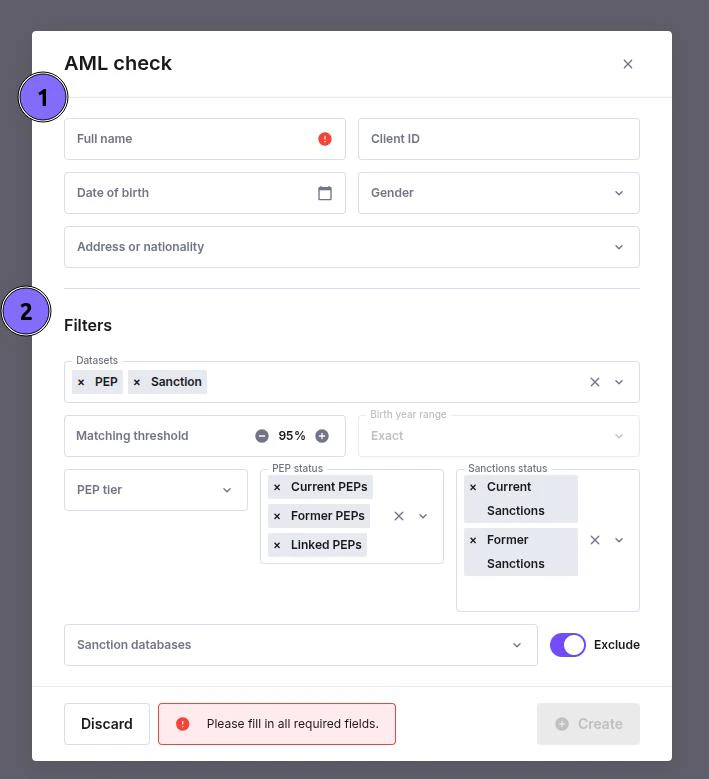
### 1. Enter Subject Details
Fill in the identifying information for the person or company you want to screen.
* **Full name** — required.
* **Client ID** — optional internal reference.
* **Date of birth / Gender** — helps narrow results.
* **Address or nationality** — adds context and reduces false matches.
Make sure all required fields are completed before continuing.
***
### 2. Apply Filters
Fine-tune your search by selecting which datasets and parameters to use.
* **Datasets** — select what to check (e.g., *PEP*, *Sanction*, *Adverse Media*).
* **Matching threshold** — sets how closely the results must match.
* **PEP status** — include current, former, or linked PEPs.
* **Sanctions status** — include current or former sanctions.
* **Sanction databases** — specify or exclude certain lists if needed.
Adjust these filters depending on your screening requirements.
***
### 3. Create or Discard
Once all required information is filled in:
* Click **Create** to start the AML check.
* Click **Discard** to cancel.
If the “Create” button is disabled, review the form and complete any missing fields.
***
## AML Check — Quick Guide
Use this form to create a new AML (Anti-Money Laundering) check for a person or company.
It screens your subject against selected datasets such as **Sanctions**, **PEPs**, and others.
***
### 1. Enter Subject Details
Fill in the identifying information for the person or company you want to screen.
* **Full name** — required.
* **Client ID** — optional internal reference.
* **Date of birth / Gender** — helps narrow results.
* **Address or nationality** — adds context and reduces false matches.
Make sure all required fields are completed before continuing.
***
### 2. Apply Filters
Fine-tune your search by selecting which datasets and parameters to use.
* **Datasets** — select what to check (e.g., *PEP*, *Sanction*, *Adverse Media*).
* **Matching threshold** — sets how closely the results must match.
* **PEP status** — include current, former, or linked PEPs.
* **Sanctions status** — include current or former sanctions.
* **Sanction databases** — specify or exclude certain lists if needed.
Adjust these filters depending on your screening requirements.
***
### 3. Create or Discard
Once all required information is filled in:
* Click **Create** to start the AML check.
* Click **Discard** to cancel.
If the “Create” button is disabled, review the form and complete any missing fields.
 After submission, the system returns a list of potential matches. Review each one to confirm whether it refers to your subject.
***
## Check Results
After submission, the system returns a list of potential matches. Review each one to confirm whether it refers to your subject.
***
## Check Results
 ### Search Parameters
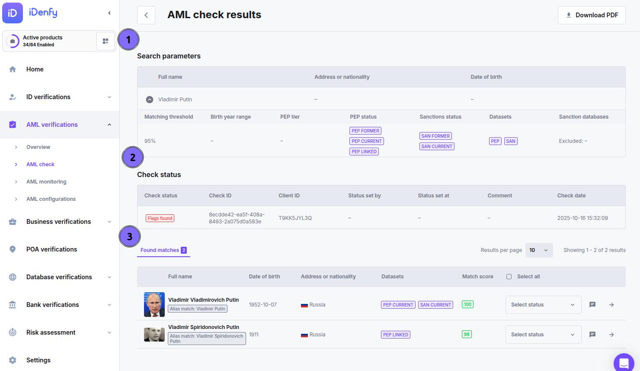
Displays the details used in the check — your reference for what was searched. The top row shows the subject identity:
* **Full name** — the entered name of the person or company
* **Address or nationality** — country or region used in the search
* **Date of birth** — full or partial, if provided
Expand the row to see the full screening configuration:
| Field | Description |
| ---------------------- | -------------------------------------------- |
| **Matching threshold** | Minimum similarity score used (e.g. 95%) |
| **Birth year range** | DOB range applied to narrow results |
| **PEP tier** | Which PEP tiers were included (Tier 1, 2, 3) |
| **PEP status** | PEP CURRENT, PEP FORMER, PEP LINKED |
| **Sanctions status** | SAN CURRENT, SAN FORMER |
| **Datasets** | Screening databases included (e.g. PEP, SAN) |
| **Sanction databases** | Any sanction lists excluded from screening |
***
### Check Status
| Column | Description |
| ----------------- | ----------------------------------------------------------------------------------------------------------------------------- |
| **Check status** | Current review state: `Flags found` (unreviewed matches exist), `True positive`, `False positive`, `Under review`, or `Clear` |
| **Check ID** | Unique identifier for this check |
| **Client ID** | Your internal customer reference |
| **Status set by** | The user who last changed the status |
| **Status set at** | When the status was last changed |
| **Comment** | Optional review note |
| **Check date** | When the screening ran |
***
### Found Matches
When matches exist, each row in the table is a potential profile. Review each one — small differences such as birth year or nationality often determine whether a match is genuine or false.
| Column | Description |
| -------------------------- | ----------------------------------------------------------------------- |
| **Full name** | Matched entity's name as listed in the dataset |
| **Date of birth** | If available in the source |
| **Address or nationality** | Country or region linked to the record |
| **Datasets** | Which databases triggered the match (e.g. `PEP CURRENT`, `SAN CURRENT`) |
| **Match score** | Confidence level (0–100) showing how close the match is to your subject |
| **Select status** | Mark the match as `True positive`, `False positive`, or `Under review` |
| **Comment** | Add context or reasoning for future reference |
Click any matched row to open its full profile — see [AML Profiles](/guides/dashboard/aml/aml-profiles) for a full description of all tabs and fields.
***
## Additional Functions Inside *Check*
### Search Parameters
Displays the details used in the check — your reference for what was searched. The top row shows the subject identity:
* **Full name** — the entered name of the person or company
* **Address or nationality** — country or region used in the search
* **Date of birth** — full or partial, if provided
Expand the row to see the full screening configuration:
| Field | Description |
| ---------------------- | -------------------------------------------- |
| **Matching threshold** | Minimum similarity score used (e.g. 95%) |
| **Birth year range** | DOB range applied to narrow results |
| **PEP tier** | Which PEP tiers were included (Tier 1, 2, 3) |
| **PEP status** | PEP CURRENT, PEP FORMER, PEP LINKED |
| **Sanctions status** | SAN CURRENT, SAN FORMER |
| **Datasets** | Screening databases included (e.g. PEP, SAN) |
| **Sanction databases** | Any sanction lists excluded from screening |
***
### Check Status
| Column | Description |
| ----------------- | ----------------------------------------------------------------------------------------------------------------------------- |
| **Check status** | Current review state: `Flags found` (unreviewed matches exist), `True positive`, `False positive`, `Under review`, or `Clear` |
| **Check ID** | Unique identifier for this check |
| **Client ID** | Your internal customer reference |
| **Status set by** | The user who last changed the status |
| **Status set at** | When the status was last changed |
| **Comment** | Optional review note |
| **Check date** | When the screening ran |
***
### Found Matches
When matches exist, each row in the table is a potential profile. Review each one — small differences such as birth year or nationality often determine whether a match is genuine or false.
| Column | Description |
| -------------------------- | ----------------------------------------------------------------------- |
| **Full name** | Matched entity's name as listed in the dataset |
| **Date of birth** | If available in the source |
| **Address or nationality** | Country or region linked to the record |
| **Datasets** | Which databases triggered the match (e.g. `PEP CURRENT`, `SAN CURRENT`) |
| **Match score** | Confidence level (0–100) showing how close the match is to your subject |
| **Select status** | Mark the match as `True positive`, `False positive`, or `Under review` |
| **Comment** | Add context or reasoning for future reference |
Click any matched row to open its full profile — see [AML Profiles](/guides/dashboard/aml/aml-profiles) for a full description of all tabs and fields.
***
## Additional Functions Inside *Check*
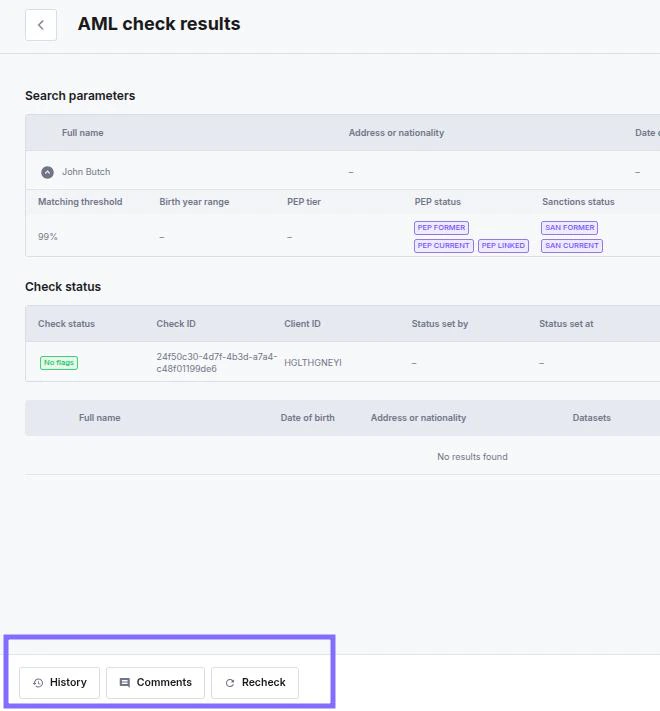 The toolbar at the bottom of the check provides the following actions:
* **History** — previous screening runs and rechecks for this check
* **Comments** — internal notes left by managers
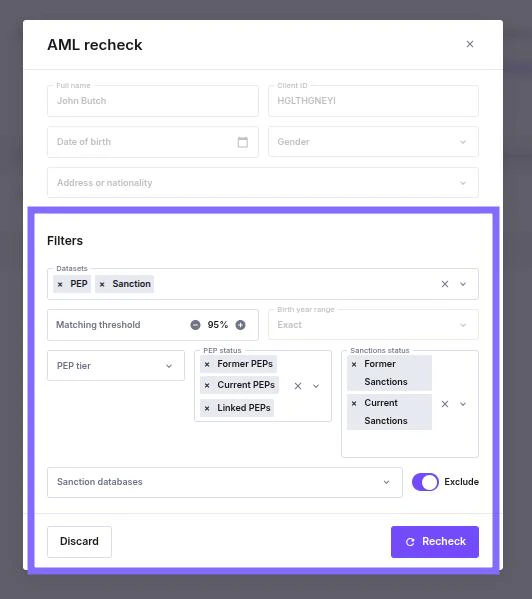
* **Recheck** — runs a new screening with adjusted filters; each recheck consumes one credit
* **Add to monitoring** — enrols the subject in ongoing daily screening; opens the monitoring creation pop-up pre-filled with the subject's details
* **Save** — saves any pending status changes on matched profiles
The toolbar at the bottom of the check provides the following actions:
* **History** — previous screening runs and rechecks for this check
* **Comments** — internal notes left by managers
* **Recheck** — runs a new screening with adjusted filters; each recheck consumes one credit
* **Add to monitoring** — enrols the subject in ongoing daily screening; opens the monitoring creation pop-up pre-filled with the subject's details
* **Save** — saves any pending status changes on matched profiles
 ***
## Download
Click **Download PDF** in the page header to export the check report, including search parameters, check status, and all matched profiles.
***
## Download
Click **Download PDF** in the page header to export the check report, including search parameters, check status, and all matched profiles.