> ## Documentation Index
> Fetch the complete documentation index at: https://documentation.idenfy.com/llms.txt
> Use this file to discover all available pages before exploring further.
# Bank Verification Workflow Step
> Configure the bank verification step in iDenfy workflows to collect account data, IBANs, balances, and transaction history from EU banks.
1. **Basic Account Data** – Includes the bank name, bank country, risk level, and other general details.
2. **Account IBAN Data** - Provides IBANs and account owner details, along with the information from the first layer.
3. **Account balances** – Displays the available and booked account balances if requested.
4. **Full Transaction History** – Retrieves transaction data for up to one year, including transaction date, booking date, details, recipient, amount, and more.*Requiring bank verification is a good idea if:*
* You want to avoid any potential issues with onboarding an illegitimate company.
* Your company’s processes require knowing potential partners' finances.
* You are working in a high-risk industry.
* You have a legal regulatory obligation.
* You want to ensure that the company is not participating in money laundering.
* You want to evaluate the registering company’s financial situation.
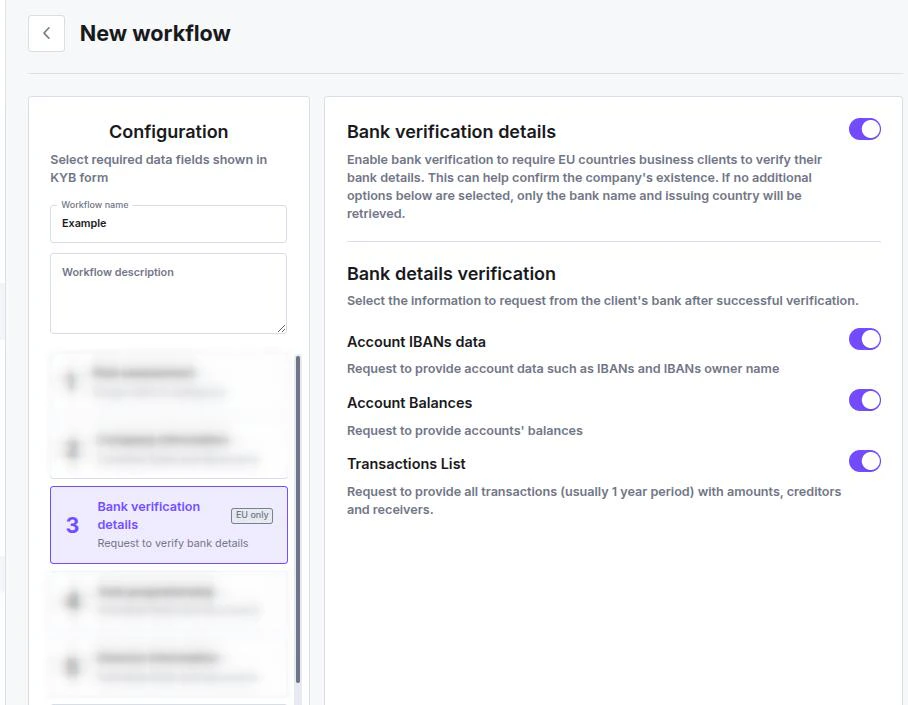 To set up the bank verification, follow this flow: