> ## Documentation Index
> Fetch the complete documentation index at: https://documentation.idenfy.com/llms.txt
> Use this file to discover all available pages before exploring further.
# Changing Verification Statuses
> Manually approve, deny, or update identity verification statuses in the iDenfy dashboard when automated results require a human override.
**Manually Changing Status**
There are times when the system status may not match your business needs.
* **Approve:** You can manually approve a user who was **Denied** by the system (e.g., if you verified the data yourself).
* **Deny:** You can manually deny a user who **Passed** the system checks but does not meet your specific internal criteria.
***
To locate these options:
1. Navigate to **Dashboard** → **ID Verifications** → **Verifications**.
2. Select the specific verification you wish to update by clicking on the applicant's **Name**.
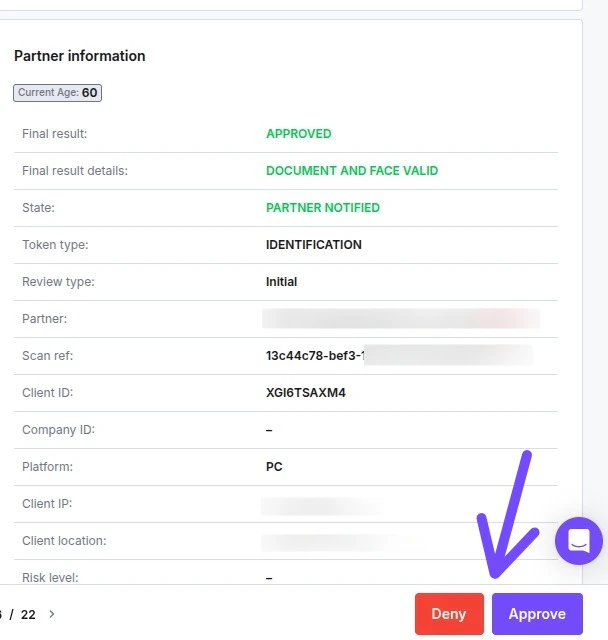
3. Look for the **Approve** and **Deny** buttons in the bottom-right corner of the page.
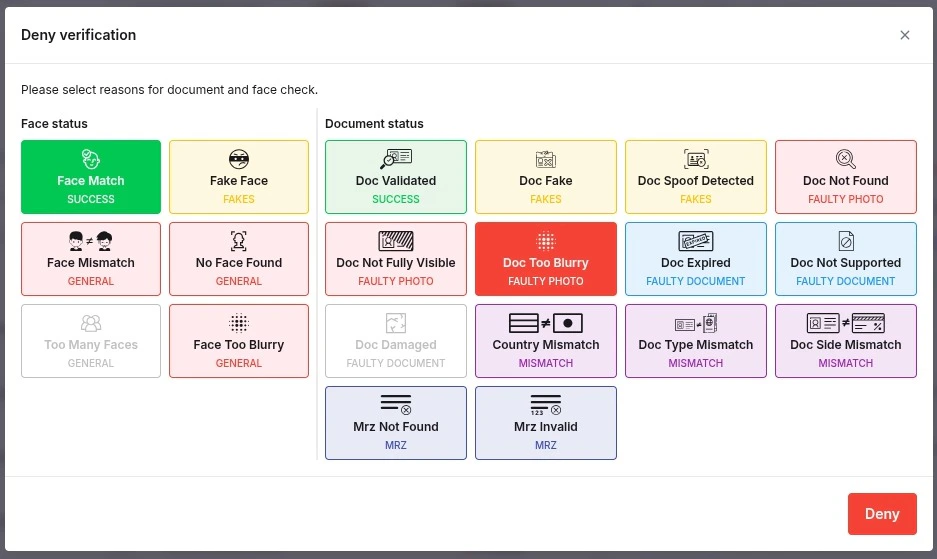
 **Note:** Upon clicking **Deny**, a confirmation window will appear. To proceed, you are **required** to select at least one rejection reason from the list.
 **Limitations & Access Rights** Before attempting to change a status, please check the following requirements:
* [**Admin Role Required**](https://idenfy-ivs.atlassian.net/servicedesk/customer/portal/1)**:** Only users with the **Admin** role can manually Approve or Deny verifications.
* **"Deny" Availability:** The option to manually **Deny** is available *only* for partners on the **Charge Per Completed** pricing model (Basic, Premium, or Enterprise).
* **Missing Buttons?** If you have the correct role but still do not see the Approve/Deny options, please contact [**Support**](https://idenfy-ivs.atlassian.net/servicedesk/customer/portal/1) to update your account permissions.
**Limitations & Access Rights** Before attempting to change a status, please check the following requirements:
* [**Admin Role Required**](https://idenfy-ivs.atlassian.net/servicedesk/customer/portal/1)**:** Only users with the **Admin** role can manually Approve or Deny verifications.
* **"Deny" Availability:** The option to manually **Deny** is available *only* for partners on the **Charge Per Completed** pricing model (Basic, Premium, or Enterprise).
* **Missing Buttons?** If you have the correct role but still do not see the Approve/Deny options, please contact [**Support**](https://idenfy-ivs.atlassian.net/servicedesk/customer/portal/1) to update your account permissions.