> ## Documentation Index
> Fetch the complete documentation index at: https://documentation.idenfy.com/llms.txt
> Use this file to discover all available pages before exploring further.
# Company Expiration
> Set a per-company KYB re-verification deadline at approval, override the global default, and trigger automated expiration reminder emails.
When a company is approved, you can assign an expiration period — a number of months after which the company's KYB is considered stale and re-verification is required. Automated reminder emails are sent to the company **one month before** and **on the expiration date**.
***
## Approving a Company
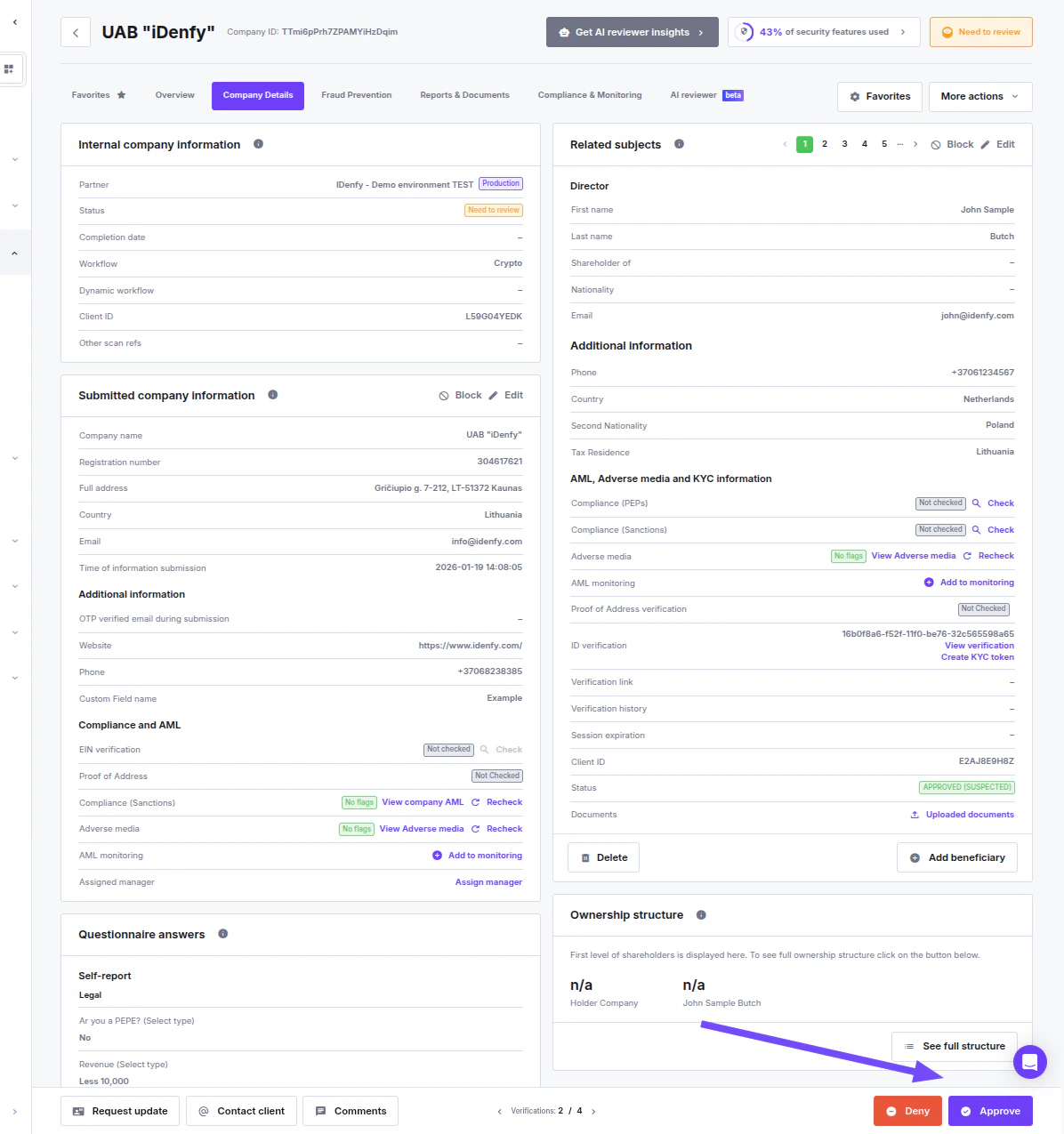
To approve a company and set its expiration:
1. Go to **Business Verifications** → **Verifications**.
2. Open the company you want to review.
3. Click the **Approve** button in the bottom right corner.
 ***
## Approve Company Modal
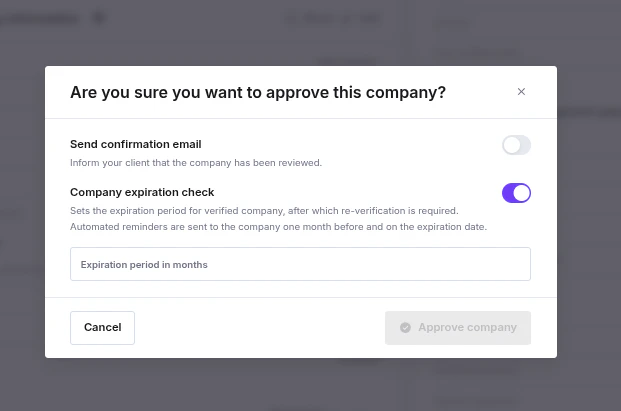
Clicking **Approve** opens a confirmation modal with two optional sections.
***
## Approve Company Modal
Clicking **Approve** opens a confirmation modal with two optional sections.
 ### Send Confirmation Email
When enabled, an email is sent to the client informing them that their company has been reviewed. Toggling this on expands the email form:
| Field | Notes |
| ------------------------- | ------------------------------------------- |
| **Email address** | Required if the toggle is on |
| **Select email template** | Optional pre-made text |
| **Email subject** | Required if no template is selected |
| **Add recipients to CC** | Optional |
| **Message to client** | Required — enter clear, informative content |
### Company Expiration Check
When enabled, sets a re-verification deadline for this specific company. Expanding the toggle shows a single field:
| Field | Notes |
| ------------------------------- | ---------------------------------------------------------------------------------------------------------------------- |
| **Expiration period in months** | Accepts values from **2 to 60**. Leave the toggle off or leave the field empty to disable expiration for this company. |
If the global default is configured in **Settings → Configuration (KYB)**, it is pre-filled here automatically. You can override it, or disable expiration entirely for this company by turning the toggle off.
Disabling the toggle in this modal only affects this company — it does not change the global default.
***
## How the Expiration Value Is Determined
The expiration period comes from one of two sources; the per-company locked value always takes precedence.
| Source | Description |
| ------------------------ | ------------------------------------------------------------------------------------------------------------------------------------------------------------------------------------------------------------ |
| **Partner default** | Set in [Settings → Configuration (KYB)](/guides/dashboard/settings/configuration-kyb). A nullable value (2–60 months or empty = disabled). Used as a fallback when no per-company value has been locked yet. |
| **Company locked value** | Set at approval time and never overwritten by future changes to the partner default. `NULL` = no expiration for this company. |
**At approval time, the value is locked as follows:**
* If the company was approved before (a locked value already exists) → the existing value is kept, regardless of what is entered in the modal.
* If no locked value exists and no override is provided in the modal → the partner default is copied.
* If no locked value exists and an override is provided → the override is used. This requires the caller to have `UPDATE_PARTNER_CUSTOMISATION_CONFIG` permission and the partner to have `check_company_expiration_edit = True`.
Once locked, the expiration period is fixed to the company. Changes to the global default in Settings do not affect already-approved companies.
**Validation:** Both the partner default and the per-company override accept **2–60 months** or **NULL** (disabled).
### Send Confirmation Email
When enabled, an email is sent to the client informing them that their company has been reviewed. Toggling this on expands the email form:
| Field | Notes |
| ------------------------- | ------------------------------------------- |
| **Email address** | Required if the toggle is on |
| **Select email template** | Optional pre-made text |
| **Email subject** | Required if no template is selected |
| **Add recipients to CC** | Optional |
| **Message to client** | Required — enter clear, informative content |
### Company Expiration Check
When enabled, sets a re-verification deadline for this specific company. Expanding the toggle shows a single field:
| Field | Notes |
| ------------------------------- | ---------------------------------------------------------------------------------------------------------------------- |
| **Expiration period in months** | Accepts values from **2 to 60**. Leave the toggle off or leave the field empty to disable expiration for this company. |
If the global default is configured in **Settings → Configuration (KYB)**, it is pre-filled here automatically. You can override it, or disable expiration entirely for this company by turning the toggle off.
Disabling the toggle in this modal only affects this company — it does not change the global default.
***
## How the Expiration Value Is Determined
The expiration period comes from one of two sources; the per-company locked value always takes precedence.
| Source | Description |
| ------------------------ | ------------------------------------------------------------------------------------------------------------------------------------------------------------------------------------------------------------ |
| **Partner default** | Set in [Settings → Configuration (KYB)](/guides/dashboard/settings/configuration-kyb). A nullable value (2–60 months or empty = disabled). Used as a fallback when no per-company value has been locked yet. |
| **Company locked value** | Set at approval time and never overwritten by future changes to the partner default. `NULL` = no expiration for this company. |
**At approval time, the value is locked as follows:**
* If the company was approved before (a locked value already exists) → the existing value is kept, regardless of what is entered in the modal.
* If no locked value exists and no override is provided in the modal → the partner default is copied.
* If no locked value exists and an override is provided → the override is used. This requires the caller to have `UPDATE_PARTNER_CUSTOMISATION_CONFIG` permission and the partner to have `check_company_expiration_edit = True`.
Once locked, the expiration period is fixed to the company. Changes to the global default in Settings do not affect already-approved companies.
**Validation:** Both the partner default and the per-company override accept **2–60 months** or **NULL** (disabled).