> ## Documentation Index
> Fetch the complete documentation index at: https://documentation.idenfy.com/llms.txt
> Use this file to discover all available pages before exploring further.
# Ownership Structure Workflow Step
> Configure shareholder declaration, ownership thresholds, check levels, and UBO verification requirements in the iDenfy KYB workflow.
### General Configuration
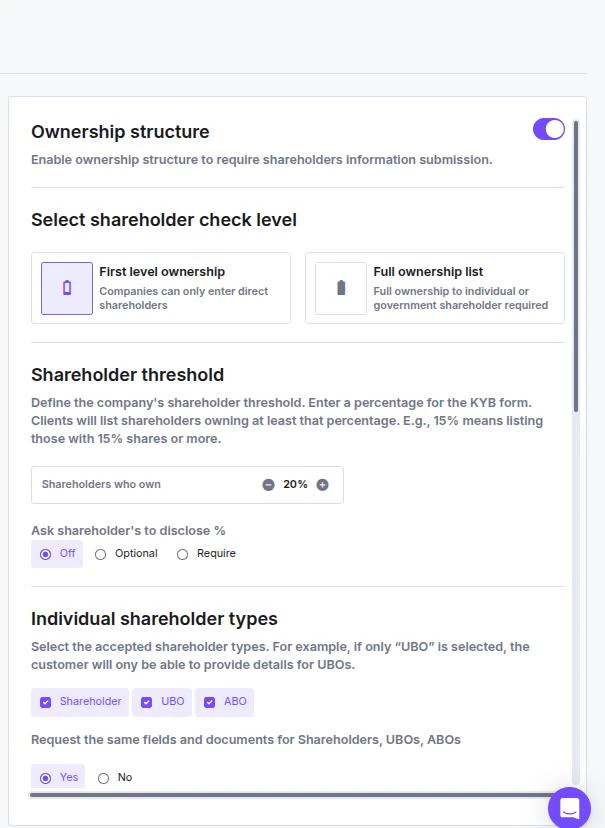
* **Enable Ownership Structure:** Toggle this **On** to require the client to declare shareholders.
* **Shareholder Check Level:**
* **First level ownership:** The client only needs to list direct shareholders (entities or individuals directly holding shares).
* **Full ownership list:** Your client must trace ownership all the way back to natural persons (individuals) or government entities.
* **Shareholder Threshold:** Define the percentage of ownership required to be listed (e.g., entering **25%** means only shareholders owning 25% or more must be declared).
* **Disclose Percentage:** Select if disclosing the exact share percentage is **Off**, **Optional**, or **Required**.
 ***
### Shareholder Types
Select which types of owners the system should accept. For example, if you only want to collect Ultimate Beneficial Owners, select only "UBO".
* **Shareholder**
* **UBO** (Ultimate Beneficial Owner)
* **ABO** (Alternative Beneficial Owner)
***
### Data Collection Strategy
You can decide if all owner types are treated equally or if they require different verification steps.
**Option A: Unified Requirements** Select **Yes** for *"Request the same fields and documents for Shareholders, UBOs, ABOs"*.
* This applies a single configuration to everyone listed in the ownership structure.
**Option B: Custom Requirements** Select **No** to reveal a tabbed interface.
* You can toggle between **Shareholder**, **UBO**, and **ABO** tabs to set unique data and document requirements for each specific type.
***
### Identity Verification and Requirements
For each enabled shareholder type (or the unified group), you can configure the specific data to collect.
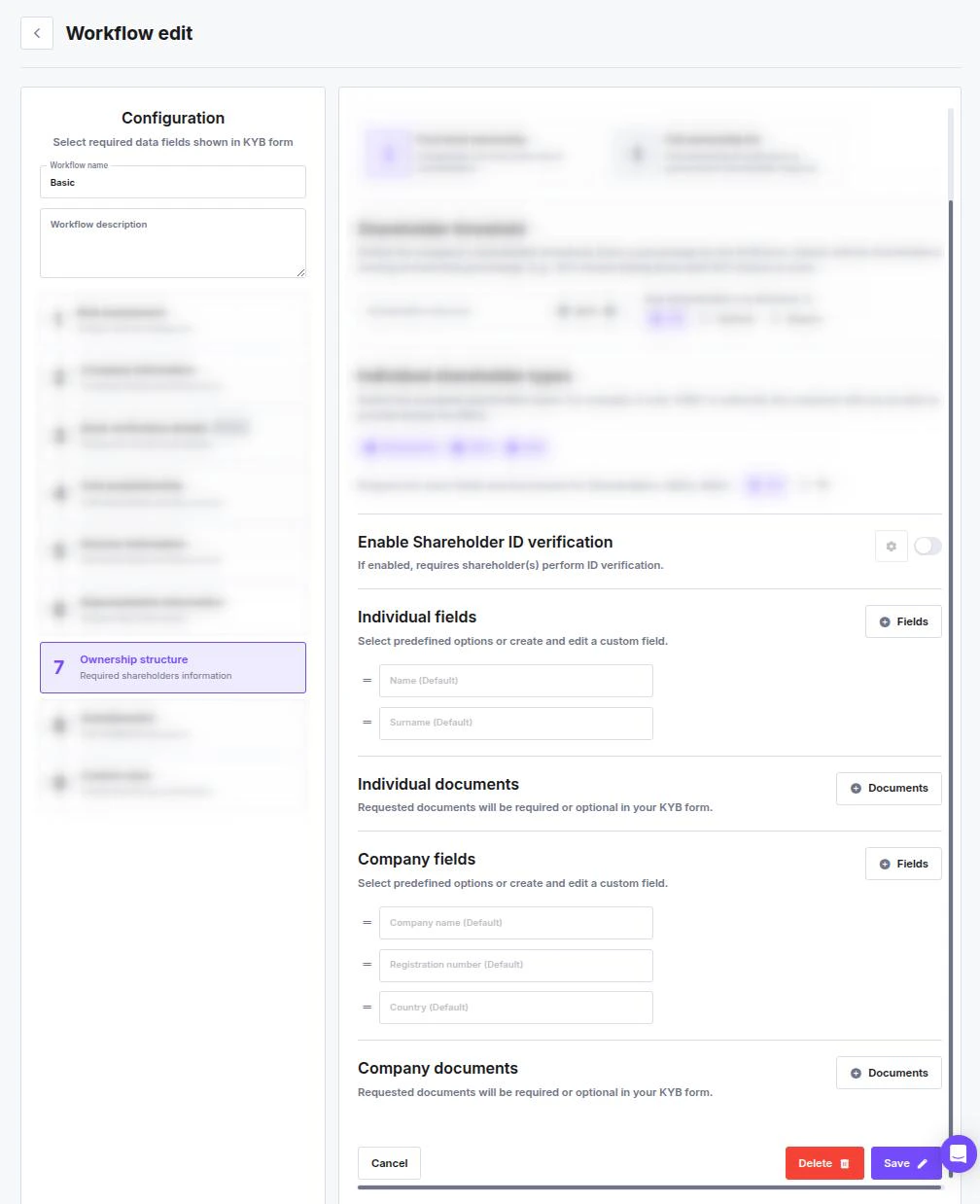
* **Enable Shareholder ID verification:** Toggle this **On** to require the individual to complete a biometric identity check.
* **Configuration:** Click the **ID Card Icon** to customize the verification session (see the **Configuring Identity Verification** guide).
**Individual** requirements\*\*:\*\*
* [**Individual Fields**](/guides/dashboard/general/field-management-individuals-companies)
* [**Individual Documents**](/guides/dashboard/general/document-management-individuals-companies)
**Company** Stakeholder customizable requirements:
* [**Company fields**](/guides/dashboard/general/field-management-individuals-companies)
* [**Company Documents**](/guides/dashboard/general/document-management-individuals-companies)
***
### Shareholder Types
Select which types of owners the system should accept. For example, if you only want to collect Ultimate Beneficial Owners, select only "UBO".
* **Shareholder**
* **UBO** (Ultimate Beneficial Owner)
* **ABO** (Alternative Beneficial Owner)
***
### Data Collection Strategy
You can decide if all owner types are treated equally or if they require different verification steps.
**Option A: Unified Requirements** Select **Yes** for *"Request the same fields and documents for Shareholders, UBOs, ABOs"*.
* This applies a single configuration to everyone listed in the ownership structure.
**Option B: Custom Requirements** Select **No** to reveal a tabbed interface.
* You can toggle between **Shareholder**, **UBO**, and **ABO** tabs to set unique data and document requirements for each specific type.
***
### Identity Verification and Requirements
For each enabled shareholder type (or the unified group), you can configure the specific data to collect.
* **Enable Shareholder ID verification:** Toggle this **On** to require the individual to complete a biometric identity check.
* **Configuration:** Click the **ID Card Icon** to customize the verification session (see the **Configuring Identity Verification** guide).
**Individual** requirements\*\*:\*\*
* [**Individual Fields**](/guides/dashboard/general/field-management-individuals-companies)
* [**Individual Documents**](/guides/dashboard/general/document-management-individuals-companies)
**Company** Stakeholder customizable requirements:
* [**Company fields**](/guides/dashboard/general/field-management-individuals-companies)
* [**Company Documents**](/guides/dashboard/general/document-management-individuals-companies)