> ## Documentation Index
> Fetch the complete documentation index at: https://documentation.idenfy.com/llms.txt
> Use this file to discover all available pages before exploring further.
# Representative Information Step
> Configure whether representatives are required, enable ID verification, and set custom fields and documents for the representative step in a KYB workflow.
**Location:** **Business Verifications** → **Configuration** → **Workflows** → edit a workflow → **Representative information**
 ***
## Toggles
### Representative Information
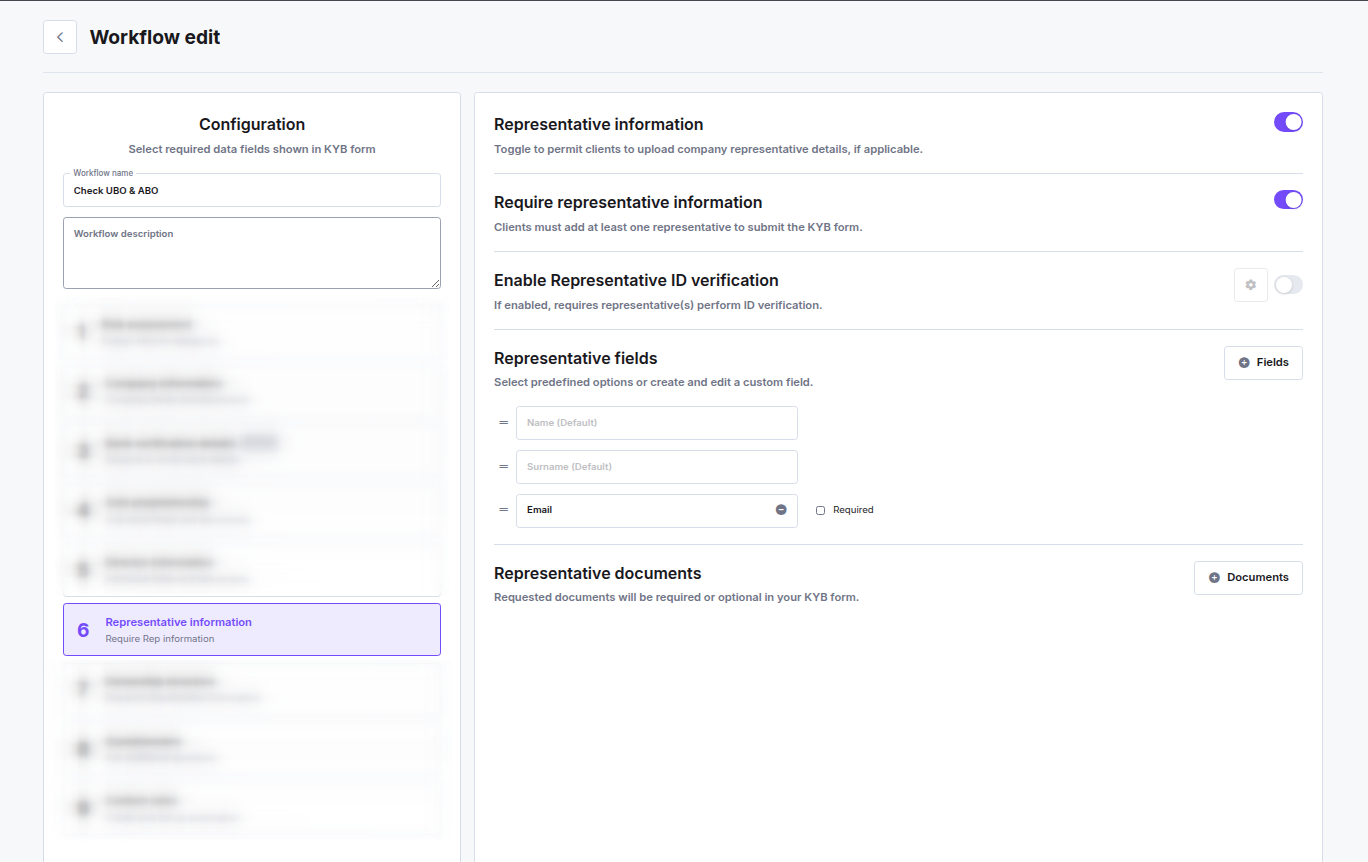
Enables the representative step in the KYB flow. When off, the step is hidden entirely and clients are not asked for representative details.
### Require Representative Information
When on, clients must add at least one representative before they can submit the KYB form. When off, the step is shown but clients can proceed without adding a representative.
This toggle is only available when **Representative information** is enabled.
### Enable Representative ID Verification
When on, each representative must complete identity verification (selfie + ID document scan) as part of the KYB flow. A settings icon next to the toggle opens the IDV configuration for this step.
***
## Representative Fields
Select which data fields to collect from each representative. Click **Fields** to add predefined or custom fields.
**Default fields (always included):**
* **Name**
* **Surname**
**Optional predefined field:**
* **Email** — can be added and optionally marked as **Required**
**Custom fields** can be created with a custom name and a field type (text, number, select, country, etc.). Each custom field can be marked as required and translated into the languages configured for your KYB flow.
Fields can be reordered by dragging.
***
## Representative Documents
Configure which documents representatives must upload. Click **Documents** to add document slots. Each document slot can be set as required or optional.
***
## Toggles
### Representative Information
Enables the representative step in the KYB flow. When off, the step is hidden entirely and clients are not asked for representative details.
### Require Representative Information
When on, clients must add at least one representative before they can submit the KYB form. When off, the step is shown but clients can proceed without adding a representative.
This toggle is only available when **Representative information** is enabled.
### Enable Representative ID Verification
When on, each representative must complete identity verification (selfie + ID document scan) as part of the KYB flow. A settings icon next to the toggle opens the IDV configuration for this step.
***
## Representative Fields
Select which data fields to collect from each representative. Click **Fields** to add predefined or custom fields.
**Default fields (always included):**
* **Name**
* **Surname**
**Optional predefined field:**
* **Email** — can be added and optionally marked as **Required**
**Custom fields** can be created with a custom name and a field type (text, number, select, country, etc.). Each custom field can be marked as required and translated into the languages configured for your KYB flow.
Fields can be reordered by dragging.
***
## Representative Documents
Configure which documents representatives must upload. Click **Documents** to add document slots. Each document slot can be set as required or optional.