> ## Documentation Index
> Fetch the complete documentation index at: https://documentation.idenfy.com/llms.txt
> Use this file to discover all available pages before exploring further.
# Disposed Verifications
> View the audit trail of deleted verification records in the iDenfy dashboard including deletion timestamps, reasons, and responsible users.
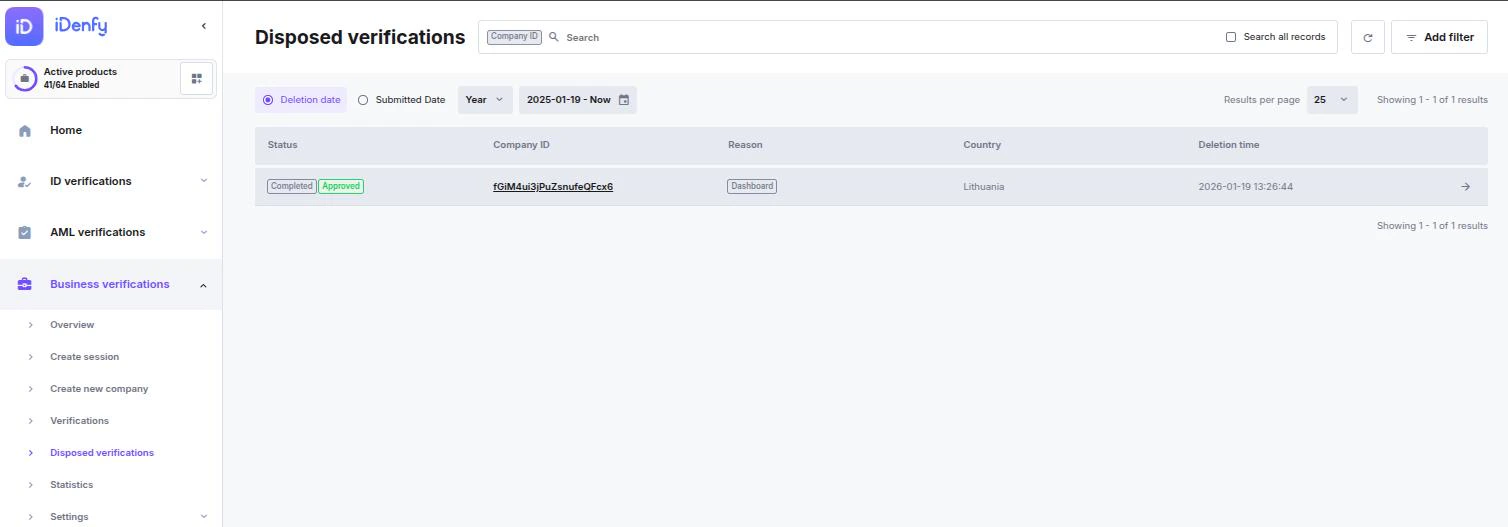
The **Disposed Verifications** page serves as an audit trail for verification records that have been deleted from the active system. This log ensures transparency regarding when, why, and by whom a record was removed.
 ***
### Search and Audit Tools
Use these tools to track down specific deleted records:
* **Search:** Locate a record using the specific **Company ID**.
* **Time Filtering:** Toggle between **Deletion Date** (when it was removed) or **Submitted Date** (when the verification originally started).
* **Add Filter:** Narrow results by specific audit metadata:
* **Reason:** Why the record was disposed of.
* **Status:** The state the record was in at the time of deletion.
* **Result:** The final outcome before disposal (Approved/Denied).
***
### Disposal Reasons
Records are typically moved to this list for one of the following reasons:
* **Dashboard:** A manager manually deleted the record from the platform.
* **Automated Deletion:** The record was removed based on your company's automated data retention or cleanup settings.
* **Partner Request:** Deletion was triggered via an API request or a direct partner instruction.
***
### Viewing Disposed Data
The main table provides a high-level overview of the audit trail. To view the full context of a deletion, click the **Company ID** link or the **Arrow Icon** to open the **Disposed Verification Info** card.
#### Information Available in the Details View
* **Deletion Time:** The exact timestamp the record was moved to the disposed list.
* **Manager:** The specific team member responsible for the deletion (if performed manually).
* **Submission Time:** The original date the verification session was created.
* **Final State:** Displays both the **Status** (e.g., Completed) and the **Result** (e.g., Approved) at the moment of disposal.
***
Disposed records are kept for compliance and auditing purposes. Depending on your data retention policy, these logs may be permanently removed after a set period.
***
### Search and Audit Tools
Use these tools to track down specific deleted records:
* **Search:** Locate a record using the specific **Company ID**.
* **Time Filtering:** Toggle between **Deletion Date** (when it was removed) or **Submitted Date** (when the verification originally started).
* **Add Filter:** Narrow results by specific audit metadata:
* **Reason:** Why the record was disposed of.
* **Status:** The state the record was in at the time of deletion.
* **Result:** The final outcome before disposal (Approved/Denied).
***
### Disposal Reasons
Records are typically moved to this list for one of the following reasons:
* **Dashboard:** A manager manually deleted the record from the platform.
* **Automated Deletion:** The record was removed based on your company's automated data retention or cleanup settings.
* **Partner Request:** Deletion was triggered via an API request or a direct partner instruction.
***
### Viewing Disposed Data
The main table provides a high-level overview of the audit trail. To view the full context of a deletion, click the **Company ID** link or the **Arrow Icon** to open the **Disposed Verification Info** card.
#### Information Available in the Details View
* **Deletion Time:** The exact timestamp the record was moved to the disposed list.
* **Manager:** The specific team member responsible for the deletion (if performed manually).
* **Submission Time:** The original date the verification session was created.
* **Final State:** Displays both the **Status** (e.g., Completed) and the **Result** (e.g., Approved) at the moment of disposal.
***
Disposed records are kept for compliance and auditing purposes. Depending on your data retention policy, these logs may be permanently removed after a set period.