> ## Documentation Index
> Fetch the complete documentation index at: https://documentation.idenfy.com/llms.txt
> Use this file to discover all available pages before exploring further.
# Verification Details
> View and interpret identity verification results including document data, provided data, photos, and compliance details in the dashboard.
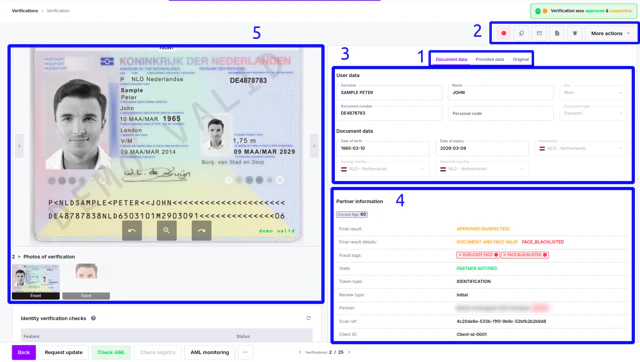 ***
### End-User Data
* **Document data** - information read from the document
* **Provided data** - information you provided for cross-matching
* **Original** - information provided in the native language, additional fields read from the document
***
### Actions for Verification
| | Add user to the blocklist |
| - | ----------------------------------------------------------------------------------------------------------------------------------------------------------------------------------------------------------- |
| | Copy verification identifier - scanRef and client ID |
| | Resends notification (Webhook, email) |
| | Generates a verification PDF file |
| | Contact support if you have questions about verification status or results |
| | More action - Duplicates will show associated verifications if duplicates are found. |
| | More actions - allows to delete verifications, depending on features, may have more options. Verification deletion is permanent and irreversible. Only members with the Admin role can delete verifications |
***
### Document Information
Here you can find data read from the document.
Depending on your needs, these fields can be adjusted.
***
### Partner Information
#### Status
* **Final result** - final status of verification
* **Final result details** - results of document and face reading
* **State** - if notification is sent
For all **statuses** and **tags,** see page [**KYC verification statuses**](/guides/dashboard/kyc/verification-statuses)
#### Other Verification-Related Information
* **Token type** - identifies if verification was document & face, or document only
* **Review type** - auto or manual
* **Partner** - environment, in which verification was performed
* **Scan ref** - identifier generated by iDenfy
* **Client ID** - identifier generated by Partner
* **Company ID** - identifier for the company, if verification is part of KYB
* **Platform** - device, on which verification was performed
* **Client IP** - IP from which the client performed verification
* **Client location** - approximate city and country from which the client performed verification
* **Risk level** - status based on risk assessment feature
* **Start time** - time when the review process started
* **Finish time** - time when the review processing finished
* **Additional step (POA) reupload date** - date when the additional step was reuploaded. Refreshes after each re-upload
* **Attempt Count** - how many attempts the user took to upload all the correct documents
* **Email address** - shows the user’s email, if email verification is used
* **Phone number** - shows the user’s phone, if phone verification is used
***
### End-User Data
* **Document data** - information read from the document
* **Provided data** - information you provided for cross-matching
* **Original** - information provided in the native language, additional fields read from the document
***
### Actions for Verification
| | Add user to the blocklist |
| - | ----------------------------------------------------------------------------------------------------------------------------------------------------------------------------------------------------------- |
| | Copy verification identifier - scanRef and client ID |
| | Resends notification (Webhook, email) |
| | Generates a verification PDF file |
| | Contact support if you have questions about verification status or results |
| | More action - Duplicates will show associated verifications if duplicates are found. |
| | More actions - allows to delete verifications, depending on features, may have more options. Verification deletion is permanent and irreversible. Only members with the Admin role can delete verifications |
***
### Document Information
Here you can find data read from the document.
Depending on your needs, these fields can be adjusted.
***
### Partner Information
#### Status
* **Final result** - final status of verification
* **Final result details** - results of document and face reading
* **State** - if notification is sent
For all **statuses** and **tags,** see page [**KYC verification statuses**](/guides/dashboard/kyc/verification-statuses)
#### Other Verification-Related Information
* **Token type** - identifies if verification was document & face, or document only
* **Review type** - auto or manual
* **Partner** - environment, in which verification was performed
* **Scan ref** - identifier generated by iDenfy
* **Client ID** - identifier generated by Partner
* **Company ID** - identifier for the company, if verification is part of KYB
* **Platform** - device, on which verification was performed
* **Client IP** - IP from which the client performed verification
* **Client location** - approximate city and country from which the client performed verification
* **Risk level** - status based on risk assessment feature
* **Start time** - time when the review process started
* **Finish time** - time when the review processing finished
* **Additional step (POA) reupload date** - date when the additional step was reuploaded. Refreshes after each re-upload
* **Attempt Count** - how many attempts the user took to upload all the correct documents
* **Email address** - shows the user’s email, if email verification is used
* **Phone number** - shows the user’s phone, if phone verification is used
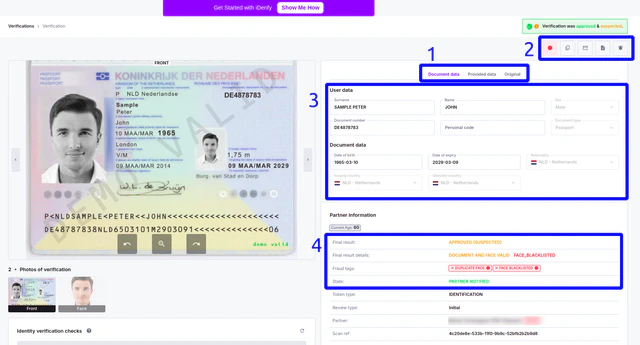
 ***
### Photos
Uploaded image section
In case of re-uploads, all previously uploaded (low quality, blurry, expired) documents will be showed on the right side, numbered by attempts.
***
### Photos
Uploaded image section
In case of re-uploads, all previously uploaded (low quality, blurry, expired) documents will be showed on the right side, numbered by attempts.
 ***
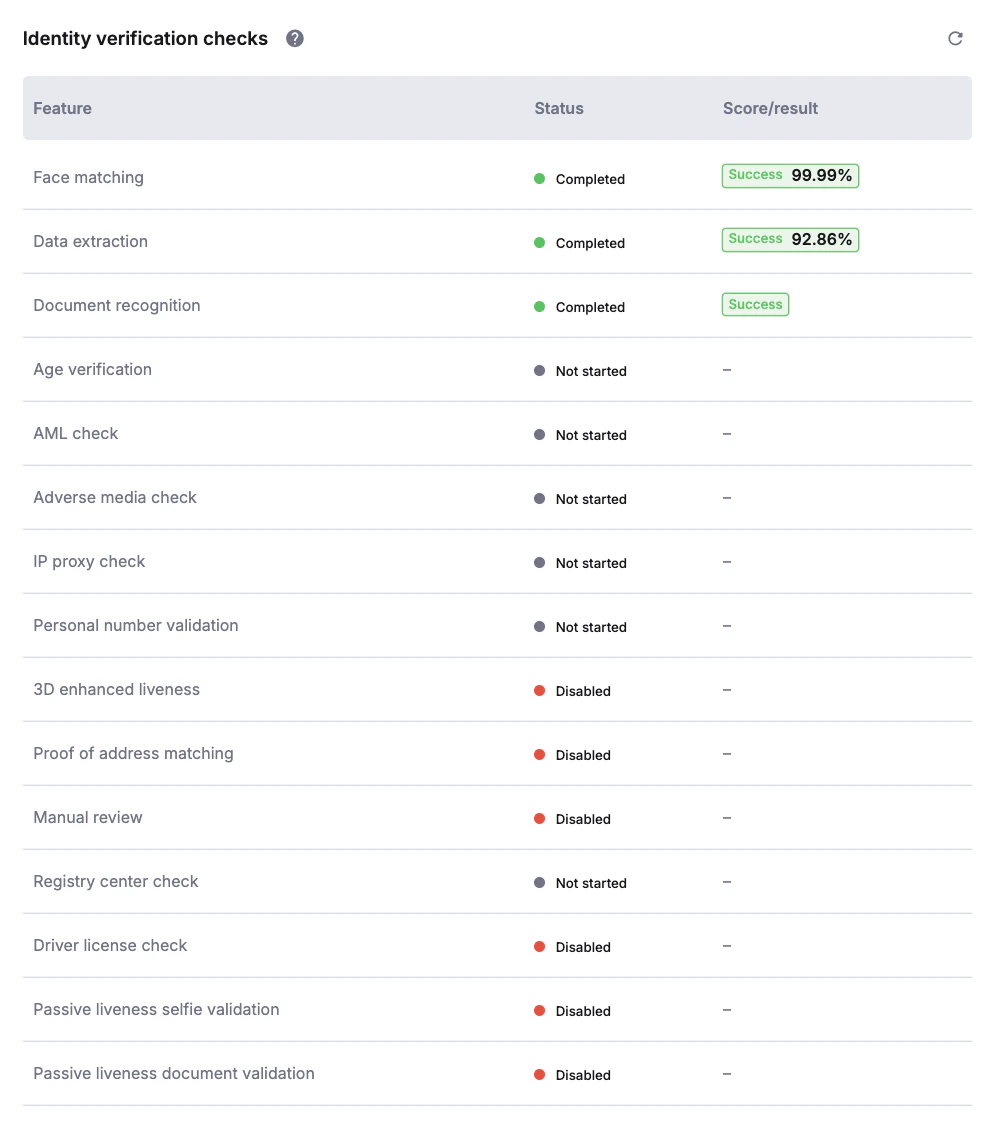
**Checks performed**
The section indicates what checks have been performed during verification.
Some checks **will not be performed** if verification has failed:
* AML check
* Criminal background
* Registry centers
* Lid
* USA driver's license
***
**Checks performed**
The section indicates what checks have been performed during verification.
Some checks **will not be performed** if verification has failed:
* AML check
* Criminal background
* Registry centers
* Lid
* USA driver's license
