> ## Documentation Index
> Fetch the complete documentation index at: https://documentation.idenfy.com/llms.txt
> Use this file to discover all available pages before exploring further.
# Blocklist Setup
> Set up face, document, and personal data blocklists in iDenfy to automatically flag or block known fraudsters during verification.
## Blocklist Overview
The **Blocklist** helps prevent known fraudulent or spam individuals from completing identity verifications.
During verification, iDenfy compares new data (face, document, or personal info) against entries in the blocklist.
If a match is found, the verification is marked **“suspected”** and flagged with one of the following tags:
* `Face_Blacklisted` — selfie image matched
* `Doc_Face_Blacklisted` — face from document matched
* `Data_Blacklisted` — personal details matched
The blocklist check runs automatically once a verification is **approved**.
***
## Interface Notes
* Access via sidebar: **Menu → Blocklist**
* Tabs:
* *Selfie*
* 🪪 *Face in Document*
* *Document Data*
* Use the search bar to find existing records by **ScanRef** or enable **Search all records**.
* Use the **Create new** button to open the blocklist creation form.
* Required fields are marked — incomplete entries cannot be submitted.
***
**Operational Tips**
* Use **ScanRef** when you already have a completed verification—this ensures accurate data/face extraction and saves time.
* For **Document data**, adding a **Personal number** and **Nationality** significantly improves matching accuracy.
* Keep **Reason** short but specific (e.g., “Chargeback fraud, 2025-10-21; internal case #1234”).
***
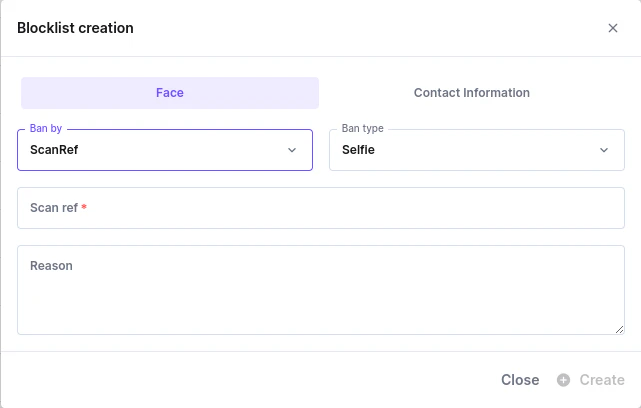
## Face Blocklist (Selfie / Face in Document)
Use when you want to block by **image**.
#### Fields in “Create New → Face”
| Field | Values / Format | Required | Notes |
| ---------------- | --------------------------- | --------------------- | -------------------------------------------------------------------------------------------- |
| **Ban by** | `Photo` or `ScanRef` | | Select **Photo** to upload; select **ScanRef** to pull images from an existing verification. |
| **Ban type** | `Selfie` or `Document Face` | | Select which face source to block. |
| **Upload photo** | PNG, JPG, HEIF | if **Ban by = Photo** | Drag & drop or click to upload. |
| **Reason** | Free text | Optional | Internal note/context. |
**How it works**
* If **Ban by = Photo** → you must upload a file.
* If **Ban by = ScanRef** → the system uses the face(s) from that verification.
* On future approved verifications, the system compares faces and flags with `Face_Blacklisted` or `Doc_Face_Blacklisted`.
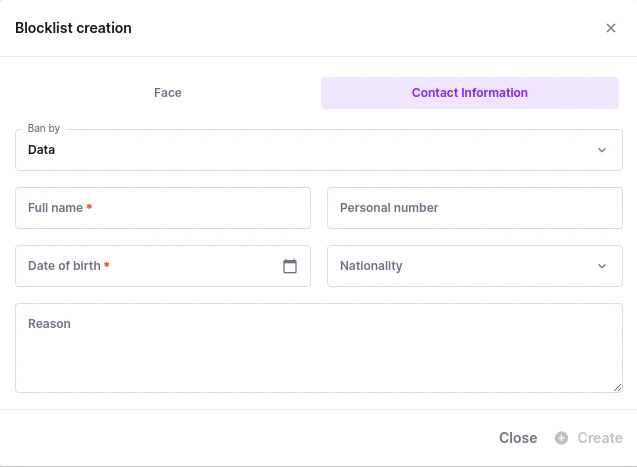 ***
## Document Data Blocklist (Personal Information)
Use when you want to block by **identity details** (no image required).
#### Fields in “Create New → Document Data”
| Field | Values / Format | Required | Notes |
| ------------------- | --------------------------------------------------- | -------- | -------------------------------------------------------- |
| **Ban by** | `Data` *(or* `ScanRef`*, if enabled in your setup)* | | With `ScanRef`, fields auto-fill from that verification. |
| **Full name** | Text | | Person’s full legal name. |
| **Date of birth** | Date | | Date picker; must be a valid date. |
| **Personal number** | Text | Optional | National ID / personal code (improves match accuracy). |
| **Nationality** | Country select | Optional | ISO country selection (improves match accuracy). |
| **Document number** | Text | Optional | Adds another strong identifier. |
| **Reason** | Free text | Optional | Internal note / context. |
**How it works**
* If details match on a future approved verification, it’s flagged with `Data_Blacklisted`.
* If created via **ScanRef**, the system pre-fills name, DOB, personal number, and nationality (when available).
***
## Document Data Blocklist (Personal Information)
Use when you want to block by **identity details** (no image required).
#### Fields in “Create New → Document Data”
| Field | Values / Format | Required | Notes |
| ------------------- | --------------------------------------------------- | -------- | -------------------------------------------------------- |
| **Ban by** | `Data` *(or* `ScanRef`*, if enabled in your setup)* | | With `ScanRef`, fields auto-fill from that verification. |
| **Full name** | Text | | Person’s full legal name. |
| **Date of birth** | Date | | Date picker; must be a valid date. |
| **Personal number** | Text | Optional | National ID / personal code (improves match accuracy). |
| **Nationality** | Country select | Optional | ISO country selection (improves match accuracy). |
| **Document number** | Text | Optional | Adds another strong identifier. |
| **Reason** | Free text | Optional | Internal note / context. |
**How it works**
* If details match on a future approved verification, it’s flagged with `Data_Blacklisted`.
* If created via **ScanRef**, the system pre-fills name, DOB, personal number, and nationality (when available).
 ***
## Validation and Behavior
* **Required fields** are enforced (you’ll see “Please fill in all required fields.” if missing).
* **Files**: Accepts **PNG / JPG / HEIF**.
* **Dates**: Must be valid (DOB uses a date picker).
* **Submission**: **Create** is disabled until the required fields are completed.
***
## Directly from a Verification
On any verification results page, click [**Add verification to a blocklist**](/guides/dashboard/kyc/verification-details) (top-right corner).
This opens a quick-action modal allowing you to add that verification immediately.
**Fields:**
| Field | Description / Options |
| ---------------- | -------------------------------------------------------------------------------------------- |
| **Block reason** | Select the reason: |
| **Block by** | Select which data to block — *Face, Document, Personal data*, depending on verification type |
**Block reason options:**
* Fake document
* Same person, multiple identities
* Deepfake / AI-generated face
* Fraudulent behavior during onboarding
* Blocklist by internal risk rules
* Confirmed criminal activity
* Other
Once submitted, the system stores that verification’s data (face/document/personal info) in the internal blocklist for future matching.
***
## Validation and Behavior
* **Required fields** are enforced (you’ll see “Please fill in all required fields.” if missing).
* **Files**: Accepts **PNG / JPG / HEIF**.
* **Dates**: Must be valid (DOB uses a date picker).
* **Submission**: **Create** is disabled until the required fields are completed.
***
## Directly from a Verification
On any verification results page, click [**Add verification to a blocklist**](/guides/dashboard/kyc/verification-details) (top-right corner).
This opens a quick-action modal allowing you to add that verification immediately.
**Fields:**
| Field | Description / Options |
| ---------------- | -------------------------------------------------------------------------------------------- |
| **Block reason** | Select the reason: |
| **Block by** | Select which data to block — *Face, Document, Personal data*, depending on verification type |
**Block reason options:**
* Fake document
* Same person, multiple identities
* Deepfake / AI-generated face
* Fraudulent behavior during onboarding
* Blocklist by internal risk rules
* Confirmed criminal activity
* Other
Once submitted, the system stores that verification’s data (face/document/personal info) in the internal blocklist for future matching.
