> ## Documentation Index
> Fetch the complete documentation index at: https://documentation.idenfy.com/llms.txt
> Use this file to discover all available pages before exploring further.
# Anti-Money Laundering (AML)
> Adjust AML matching thresholds, screening options, and monitoring settings in the iDenfy dashboard Anti-Money Laundering configuration.
**Location:** **Settings** → **Anti-Money Laundering (AML)**
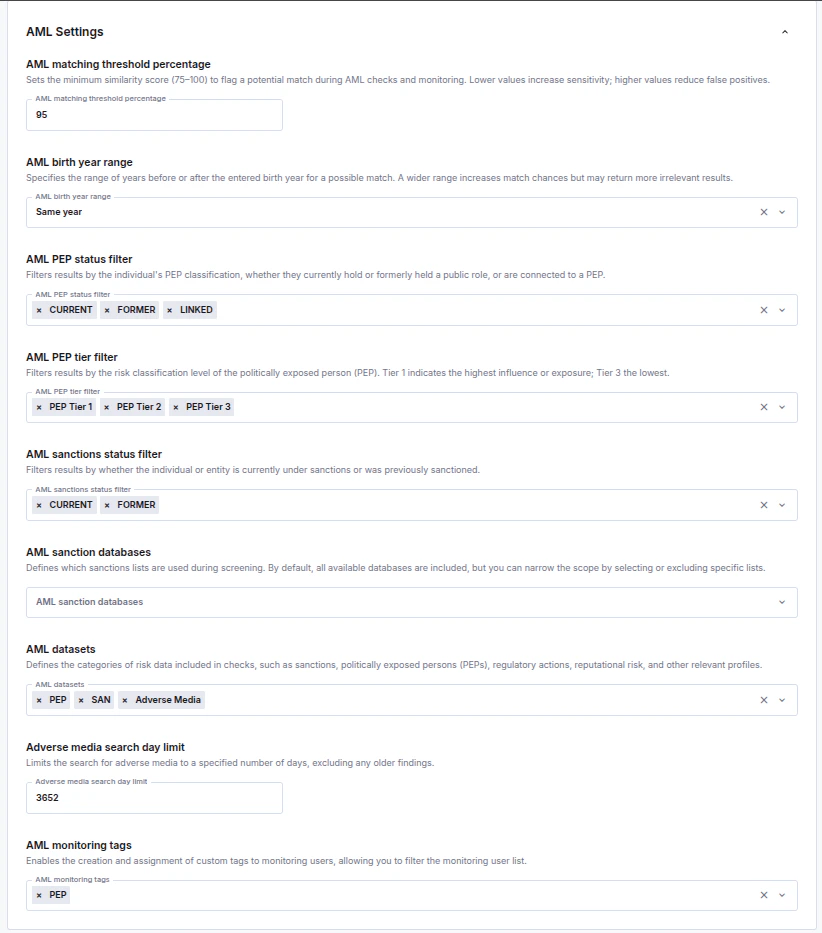 Monitoring created via the dashboard will use these settings that are set on the environment.
## AML Matching Threshold Percentage
Sets the minimum similarity score (75–100) to flag a potential match during AML checks and monitoring. Lower values increase sensitivity; higher values reduce false positives.
Our recommended value is 95% as it leaves some room for error and provides a more detailed list.
***
## AML Birth Year Range
Specify the search range for the Date of Birth. You can select an **exact** date, a range **within a single year**, or a **span of up to 5 years**, depending on how accurate or wide results you wish to see.
***
## AML PEP Status Filter
Filters results by the individual's PEP classification, whether they **currently** hold or **formerly** held a public role, or are **connected** to a PEP.
***
## AML PEP Tier Filter
Filters results by the risk classification level of the politically exposed person (PEP).
**Tier 1** indicates the highest influence or exposure;**Tier 3** indicates the lowest.
| **Tier** | **Description** |
| -------- | ----------------------------------------------------------------------------------------------------------------------------------------------------------------------------------------------------------------------------- |
| 1 | International and National level. Requires the most stringent monitoring because they have the highest authority and access to state funds, making them more susceptible to large-scale bribery, corruption, or embezzlement. |
| 2 | Regional or provincial officials, ambassadors, and senior management of slightly smaller bodies. |
| 3 | Local officials, mayors of smaller cities, and board members of smaller state enterprises. |
***
## AML Sanctions Status Filter
Filters results by whether the individual or entity is **currently** under sanctions or was **formerly** sanctioned.
***
## AML Datasets
Defines the categories of risk data included in checks, such as sanctions, politically exposed persons (PEPs), regulatory actions, reputational risk, and other relevant profiles.
[Here you can find datasets descriptions ↗](/guides/dashboard/aml/aml-key-terms-concepts#datasets)
***
## Adverse Media Search Day Limit
Limits the search for adverse media to a specified number of days, excluding any older findings.
Our recommendation is 7 days, as lowering it might increase the findings for common names and surnames.
***
## AML Monitoring Tags
Enables the creation and assignment of custom tags to monitoring users, allowing you to filter the monitoring user list for easier management of AML monitors.
***
## AML Sanction Databases
Defines which sanctions lists are used during screening. By default, all available databases are included, but you can narrow the scope by selecting or excluding specific lists.
Monitoring created via the dashboard will use these settings that are set on the environment.
## AML Matching Threshold Percentage
Sets the minimum similarity score (75–100) to flag a potential match during AML checks and monitoring. Lower values increase sensitivity; higher values reduce false positives.
Our recommended value is 95% as it leaves some room for error and provides a more detailed list.
***
## AML Birth Year Range
Specify the search range for the Date of Birth. You can select an **exact** date, a range **within a single year**, or a **span of up to 5 years**, depending on how accurate or wide results you wish to see.
***
## AML PEP Status Filter
Filters results by the individual's PEP classification, whether they **currently** hold or **formerly** held a public role, or are **connected** to a PEP.
***
## AML PEP Tier Filter
Filters results by the risk classification level of the politically exposed person (PEP).
**Tier 1** indicates the highest influence or exposure;**Tier 3** indicates the lowest.
| **Tier** | **Description** |
| -------- | ----------------------------------------------------------------------------------------------------------------------------------------------------------------------------------------------------------------------------- |
| 1 | International and National level. Requires the most stringent monitoring because they have the highest authority and access to state funds, making them more susceptible to large-scale bribery, corruption, or embezzlement. |
| 2 | Regional or provincial officials, ambassadors, and senior management of slightly smaller bodies. |
| 3 | Local officials, mayors of smaller cities, and board members of smaller state enterprises. |
***
## AML Sanctions Status Filter
Filters results by whether the individual or entity is **currently** under sanctions or was **formerly** sanctioned.
***
## AML Datasets
Defines the categories of risk data included in checks, such as sanctions, politically exposed persons (PEPs), regulatory actions, reputational risk, and other relevant profiles.
[Here you can find datasets descriptions ↗](/guides/dashboard/aml/aml-key-terms-concepts#datasets)
***
## Adverse Media Search Day Limit
Limits the search for adverse media to a specified number of days, excluding any older findings.
Our recommendation is 7 days, as lowering it might increase the findings for common names and surnames.
***
## AML Monitoring Tags
Enables the creation and assignment of custom tags to monitoring users, allowing you to filter the monitoring user list for easier management of AML monitors.
***
## AML Sanction Databases
Defines which sanctions lists are used during screening. By default, all available databases are included, but you can narrow the scope by selecting or excluding specific lists.