> ## Documentation Index
> Fetch the complete documentation index at: https://documentation.idenfy.com/llms.txt
> Use this file to discover all available pages before exploring further.
# Configuration (KYB)
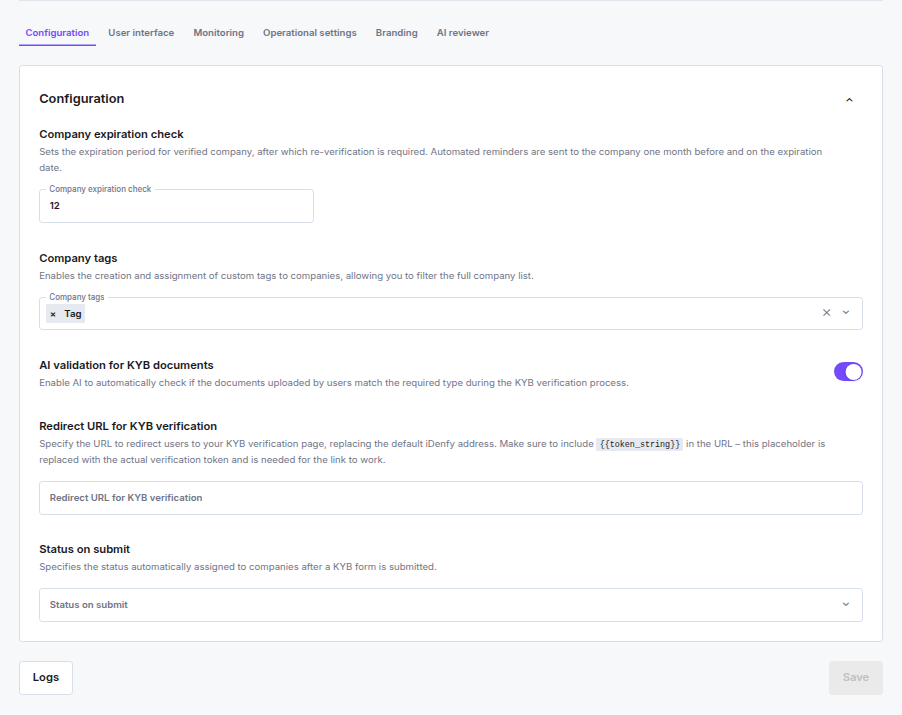
> Configure core KYB flow behavior including company expiration, document validation, redirect URL, and submission status in the iDenfy dashboard.
**Location:** **Settings** → **Business Verifications (KYB)** → **Configuration**
 ***
### Company Expiration Check
When enabled, approved companies expire after a set number of months and must re-verify. Set the expiration period between **2 and 60 months**.
Automated reminders are sent to the company **one month before** and **on the expiration date**.
The period can be overridden per company in the **Approve company** modal — the global value is pre-filled but can be adjusted per case. Disabling the toggle in that modal only affects the individual company; the global setting is not changed.
Leaving this field empty or keeping the toggle off disables expiration entirely — companies will not expire and no reminder emails are sent. See [Company Expiration](/guides/dashboard/kyb/company-expiration-and-update) for how the per-company value is set and locked at approval time.
Partners who previously had this setting enabled with a fixed 12-month period were automatically migrated.
***
### Company Tags
Custom labels you can create and attach to companies for filtering and organization in the dashboard.
* Up to **100 tags**, each up to **64 characters**
* Tags can also be passed via API when generating a KYB session
***
### AI Validation for KYB Documents
AI automatically checks whether documents uploaded during KYB match the required document type for each step. For example, it flags a selfie uploaded where a company registration document was expected.
***
### Redirect URL for KYB Verification
The URL sent to businesses to access the KYB verification form, replacing the default iDenfy-hosted page.
* When **not set**, a URL is auto-generated per session
* When **set**, include `{{token_string}}` in the URL — this placeholder is replaced with the actual verification token at runtime
**Example:** `https://example.com/verify?token={{token_string}}`
The value must be a valid URL.
***
### Status on Submit
The status automatically assigned to a company immediately after the KYB form is submitted.
| Value | Behaviour |
| -------- | ------------------------------------------ |
| Not set | Company lands in the default review queue |
| Approved | Company bypasses the review queue entirely |
***
### Company Expiration Check
When enabled, approved companies expire after a set number of months and must re-verify. Set the expiration period between **2 and 60 months**.
Automated reminders are sent to the company **one month before** and **on the expiration date**.
The period can be overridden per company in the **Approve company** modal — the global value is pre-filled but can be adjusted per case. Disabling the toggle in that modal only affects the individual company; the global setting is not changed.
Leaving this field empty or keeping the toggle off disables expiration entirely — companies will not expire and no reminder emails are sent. See [Company Expiration](/guides/dashboard/kyb/company-expiration-and-update) for how the per-company value is set and locked at approval time.
Partners who previously had this setting enabled with a fixed 12-month period were automatically migrated.
***
### Company Tags
Custom labels you can create and attach to companies for filtering and organization in the dashboard.
* Up to **100 tags**, each up to **64 characters**
* Tags can also be passed via API when generating a KYB session
***
### AI Validation for KYB Documents
AI automatically checks whether documents uploaded during KYB match the required document type for each step. For example, it flags a selfie uploaded where a company registration document was expected.
***
### Redirect URL for KYB Verification
The URL sent to businesses to access the KYB verification form, replacing the default iDenfy-hosted page.
* When **not set**, a URL is auto-generated per session
* When **set**, include `{{token_string}}` in the URL — this placeholder is replaced with the actual verification token at runtime
**Example:** `https://example.com/verify?token={{token_string}}`
The value must be a valid URL.
***
### Status on Submit
The status automatically assigned to a company immediately after the KYB form is submitted.
| Value | Behaviour |
| -------- | ------------------------------------------ |
| Not set | Company lands in the default review queue |
| Approved | Company bypasses the review queue entirely |