> ## Documentation Index
> Fetch the complete documentation index at: https://documentation.idenfy.com/llms.txt
> Use this file to discover all available pages before exploring further.
# Workflow Setup Overview
> A step-by-step guide to every configurable step in a KYB verification workflow — what each one does, where to find it, and how to configure it.
A **workflow** is the verification sequence your clients move through. You pick which steps are active, configure each one, and the result is a tailored flow — from a quick 2-step check to a full KYB with UBO verification, bank data, and identity checks.
Risk, company info, directors, owners, representatives, bank, questionnaire, custom rules, identity verification, and sole proprietorship.
Toggle any step on or off. Disabled steps are skipped in the client-facing flow.
Create different workflows for different company types and route companies automatically with Dynamic Workflows.
***
## Getting to Workflows
Navigate to **Business Verifications → Configuration → Workflows**.
From this screen you can:
| Action | How |
| ----------------------------- | ---------------------------------------------------------------- |
| Create a new workflow | **Create New** button (top right) |
| Import a workflow file | **Import** button |
| Edit an existing workflow | Click **⋮** → **Edit** |
| Duplicate as a template | Click **⋮** → **Create a copy** |
| Set as default workflow | Click **⋮** → **Set as default** |
| Export for backup or transfer | Click **⋮** → **Export workflow** |
| Delete | Click **⋮** → **Delete** (blocked if verifications are attached) |
***
## Configuring Steps
Inside the workflow editor, each step has a toggle in the top-right corner of its panel. Enable the steps you need — the rest are skipped.
The steps below follow the order they appear in the workflow editor.
***
Attach a pre-configured risk profile to automatically score the company.
Scores are calculated based on the rules and weights you defined in the risk profile. The profile must be created outside the workflow builder before adding this step.
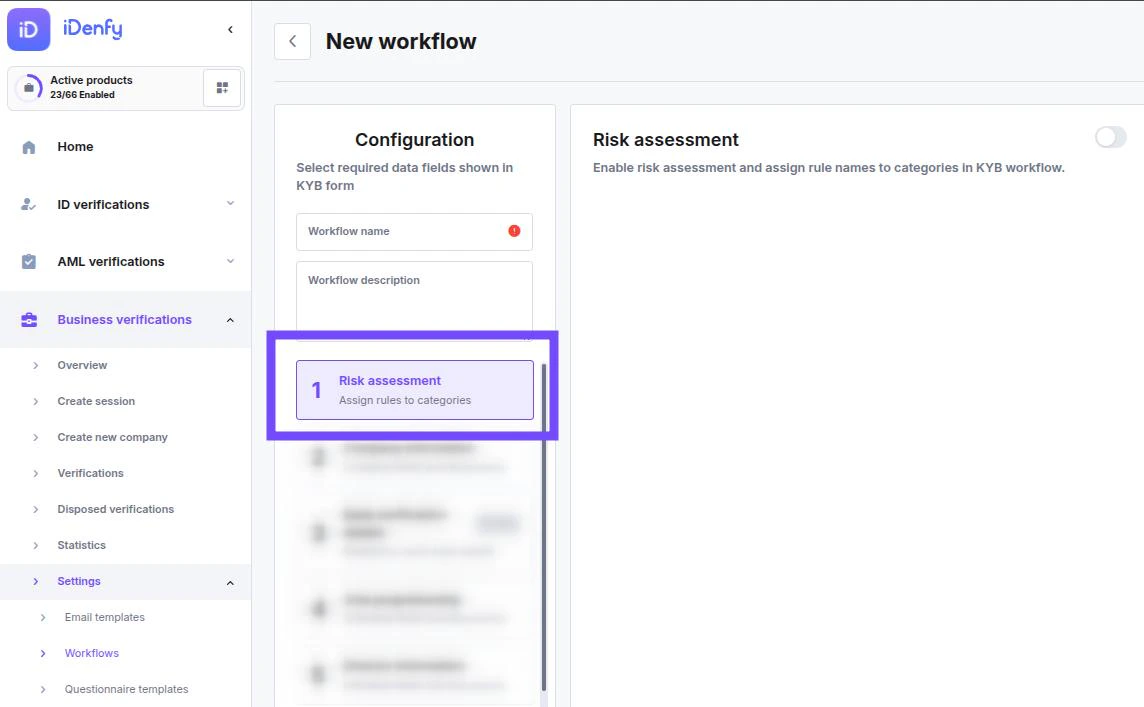 **Prerequisite:** [How to set up Risk Assessment →](/guides/dashboard/risk/how-to-setup-and-configure-risk-assessment)
[Configure Risk Assessment step →](/guides/dashboard/risk/step-risk-assessment)
Define required company data fields, documents, and auto-fill settings.
Enable company search auto-fill via name or registration number, configure email verification, and set which fields and documents the company must provide.
* [Configure required fields →](/guides/dashboard/general/field-management-individuals-companies)
* [Configure required documents →](/guides/dashboard/general/document-management-individuals-companies)
[Configure Company Information step →](/guides/dashboard/kyb/step-company-information)
Collect IBAN details, account balances, and transaction history via open banking.
Covers 2,500+ European banks. Clients connect their bank account directly during the verification flow — no manual uploads required.
**Prerequisite:** [How to set up Risk Assessment →](/guides/dashboard/risk/how-to-setup-and-configure-risk-assessment)
[Configure Risk Assessment step →](/guides/dashboard/risk/step-risk-assessment)
Define required company data fields, documents, and auto-fill settings.
Enable company search auto-fill via name or registration number, configure email verification, and set which fields and documents the company must provide.
* [Configure required fields →](/guides/dashboard/general/field-management-individuals-companies)
* [Configure required documents →](/guides/dashboard/general/document-management-individuals-companies)
[Configure Company Information step →](/guides/dashboard/kyb/step-company-information)
Collect IBAN details, account balances, and transaction history via open banking.
Covers 2,500+ European banks. Clients connect their bank account directly during the verification flow — no manual uploads required.
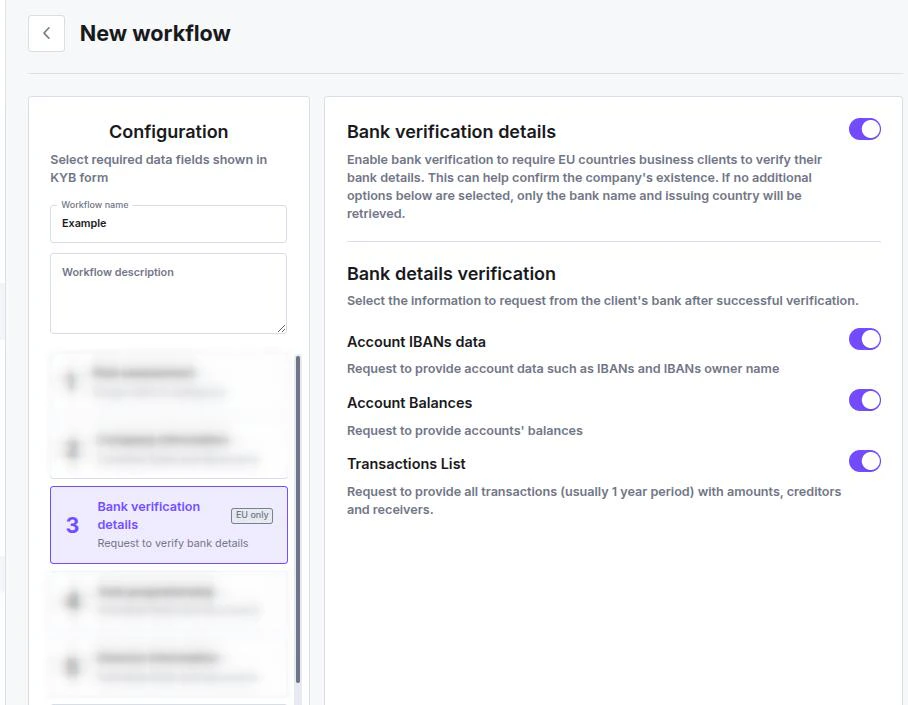 [Configure Bank Verification step →](/guides/dashboard/bank/step-bank-verification)
Collect owner-specific fields and documents for sole traders.
Tailor the verification form for sole proprietors with fields and documents that differ from standard company verification.
[Configure Sole Proprietorship step →](/guides/dashboard/kyb/step-sole-proprietorship)
Collect and verify details for company directors.
Configure whether identity verification is required for directors, handle corporate directors (companies acting as directors), and set custom fields and documents.
[Configure Bank Verification step →](/guides/dashboard/bank/step-bank-verification)
Collect owner-specific fields and documents for sole traders.
Tailor the verification form for sole proprietors with fields and documents that differ from standard company verification.
[Configure Sole Proprietorship step →](/guides/dashboard/kyb/step-sole-proprietorship)
Collect and verify details for company directors.
Configure whether identity verification is required for directors, handle corporate directors (companies acting as directors), and set custom fields and documents.
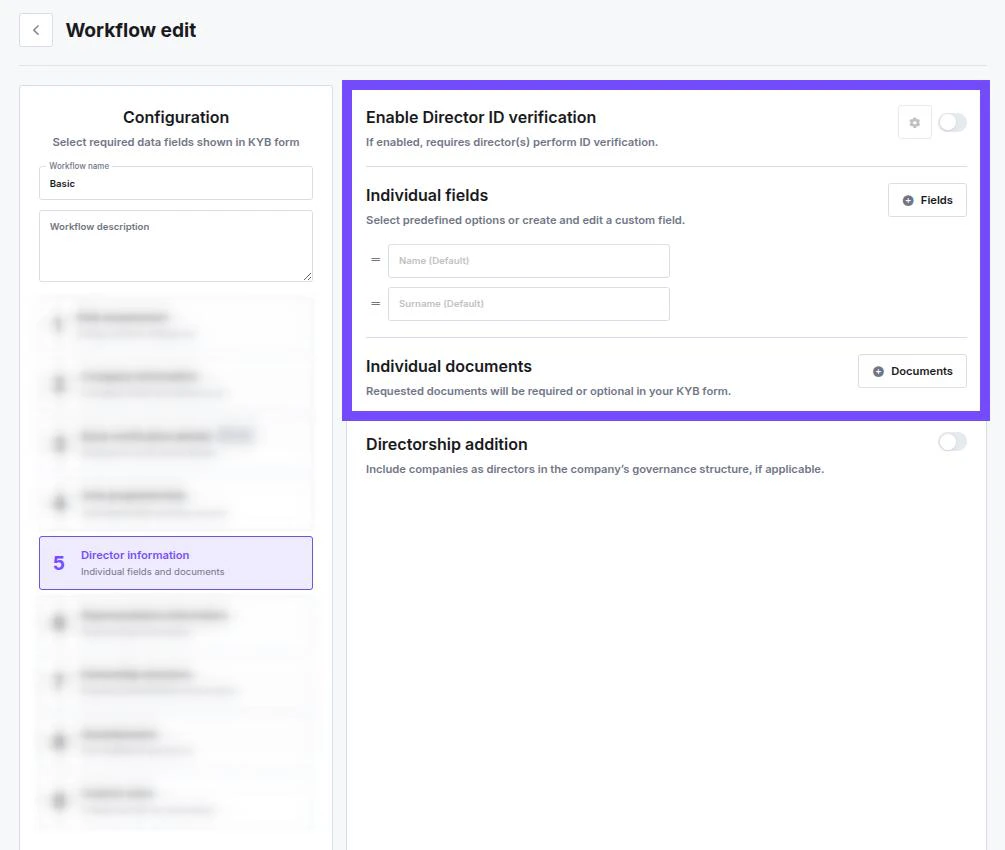 [Configure Director Information step →](/guides/dashboard/kyb/step-director-information)
Configure data and verification requirements for the company representative.
Set whether a representative is required, what data and documents they must provide, and whether identity verification applies to them.
[Configure Representative Information step →](/guides/dashboard/kyb/step-representative-information)
Declare shareholders and configure UBO verification thresholds.
Set ownership thresholds that trigger UBO checks and configure the depth of verification required for Ultimate Beneficial Owners.
[Configure Director Information step →](/guides/dashboard/kyb/step-director-information)
Configure data and verification requirements for the company representative.
Set whether a representative is required, what data and documents they must provide, and whether identity verification applies to them.
[Configure Representative Information step →](/guides/dashboard/kyb/step-representative-information)
Declare shareholders and configure UBO verification thresholds.
Set ownership thresholds that trigger UBO checks and configure the depth of verification required for Ultimate Beneficial Owners.
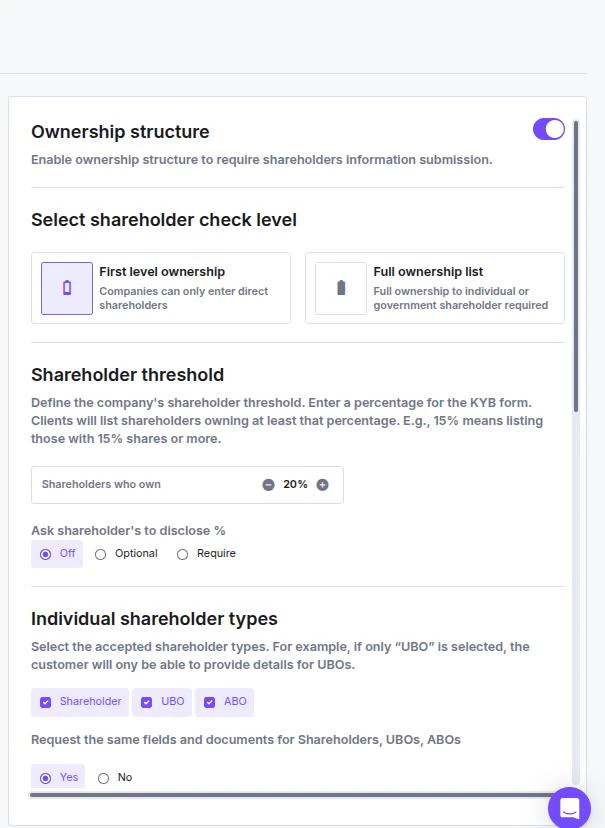 [Configure Ownership Structure step →](/guides/dashboard/kyb/step-ownership-structure)
Collect source of funds, compliance answers, or custom data via a structured form.
Add one or more questionnaire sections to gather business-specific information from the company or its representatives during verification.
[Configure Questionnaire step →](/guides/dashboard/features/step-questionnaire)
Run automated risk and blocklist checks against the company.
Select and order the rules to apply. Rules run sequentially and flag or block companies based on the conditions you define.
[Configure Ownership Structure step →](/guides/dashboard/kyb/step-ownership-structure)
Collect source of funds, compliance answers, or custom data via a structured form.
Add one or more questionnaire sections to gather business-specific information from the company or its representatives during verification.
[Configure Questionnaire step →](/guides/dashboard/features/step-questionnaire)
Run automated risk and blocklist checks against the company.
Select and order the rules to apply. Rules run sequentially and flag or block companies based on the conditions you define.
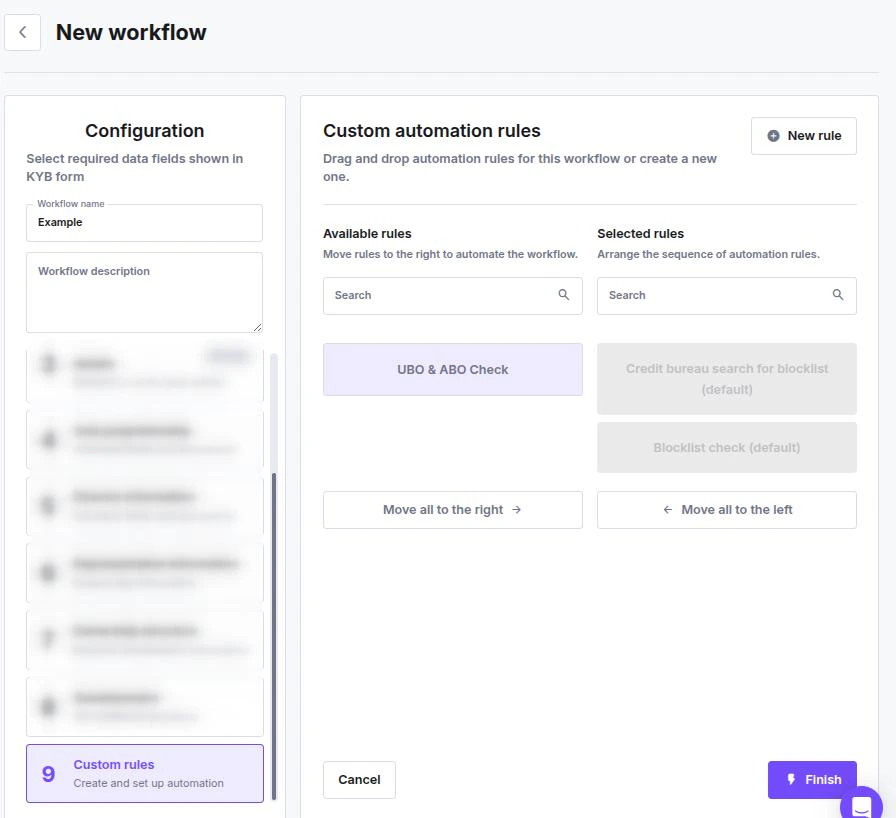 **Prerequisite:** Rules must be created in [Custom Rules setup →](/guides/dashboard/risk/custom-rules) before they can be added here.
[Configure Custom Rules step →](/guides/dashboard/risk/step-custom-rules)
Embed KYC identity checks for directors, shareholders, and representatives.
Enable document scan and selfie/liveness verification for people within the KYB flow — no separate KYC session required.
**Prerequisite:** Rules must be created in [Custom Rules setup →](/guides/dashboard/risk/custom-rules) before they can be added here.
[Configure Custom Rules step →](/guides/dashboard/risk/step-custom-rules)
Embed KYC identity checks for directors, shareholders, and representatives.
Enable document scan and selfie/liveness verification for people within the KYB flow — no separate KYC session required.
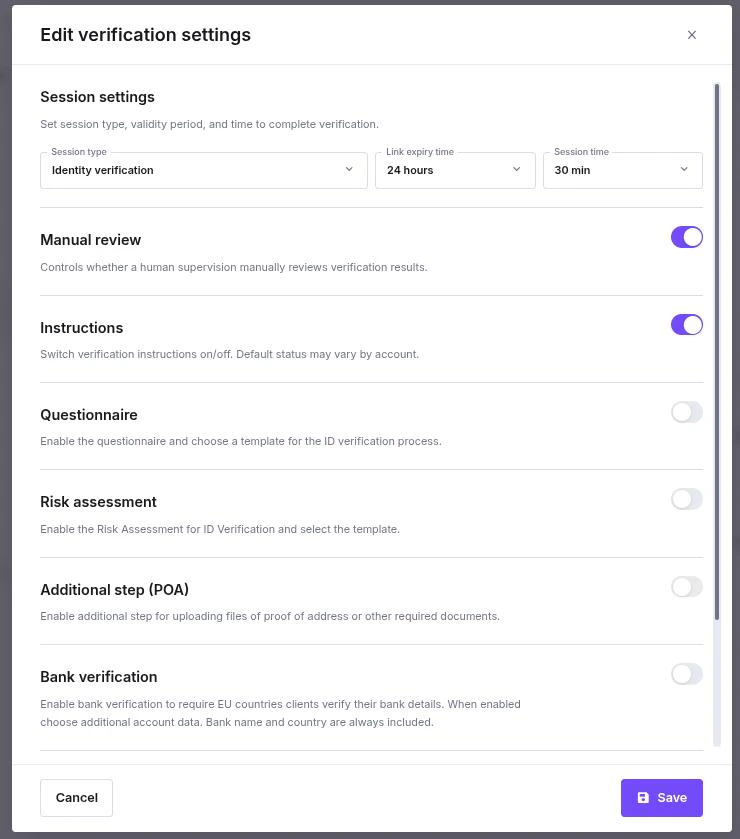 [Configure Identity Verification step →](/guides/dashboard/kyc/identity-verification-in-workflow)
***
## Dynamic Workflows
Route companies to different workflows automatically based on their answers to a short screening questionnaire — for example, directing sole traders to a lighter flow and LTDs to a full KYB.
[Configure Identity Verification step →](/guides/dashboard/kyc/identity-verification-in-workflow)
***
## Dynamic Workflows
Route companies to different workflows automatically based on their answers to a short screening questionnaire — for example, directing sole traders to a lighter flow and LTDs to a full KYB.
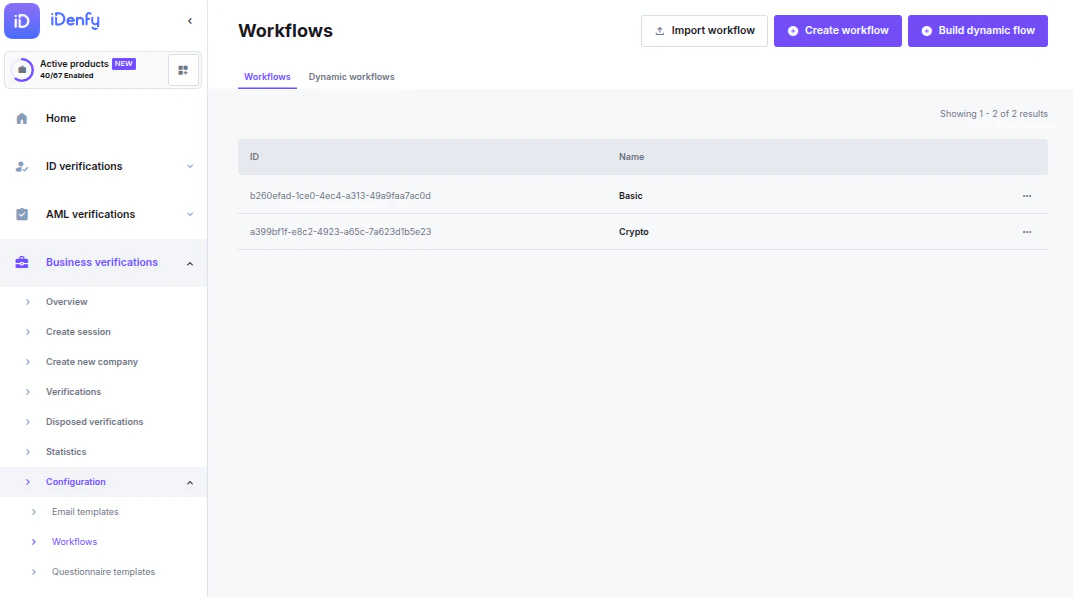 [Configure Dynamic Workflows →](/guides/dashboard/kyb/dynamic-workflows)