> ## Documentation Index
> Fetch the complete documentation index at: https://documentation.idenfy.com/llms.txt
> Use this file to discover all available pages before exploring further.
# Magic Link
> Send verification links to customers via email or SMS using iDenfy Magic Link for identity verification without any code integration.
## Overview
Magic Link lets you send a verification URL directly to your user via email or SMS. The user clicks the link, completes verification on iDenfy’s hosted page, and you receive results via webhook. No coding required.
***
## Reusable Magic Links (Dashboard)
Reusable Magic Links are specialized URLs that allow users to start identity verification immediately without needing to log in or create an account. It acts as a shareable "entry pass" that redirects the user directly into your defined verification flow.
| Feature | Description |
| -------------- | ----------------------------------------------------------------------------------------------------- |
| **Single-use** | The link becomes invalid after one successful verification. Ideal for individual user invites. |
| **Multi-use** | The link remains active for a specific number of times (e.g., 100 uses). Best for limited campaigns. |
| **Unlimited** | The link remains active indefinitely until it is manually deactivated or reaches its expiration date. |
| **Expiration** | An optional setting to automatically disable the link after a specific date and time. |
**Usage Logic & Limitations**
* **Clicks count as usage**: Every click reduces the link's limit, even if the user quits early. You are only billed for *completed* verifications.
* **No renewals**: Links cannot be extended or refreshed. Once a link expires or hits its limit, you must create a new one.
When a user clicks the Magic Link, the system performs a background check to ensure the link is active and your account has sufficient credits.
1. **Validation**: If valid, a new verification session is created automatically.
2. **Redirection**: The user is taken directly to the verification flow.
3. **Completion**: The user uploads documents/selfies without entering passwords.
### How to Create a Reusable Magic Link
Log in to your dashboard. From the left-hand menu, go to **ID Verification** → **Settings** → **Magic Link**.
Click **Create New Magic Link**.
* **Name**: Internal identifier to help you recognize this link.
* **Verification Flow**: Select which steps the user must complete (e.g., Document Verification, Selfie, or both).
* **Usage Limit**: Choose between Single-use, Multi-use, or Unlimited.
* **Expiration**: (Optional) Set a date and time for the link to stop working.
* **Language**: Pre-select the interface language for the user.
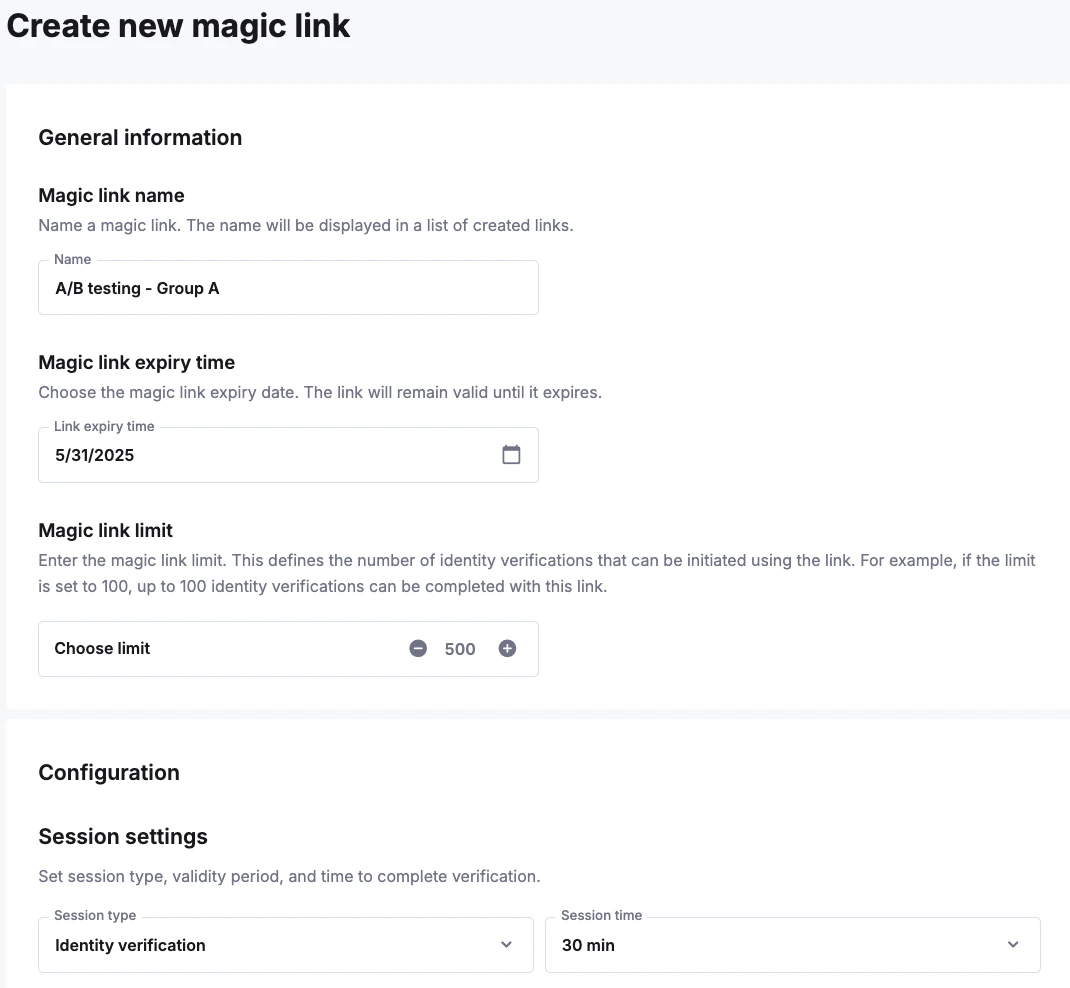 Click **Save** to create the link. Copy the URL and share it via email, SMS, or embed it on your website.
***
## Receiving Results
Results can be viewed in real-time in the **iDenfy Dashboard**. Alternatively, you can receive updates via [webhook](/kyc/webhooks).
***
## When to Use Magic Link
| Use case | Recommended Type | Why |
| ----------------------- | -------------------------- | ------------------------------------------- |
| **Bulk Campaigns** | Reusable (Unlimited/Multi) | One link for all users, easy to manage. |
| **Personal Invites** | Reusable (Single-use) | Security for one-on-one onboarding. |
| **App Integration** | Dynamic (API) | Programmatically generate unique sessions. |
| **Manual Verification** | Dynamic (Dashboard) | Quick one-off link for a specific customer. |
| **Physical Marketing** | Reusable (Unlimited) | Perfect for QR codes on flyers or posters. |
Click **Save** to create the link. Copy the URL and share it via email, SMS, or embed it on your website.
***
## Receiving Results
Results can be viewed in real-time in the **iDenfy Dashboard**. Alternatively, you can receive updates via [webhook](/kyc/webhooks).
***
## When to Use Magic Link
| Use case | Recommended Type | Why |
| ----------------------- | -------------------------- | ------------------------------------------- |
| **Bulk Campaigns** | Reusable (Unlimited/Multi) | One link for all users, easy to manage. |
| **Personal Invites** | Reusable (Single-use) | Security for one-on-one onboarding. |
| **App Integration** | Dynamic (API) | Programmatically generate unique sessions. |
| **Manual Verification** | Dynamic (Dashboard) | Quick one-off link for a specific customer. |
| **Physical Marketing** | Reusable (Unlimited) | Perfect for QR codes on flyers or posters. |