> ## Documentation Index
> Fetch the complete documentation index at: https://documentation.idenfy.com/llms.txt
> Use this file to discover all available pages before exploring further.
# Collect Information
> Gather company details and beneficial owner data using the iDenfy KYB API after creating a business verification session token string.
**Requirements**
* **API** key pair
* [Successfully created **`tokenString`**](/kyb/generate-token#step-1-create-business-verification-form-session) - used as **Authorization**
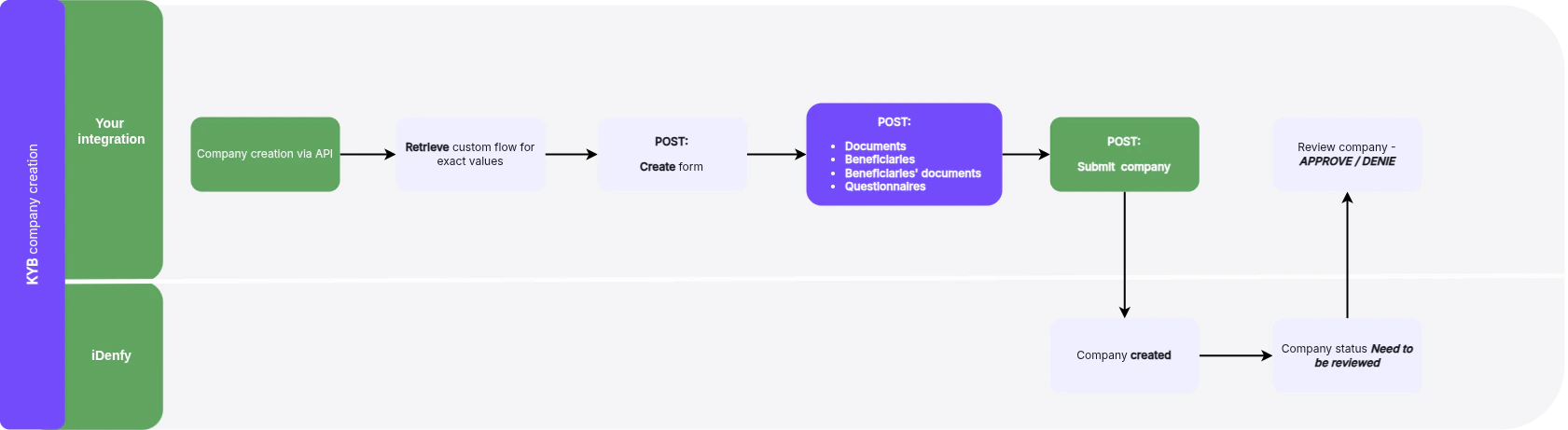
## Business Verification Schema
See the recommended integration and use schema below.
 ## Check Flow
To determine what data the form requires, call the Business verification Token Retrieve endpoint.
For the **Business verification Token Retrieve** endpoint (retrieves flow information related to the specific token, detailing the data required for form submission), see the **API Reference** tab for `kybInfoRetrieve`.
You can skip this step if you use the same flow, since the data fields are similar.
***
## Form Creation
Create a Business verification Form by sending a request to the form creation endpoint.
For the **Create Business verification form** endpoint (creates a new form linked to the generated token for capturing and submitting necessary compliance information), see the **API Reference** tab for `kybFormsCreate`.
After the form is created, the following operations are available:
* **Info Retrieve** - Retrieves detailed information about an active Business verification session, including various aspects of the company's compliance and verification process. See `kybFormsRetrieve` in the API Reference.
* **Form Update** - Updates information on an existing Business verification form. See `kybFormsUpdate` in the API Reference.
* **Form Partial Update** - Partially updates specific sections of an existing Business verification form. See `kybFormsPartialUpdate` in the API Reference.
You can retrieve a list of Business verification forms associated with a particular token. The list contains one item if a form was created, or zero items if it was not.
* **List Business verification forms** - Lists all forms associated with a particular token. See `kybFormsList` in the API Reference.
***
## Documents
You can manage documents within the Business verification form/company. The following operations are available:
| Operation | Description | API Reference |
| --------------------- | ------------------------------------------------------------------------------ | -------------------------------- |
| **List documents** | Lists all documents associated with the Business verification form/company | `kybFormsDocumentsList` |
| **Add document** | Uploads a new document to the Business verification form/company | `kybFormsDocumentsCreate` |
| **Retrieve document** | Retrieves a specific document linked to the Business verification form/company | `kybFormsDocumentsRetrieve` |
| **Update document** | Updates an existing document within the Business verification form/company | `kybFormsDocumentsUpdate` |
| **Partial update** | Partially updates a document in the Business verification form/company | `kybFormsDocumentsPartialUpdate` |
| **Delete document** | Deletes a document associated with the Business verification form/company | `kybFormsDocumentsDestroy` |
***
## Beneficiaries
You can manage beneficiaries within the Business verification form/company. The following operations are available:
| Operation | Description | API Reference |
| ------------------------ | ------------------------------------------------------------------------ | ------------------------------------ |
| **List beneficiaries** | Lists all beneficiaries linked to the Business verification form/company | `kybFormsBeneficiariesList` |
| **Add beneficiary** | Adds a new beneficiary to the Business verification form/company | `kybFormsBeneficiariesCreate` |
| **Retrieve beneficiary** | Retrieves information on a specific beneficiary | `kybFormsBeneficiariesRetrieve` |
| **Update beneficiary** | Updates details of an existing beneficiary | `kybFormsBeneficiariesUpdate` |
| **Partial update** | Partially updates information of a specific beneficiary | `kybFormsBeneficiariesPartialUpdate` |
| **Delete beneficiary** | Removes a beneficiary from the Business verification form/company | `kybFormsBeneficiariesDestroy` |
***
## Beneficiaries' Documents
You can manage beneficiaries' documents using the following operations:
| Operation | Description | API Reference |
| --------------------- | ----------------------------------------------------------- | --------------------------------------------- |
| **List documents** | Lists all documents related to a specific beneficiary | `kybFormsBeneficiariesDocumentsList` |
| **Add document** | Uploads a new document for a beneficiary | `kybFormsBeneficiariesDocumentsCreate` |
| **Retrieve document** | Retrieves a specific document associated with a beneficiary | `kybFormsBeneficiariesDocumentsRetrieve` |
| **Update document** | Updates an existing document for a beneficiary | `kybFormsBeneficiariesDocumentsUpdate` |
| **Partial update** | Partially updates a beneficiary's document | `kybFormsBeneficiariesDocumentsPartialUpdate` |
| **Delete document** | Deletes a document linked to a beneficiary | `kybFormsBeneficiariesDocumentsDestroy` |
***
## Questionnaires
A questionnaire can be added to the flow. To check whether the form requires a questionnaire to be filled out, use the following endpoints:
* **Questionnaire list** - Lists all available questionnaires associated with the Business verification form flow. See `kybFormsQuestionnairesList` in the API Reference.
* **Retrieve specific questionnaire** - Retrieves a particular questionnaire within the Business verification process. See `kybFormsQuestionnairesRetrieve` in the API Reference.
If there is a need to fill it out, the following endpoints can be used:
| Operation | Description | API Reference |
| -------------------- | -------------------------------------------------------- | ----------------------------------------- |
| **Update answers** | Updates the answers to a questionnaire | `kybFormsQuestionnairesAnswersUpdate` |
| **Retrieve answers** | Retrieves the answers provided in a questionnaire | `kybFormsQuestionnairesAnswersRetrieve` |
| **List all answers** | Retrieves all completed questionnaire answers for a form | `kybFormsQuestionnairesAnswersDetailList` |
| **Delete answers** | Deletes answers provided in a questionnaire | `kybFormsQuestionnairesAnswersDestroy` |
***
## Form Submit
When the form is filled, it can be submitted. See `kybFormsSubmitCreate` in the API Reference.
Once you submit the form, iDenfy sends a [**webhook**](/kyb/webhooks) notification to your endpoint.
## Check Flow
To determine what data the form requires, call the Business verification Token Retrieve endpoint.
For the **Business verification Token Retrieve** endpoint (retrieves flow information related to the specific token, detailing the data required for form submission), see the **API Reference** tab for `kybInfoRetrieve`.
You can skip this step if you use the same flow, since the data fields are similar.
***
## Form Creation
Create a Business verification Form by sending a request to the form creation endpoint.
For the **Create Business verification form** endpoint (creates a new form linked to the generated token for capturing and submitting necessary compliance information), see the **API Reference** tab for `kybFormsCreate`.
After the form is created, the following operations are available:
* **Info Retrieve** - Retrieves detailed information about an active Business verification session, including various aspects of the company's compliance and verification process. See `kybFormsRetrieve` in the API Reference.
* **Form Update** - Updates information on an existing Business verification form. See `kybFormsUpdate` in the API Reference.
* **Form Partial Update** - Partially updates specific sections of an existing Business verification form. See `kybFormsPartialUpdate` in the API Reference.
You can retrieve a list of Business verification forms associated with a particular token. The list contains one item if a form was created, or zero items if it was not.
* **List Business verification forms** - Lists all forms associated with a particular token. See `kybFormsList` in the API Reference.
***
## Documents
You can manage documents within the Business verification form/company. The following operations are available:
| Operation | Description | API Reference |
| --------------------- | ------------------------------------------------------------------------------ | -------------------------------- |
| **List documents** | Lists all documents associated with the Business verification form/company | `kybFormsDocumentsList` |
| **Add document** | Uploads a new document to the Business verification form/company | `kybFormsDocumentsCreate` |
| **Retrieve document** | Retrieves a specific document linked to the Business verification form/company | `kybFormsDocumentsRetrieve` |
| **Update document** | Updates an existing document within the Business verification form/company | `kybFormsDocumentsUpdate` |
| **Partial update** | Partially updates a document in the Business verification form/company | `kybFormsDocumentsPartialUpdate` |
| **Delete document** | Deletes a document associated with the Business verification form/company | `kybFormsDocumentsDestroy` |
***
## Beneficiaries
You can manage beneficiaries within the Business verification form/company. The following operations are available:
| Operation | Description | API Reference |
| ------------------------ | ------------------------------------------------------------------------ | ------------------------------------ |
| **List beneficiaries** | Lists all beneficiaries linked to the Business verification form/company | `kybFormsBeneficiariesList` |
| **Add beneficiary** | Adds a new beneficiary to the Business verification form/company | `kybFormsBeneficiariesCreate` |
| **Retrieve beneficiary** | Retrieves information on a specific beneficiary | `kybFormsBeneficiariesRetrieve` |
| **Update beneficiary** | Updates details of an existing beneficiary | `kybFormsBeneficiariesUpdate` |
| **Partial update** | Partially updates information of a specific beneficiary | `kybFormsBeneficiariesPartialUpdate` |
| **Delete beneficiary** | Removes a beneficiary from the Business verification form/company | `kybFormsBeneficiariesDestroy` |
***
## Beneficiaries' Documents
You can manage beneficiaries' documents using the following operations:
| Operation | Description | API Reference |
| --------------------- | ----------------------------------------------------------- | --------------------------------------------- |
| **List documents** | Lists all documents related to a specific beneficiary | `kybFormsBeneficiariesDocumentsList` |
| **Add document** | Uploads a new document for a beneficiary | `kybFormsBeneficiariesDocumentsCreate` |
| **Retrieve document** | Retrieves a specific document associated with a beneficiary | `kybFormsBeneficiariesDocumentsRetrieve` |
| **Update document** | Updates an existing document for a beneficiary | `kybFormsBeneficiariesDocumentsUpdate` |
| **Partial update** | Partially updates a beneficiary's document | `kybFormsBeneficiariesDocumentsPartialUpdate` |
| **Delete document** | Deletes a document linked to a beneficiary | `kybFormsBeneficiariesDocumentsDestroy` |
***
## Questionnaires
A questionnaire can be added to the flow. To check whether the form requires a questionnaire to be filled out, use the following endpoints:
* **Questionnaire list** - Lists all available questionnaires associated with the Business verification form flow. See `kybFormsQuestionnairesList` in the API Reference.
* **Retrieve specific questionnaire** - Retrieves a particular questionnaire within the Business verification process. See `kybFormsQuestionnairesRetrieve` in the API Reference.
If there is a need to fill it out, the following endpoints can be used:
| Operation | Description | API Reference |
| -------------------- | -------------------------------------------------------- | ----------------------------------------- |
| **Update answers** | Updates the answers to a questionnaire | `kybFormsQuestionnairesAnswersUpdate` |
| **Retrieve answers** | Retrieves the answers provided in a questionnaire | `kybFormsQuestionnairesAnswersRetrieve` |
| **List all answers** | Retrieves all completed questionnaire answers for a form | `kybFormsQuestionnairesAnswersDetailList` |
| **Delete answers** | Deletes answers provided in a questionnaire | `kybFormsQuestionnairesAnswersDestroy` |
***
## Form Submit
When the form is filled, it can be submitted. See `kybFormsSubmitCreate` in the API Reference.
Once you submit the form, iDenfy sends a [**webhook**](/kyb/webhooks) notification to your endpoint.