> ## Documentation Index
> Fetch the complete documentation index at: https://documentation.idenfy.com/llms.txt
> Use this file to discover all available pages before exploring further.
# KYB Webhooks
> Receive business verification results and status changes via webhook callbacks for company submit, review, AML, and expiration events.
**Requirements**
* Setting up **webhooks** requires **Admin** role
* Set up [webhooks](/guides/dashboard/settings/system-notifications-webhooks-emails)
* Your endpoint must have a valid **SSL** certificate for TLS webhooks to prevent delivery failures
## Setting Up Notifications
To set up notifications, log in to your dashboard and navigate to [Settings > Notifications](/guides/dashboard/settings/system-notifications-webhooks-emails).
***
## Webhook Events for Companies
The following webhook events are available for company-related notifications. For full payload details on each event, see the **API Reference** tab.
| Event | API Reference | Description |
| ------------------------ | -------------------- | -------------------------------------------------- |
| **COMPANY SUBMIT** | `companySubmit` | Triggered when a company form is submitted |
| **COMPANY REVIEW** | `companyReview` | Triggered when a company review is completed |
| **COMPANY AML REVIEW** | `companyAmlReview` | Triggered when a company AML review is completed |
| **COMPANY EXPIRATION** | `companyExpiration` | Triggered when a company verification expires |
| **COMPANY INFO REQUEST** | `companyInfoRequest` | Triggered when additional information is requested |
| **COMPANY DELETE** | `companyDelete` | Triggered when a company is deleted |
***
## Webhook Events for Reports
| Event | API Reference | Description |
| ------------------------ | -------------------- | ----------------------------------------------------------- |
| **GOV ORDERED DOCUMENT** | `govOrderedDocument` | Triggered when a government ordered document status changes |
***
## Webhook Troubleshooting
### Ensure That
* You have provided a valid callback endpoint (it does not contain typos and is a fully specified URL with HTTP schema, port, and domain name).
* The provided endpoint can be reached from the internet.
* Your SSL is set up correctly. The system can only send webhooks to URLs with valid SSL certificates.
* You are truly not receiving a callback and your framework is not accidentally returning some other HTTP response (e.g. 422 or 500).
### Review Webhooks Sent via iDenfy Dashboard
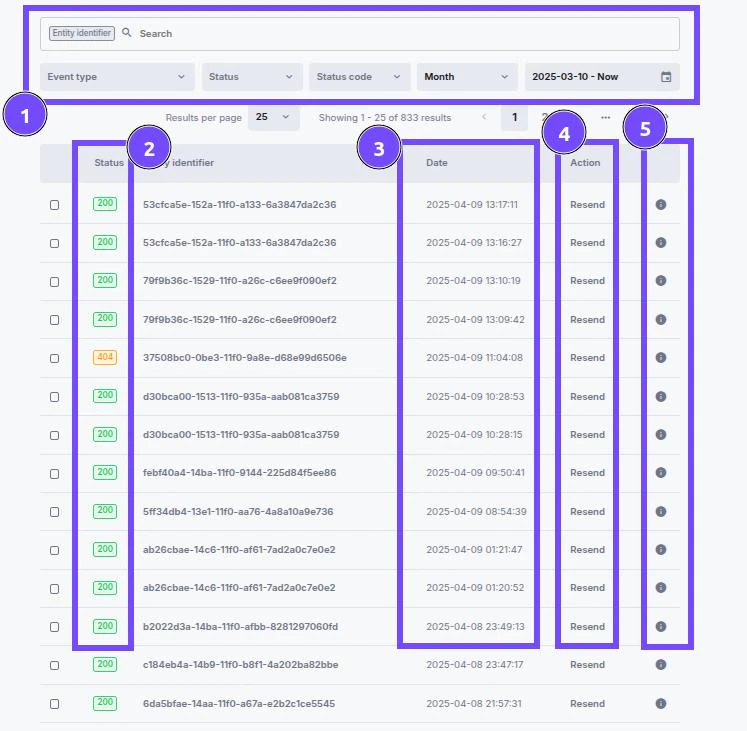
By going to **Settings** > **Notifications** > selecting **Recently sent** in the top right corner, you can search for specific notifications and see what was sent and what status was received from your server.
1. **Search field** - Use scanRef to search for specific notifications for verification.
2. **Response status** - The response received from your server:
* **`0`** - No Response: No communication; server unreachable.
* **`2xx`** - Success: Request successful, information returned.
* **`3xx`** - Redirection: Further action needed, request redirected.
* **`4xx`** - Client Errors: Your server could not handle the response.
* **`5xx`** - Server Errors: Request valid, there is a problem with the server.
3. **Date and time** when the notification was sent.
4. **Resend** - Attempt to resend the webhook.
5. **Details** - Shows full information of what was sent in JSON format.