UI customization
Android SDK provides various customization options with programming code or xml files.
Getting started
Create IdenfyUISettings
Create an instance of IdenfyUISettings class:
    val idenfyUISettingsV2 = IdenfyUISettingsV2.IdenfyUIBuilderV2()
    .build()
Update IdenfyUISettings
    val idenfySettingsV2 = IdenfySettingsV2.IdenfyBuilderV2()
    .withIdenfyUISettingsV2(idenfyUISettingsV2)
    ...
    build()
SDK currently supports three ways of customization:
Customization options
Customization with IdenfyUISettingsV2:
-
Camera OnBoarding view
    IdenfyUISettingsV2.IdenfyUIBuilderV2()
    /**
     * OnBoarding View acts as additional screen, which helps user to familiarize himself with current step
     * @param idenfyOnBoardingViewTypeEnum Defines onBoarding view type
     */
    .withConfirmationView(idenfyOnBoardingViewTypeEnum: IdenfyOnBoardingViewTypeEnum)
    ...
    build()
The possible options of the Camera OnBoarding View are explained below:
| IdenfyOnBoardingViewTypeEnum | Description | UI |
|---|---|---|
NONE | OnBoarding view is skipped | |
MULTIPLE_STATIC | Shows an onBoarding view before EVERY step of the verification process with a static instruction list | 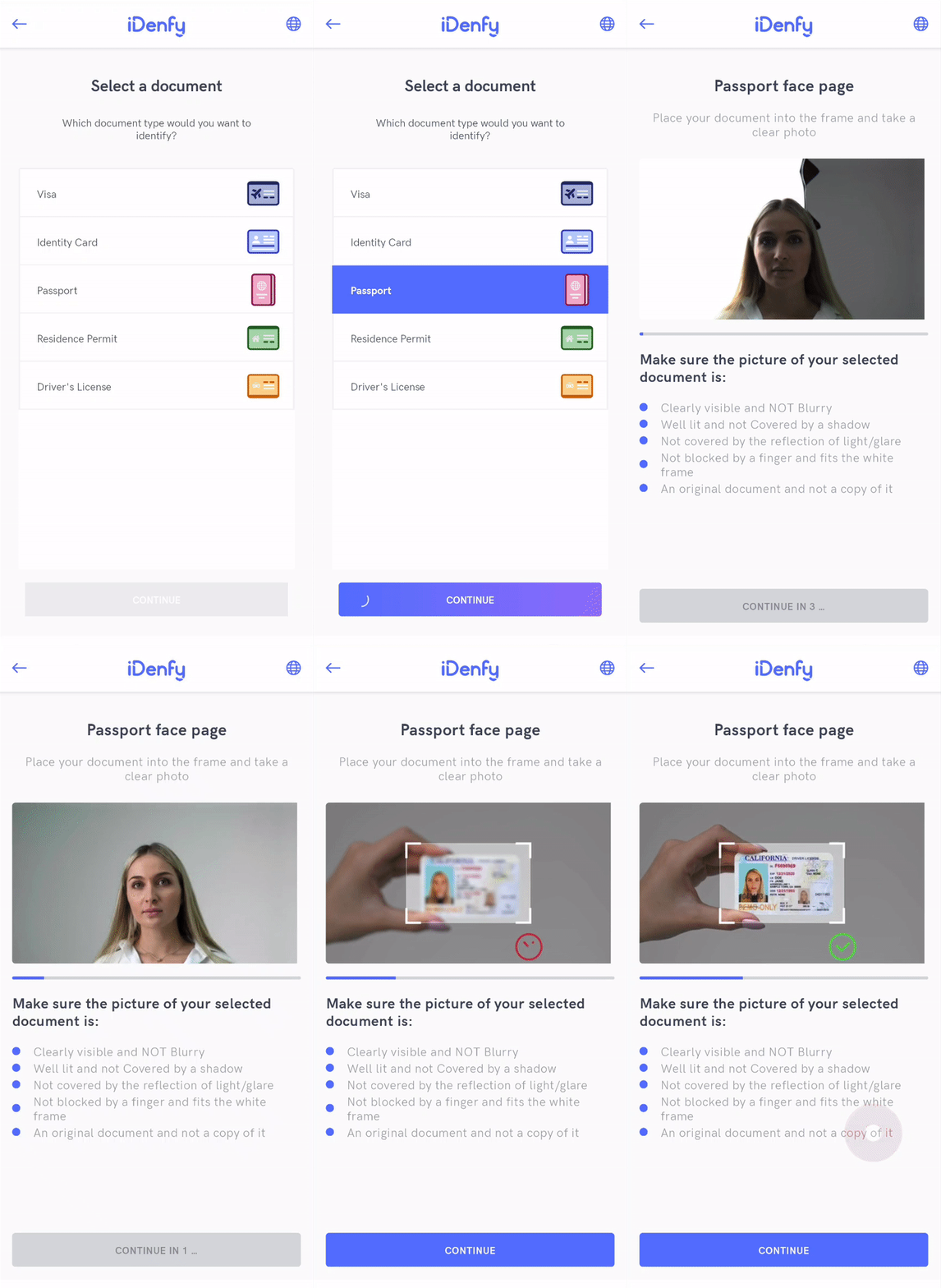 |
-
Language selection
    IdenfyUISettingsV2.IdenfyUIBuilderV2()
    /**
     * Enables language selection window, which provides an option to change the locale
     * @param isLanguageSelectionNeeded Changes visibility of locale selection
     icon.
    */
    .withLanguageSelection(Boolean isLanguageSelectionNeeded)
    ...
    build()
-
Mismatch tags alert visibility
    IdenfyUISettingsV2.IdenfyUIBuilderV2()
    /**
     * An option to choose whether mismatch tags alert is visible
     * @param mismatchTagsAlert: set the visibility of mismatch tags alert
     icon.
    */
    .withMismatchTagsAlert(Boolean mismatchTagsAlert)
    ...
    build()
-
Document camera rectangle visibility
Since some documents are non regular size, therefore we have an option to hide the camera rectangle. This way the whole screen is dedicated to the document capturing.
The rectangle can be hidden for all document types:
    /**
    * Camera rectangle will be hidden for ALL countries and document types
    */
    val idenfyUISettingsV2 =
        IdenfyUISettingsV2.IdenfyUIBuilderV2()
          .withDocumentFrameVisibility(DocumentCameraFrameVisibility.HiddenForAllCountriesAndDocumentTypes)
          .build()
or for specific countries and document types:
    /**
    * Camera rectangle will be hidden ONLY for Lithuanian passport
    */
    val countryDocumentMap: MutableMap<String, List<DocumentTypeEnum>> = mutableMapOf()
    countryDocumentMap["LT"] = mutableListOf(DocumentTypeEnum.PASSPORT)
    val documentCameraFrameVisibility = DocumentCameraFrameVisibility.HiddenForSpecificCountriesAndDocumentTypes(countryDocumentMap)

    val idenfyUISettingsV2 = IdenfyUISettingsV2.IdenfyUIBuilderV2()
        .withDocumentFrameVisibility(documentCameraFrameVisibility)
        .build()
-
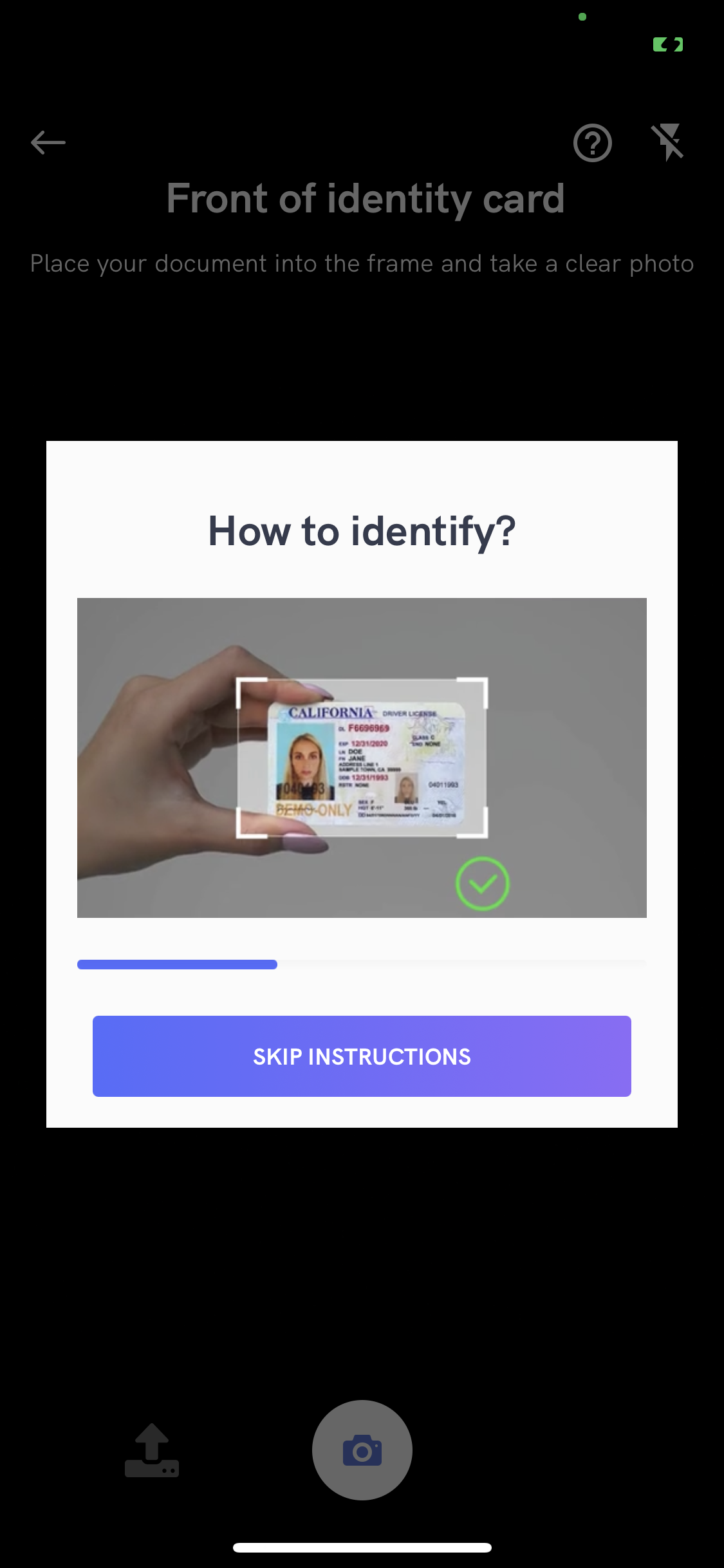
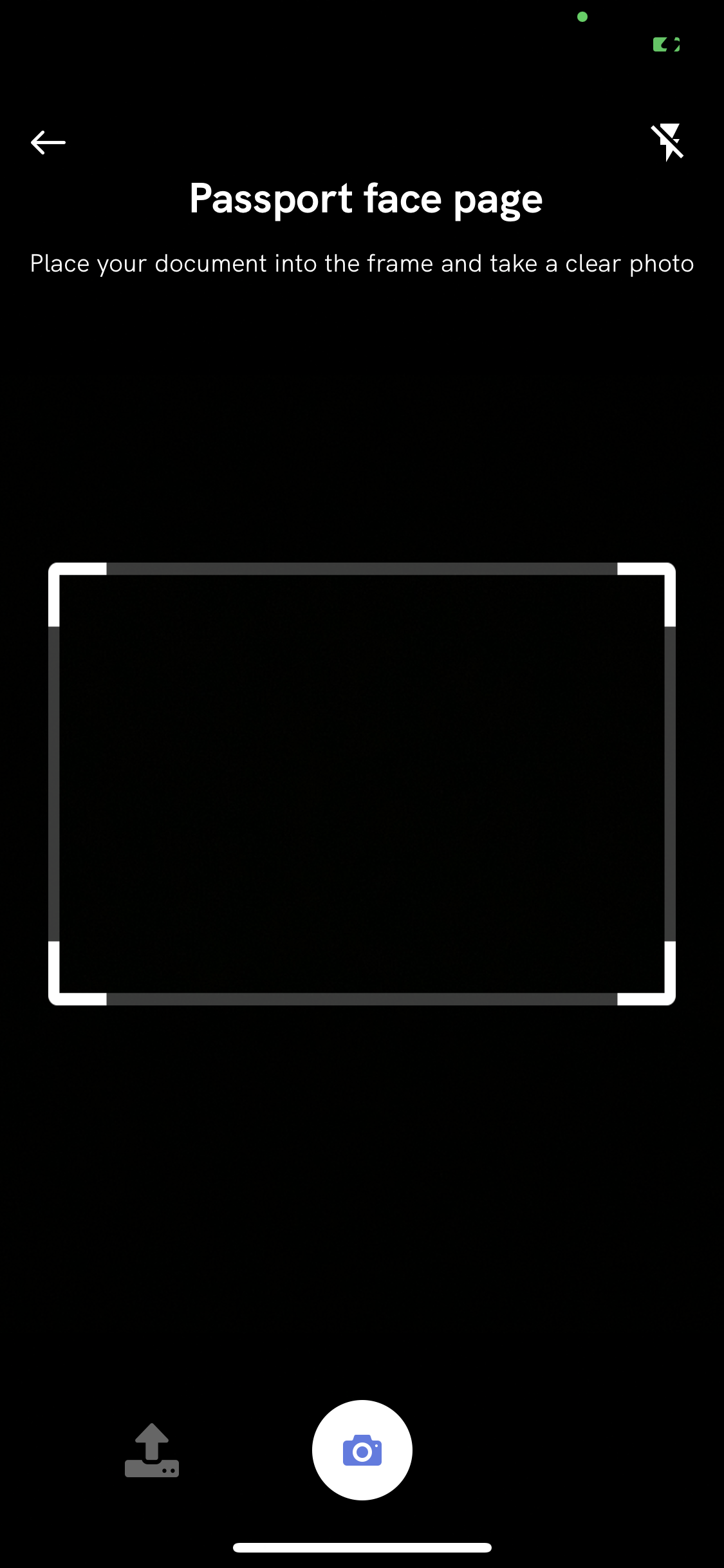
Adding instructions in camera session.
The iDenfySDK provides informative instructions during the verification session. They can provide valuable information for the user and help to tackle common issues: bad lightning, wrong document side, etc. Instructions can be customized, by changing all UI elements or even using your MP4 video files. Instructions are configured by your backend settings and can be overridden with the SDK settings.
Using IdenfyInstructionsEnum dialog
Using IdenfyInstructionsEnum none
1. Enable instructions in IdenfyUISettingsV2
   val idenfyUISettingsV2 = IdenfyUISettingsV2.IdenfyUIBuilderV2()
       .withInstructions(IdenfyInstructionsType.DIALOG)
       ...
       build()
Applying SDK wide color changes
If color and assets changes are the only requirement, then it can be easily customized by changing main colors.
Information about mostly used colors:
| Color name | Description | Default color value |
|---|---|---|
idenfyMainColorV2 | Defines the color of most single colored assets and focused parts in SDK. | #536DFE |
idenfyMainDarkerColorV2 | Defines the color of some focused parts in SDK, similar to idenfyMainColorV2. | #5D7CE4 |
idenfyBackgroundColorV2 | Defines the background color. | #FBFBFB |
idenfySecondColorV2 | Defines the text color. | #F2353B4E |
You can customize it in the following manner:
1. Override color names in your app module.
Create either a new idenfy_colors.xml or add our defined colors to your project.
2. Make color changes
Example:
<resources>
    <color name="idenfyMainColorV2">#7CFC00</color>
    <color name="idenfyMainDarkerColorV2">#7CFC00</color>
</resources>
Colors also are applied on images, which use a single color from idenfy drawable resources. If perhaps you decided to override our provided images with more sophisticated icons, which use more than 1 color, then you can easily disable tint on images. You need to override our defined layouts styles with the removed tint attribute.
Example
-
Before:
<style name="idenfyAppBarLayoutBackButtonStyle">
    <item name="android:tint">
        @color/idenfyMainColorV2
    </item>
</style>
-
After:
<style name="idenfyAppBarLayoutBackButtonStyle" />
Customization with styles.xml or colors.xml:
Every screen in SDK uses different styles.xml, which covers all UI elements visible on that screen.
By overriding styles or colors in your app target, you can change the look of IdenfySDK to match your brand guidelines. You can access our styles.xml and colors.xml here.
Customization with overriding layouts of SDK:
All layouts in iDenfySDK are structured in a way that it is easy to override all components to match your brand identity. Requirements for overriding layouts:
-
Do not remove ids of components
This will lead to better project maintainability and will not cause runtime crashes.
-
Keep same layouts name
If layouts' names are changed, then layouts in SDK will not be overridden.
All layouts can be found here.
Customization by providing your own implementations of Jetpack Compose Composables:
For more advanced customization (fonts, layout structure, etc.), we provide a possibility to use your own composable implementations.
This is a new feature, that is still in progress, therefore Jetpack Compose is NOT supported in all the views, we strongly suggest you to try it out and share your feedback with us. We will continue to implement more views in the future.
1. Create an instance of IdenfyComposableViews
Use IdenfyComposeViewBuilder to create an instance of IdenfyComposableViews with your custom composables, which conform to an interface provided by the iDenfySDK. Take a look at the methods of the IdenfyComposeViewBuilder class.
  val idenfyComposeViews = IdenfyComposeViewBuilder()
    .withManualReviewingIdentificationResultsStatusWaitingComposable { data -> ManualReviewingIdentificationResultsWaitingTestComposable.composeManualView(data) }
    ...
    .build()
2. Pass IdenfyComposableViews instance to iDenfySDK
Pass created instance of the IdenfyComposableViews class to iDenfySDK, by setting idenfyComposableViews in the IdenfyController.
IdenfyController.getInstance().idenfyComposableViews = idenfyComposeViews
Make sure you create an instance of IdenfyComposableViews in the Application class, otherwise your provided composables will be lost after process death.
3. Pass resources to composables
IdenfyComposeViewBuilder with each method provides a data class with all required resources (images, videos, button actions, etc.) to fulfil the view, pass this class to your composable
val idenfyComposeViews = IdenfyComposeViewBuilder()
    .withManualReviewingIdentificationResultsStatusWaitingComposable { data -> ManualReviewingIdentificationResultsWaitingTestComposable.composeManualView(data) }
    ...
    .build()

@Composable
fun composeManualView(data: IdenfyManualReviewingIdentificationResultsStatusWaitingComposeViewData) {
  ...
}
4. Create the composable
The data class also contains IdenfyComposeBases, by using this class, you can provide ONLY your customized separate composables. This means your provided composables will be composed by iDenfySDK. This way our intended layout guidelines will not be broken and your own customized composables will be displayed.
A complete example:
    @Composable
fun composeManualView(data: IdenfyManualReviewingIdentificationResultsStatusWaitingComposeViewData) {
  //All needed resources for the view
  val resources = data.resources
  //A base for the composable
  val composeBases = data.idenfyComposeBases
  //States of the view
  val state = resources.state.collectAsState()

  composeBases.manualReviewingIdentificationResultsStatusWaitingComposableBase(
    resources,
    manualReviewingWaitingStatusViewTitle = { title ->
      Text(
        modifier = Modifier
          .padding(16.dp, 32.dp, 16.dp, 0.dp),
        text = title,
        textAlign = TextAlign.Center,
        color = colorResource(R.color.idenfyManualReviewingStatusWaitingCommonInformationTitleTextColor),
        fontSize = TextUnit(20f, TextUnitType.Sp),
        fontWeight = FontWeight.Bold,
        fontFamily = IdenfyFonts.hkGrotesk
      )
    },
    manualReviewingWaitingStatusViewDescription = { description ->
      Text(
        modifier = Modifier
          .padding(16.dp, 0.dp, 16.dp, 0.dp),
        text = description,
        textAlign = TextAlign.Center,
        color = colorResource(R.color.idenfyManualReviewingStatusWaitingCommonInformationDescriptionTextColor),
        fontSize = TextUnit(15f, TextUnitType.Sp),
        fontWeight = FontWeight.Normal,
        fontFamily = IdenfyFonts.hkGrotesk
      )
    },
    manualReviewingWaitingStatusViewAutomatedReviewBox = { firstCardTitle ->
      Surface(
        elevation = 4.dp,
        shape = RoundedCornerShape(4.dp),
        color = colorResource(R.color.idenfyManualReviewingStatusWaitingCommonReviewBoxFinishedBackgroundColor),
        modifier = Modifier
          .height(IntrinsicSize.Min)
          .padding(start = 16.dp, end = 16.dp)
          .fillMaxWidth()
      ) {
        Box {
          Row(
            horizontalArrangement = Arrangement.End,
            modifier = Modifier
              .requiredHeight(60.dp)
          ) {
            Text(
              modifier = Modifier
                .weight(weight = 1f)
                .padding(start = 16.dp, end = 16.dp)
                .align(Alignment.CenterVertically),
              textAlign = TextAlign.Start,
              text = firstCardTitle,
              color = colorResource(R.color.idenfyManualReviewingStatusWaitingCommonReviewBoxFinishedTitleColor),
              fontSize = TextUnit(13f, TextUnitType.Sp),
              fontWeight = FontWeight.SemiBold,
              fontFamily = IdenfyFonts.hkGrotesk
            )
            Image(
              painterResource(R.drawable.idenfy_ic_language_selection_language_selected_tick),
              contentDescription = "",
              colorFilter = ColorFilter.tint(colorResource(R.color.idenfyManualReviewingStatusWaitingCommonReviewBoxFinishedTickImageTintColor)),
              modifier = Modifier
                .padding(end = 16.dp)
                .align(Alignment.CenterVertically)
                .wrapContentWidth(Alignment.End)
                .requiredSize(20.dp),
            )
          }
        }
      }
    },
    manualReviewingWaitingStatusViewManualReviewBox = { secondCardTitle ->
      Surface(
        elevation = 4.dp,
        shape = RoundedCornerShape(4.dp),
        color = if (state.value == ManualWaitingScreenState.WAITING) colorResource(
          R.color.idenfyManualReviewingStatusWaitingCommonReviewBoxWaitingBackgroundColor
        ) else colorResource(R.color.idenfyManualReviewingStatusWaitingCommonReviewBoxFinishedBackgroundColor),
        modifier = Modifier
          .height(IntrinsicSize.Min)
          .padding(start = 16.dp, end = 16.dp)
          .fillMaxWidth()
      ) {
        Box {
          Row(
            horizontalArrangement = Arrangement.End,
            modifier = Modifier
              .requiredHeight(60.dp)
          ) {
            Text(
              modifier = Modifier
                .weight(weight = 1f)
                .padding(start = 16.dp, end = 16.dp)
                .align(Alignment.CenterVertically),
              textAlign = TextAlign.Start,
              text = secondCardTitle,
              color = if (state.value == ManualWaitingScreenState.WAITING) colorResource(
                R.color.idenfyManualReviewingStatusWaitingCommonReviewBoxWaitingTitleColor
              ) else colorResource(R.color.idenfyManualReviewingStatusWaitingCommonReviewBoxFinishedTitleColor),
              fontSize = TextUnit(13f, TextUnitType.Sp),
              fontWeight = FontWeight.SemiBold,
              fontFamily = IdenfyFonts.hkGrotesk
            )
            if (state.value == ManualWaitingScreenState.WAITING) {
              CircularProgressIndicator(
                modifier = Modifier
                  .padding(end = 16.dp)
                  .align(Alignment.CenterVertically)
                  .wrapContentWidth(Alignment.End)
                  .requiredSize(20.dp),
                color = colorResource(R.color.idenfyManualReviewingStatusWaitingCommonReviewBoxWaitingSpinnerColor)
              )
            } else {
              Image(
                painterResource(R.drawable.idenfy_ic_language_selection_language_selected_tick),
                contentDescription = "",
                colorFilter = ColorFilter.tint(colorResource(R.color.idenfyManualReviewingStatusWaitingCommonReviewBoxFinishedTickImageTintColor)),
                modifier = Modifier
                  .padding(end = 16.dp)
                  .align(Alignment.CenterVertically)
                  .wrapContentWidth(Alignment.End)
                  .requiredSize(20.dp),
              )
            }
          }
        }
      }
    },
    manualReviewingWaitingStatusViewWaitingDurationTitle = { waitingDurationTitle ->
      Text(
        modifier = Modifier
          .padding(bottom = 8.dp)
          .wrapContentWidth(Alignment.Start),
        text = waitingDurationTitle,
        textAlign = TextAlign.Center,
        color = colorResource(R.color.idenfyManualReviewingStatusWaitingCommonWaitingDurationTitleColor),
        fontSize = TextUnit(13f, TextUnitType.Sp),
        fontWeight = FontWeight.Normal,
        fontFamily = IdenfyFonts.hkGrotesk
      )
    },
    manualReviewingWaitingStatusViewWaitingTimerBox = { timeState ->
      val time = timeState.collectAsState()
      Surface(
        shape = RoundedCornerShape(4.dp),
        color = colorResource(R.color.idenfyManualReviewingStatusWaitingCommonWaitingTimerBoxBackgroundColor),
        modifier = Modifier
          .height(42.dp)
          .padding(start = 16.dp, end = 16.dp)
          .fillMaxWidth()
      ) {
        Row(horizontalArrangement = Arrangement.Center) {
          Image(
            painterResource(R.drawable.idenfy_ic_waiting_results_timer_clock_v2),
            contentDescription = "",
            modifier = Modifier
              .size(25.dp)
              .align(Alignment.CenterVertically),
            colorFilter = ColorFilter.tint(colorResource(R.color.idenfyManualReviewingStatusWaitingCommonWaitingTimerImageTintColor))
          )
          Text(
            text = time.value,
            color = colorResource(R.color.idenfyManualReviewingStatusWaitingCommonWaitingTimerTitleColor),
            fontSize = TextUnit(12f, TextUnitType.Sp),
            fontWeight = FontWeight.Bold,
            fontFamily = IdenfyFonts.hkGrotesk,
            modifier = Modifier
              .align(Alignment.CenterVertically)
              .padding(start = 8.dp)
          )
        }
      }
    },
    manualReviewingWaitingStatusViewBackToAccountButton = { buttonResources ->
      when (buttonResources) {
        BackToAccountButtonResources.Hidden -> {
        }
        is BackToAccountButtonResources.Visible -> {
          Surface(
            shape = RoundedCornerShape(4.dp),
            color = colorResource(R.color.idenfyManualReviewingStatusWaitingBackToAccountButtonBackgroundColor),
            modifier = Modifier
              .height(42.dp)
              .padding(start = 16.dp, end = 16.dp)
              .clickable(onClick = buttonResources.buttonAction)
              .fillMaxWidth()
          ) {
            Row(horizontalArrangement = Arrangement.Center) {
              Text(
                text = buttonResources.title,
                color = colorResource(R.color.idenfyManualReviewingStatusWaitingBackToAccountButtonTextColor),
                fontSize = TextUnit(12f, TextUnitType.Sp),
                fontWeight = FontWeight.Bold,
                fontFamily = IdenfyFonts.hkGrotesk,
                modifier = Modifier
                  .align(Alignment.CenterVertically)
              )
            }
          }
        }
      }
    })
}
If you desire to compose the view by yourself, you are not required to use the IdenfyComposeBases class.
If you are composing the view by yourself, make sure you carefully test the views, since the layout will NOT be used as we intended, therefore unexpected behavior might occur
Example of the customization flow
Download the sample app here.
Check the IdenfyApplication class, there you will find IdenfyComposeViewBuilder with all the composables, composed by IdenfyComposeBases
We strongly suggest taking a look at the example class, since it shows how to collect the view state, pass the resources, button actions.
Customization by providing a Custom verification results view:
To fully customize your verification results waiting view, we provide a solution to pass your own fragment.
After supplying your own implementation of the results Fragment, the SDK will not load its own Fragment and navigate directly to your own Fragment.
Then you can control when and after which additional steps do you want to retry the verification session. The example below illustrates the flow:
1. Create a class, that implements IdenfyInProcessIdentificationResultsHandler
Pass an instance of your created class to the setIdenfyCallBackHandlerAfterSDKCloses() method of IdenfyCallbackController.
  val idenfyCallBackHandlerAfterSDKCloses = IdenfyCallbackHandler()
        com.idenfy.idenfySdk.CoreSdkInitialization.IdenfyCallbackController.setIdenfyCallBackHandlerAfterSDKCloses(
            idenfyCallBackHandlerAfterSDKCloses
        )
2. Create an instance of your CustomWaitingViewController
Return created instance in the onIdenfyFlowFinished() method of your IdenfyInProcessIdentificationResultsDelegate implementation.
    /**
     - Parameter idenfyIdentificationResultStatus: returns a current verification status. This status is updated until FINISHED is returned.
     */
     override fun onIdenfyFlowFinished(idenfyFlowSettings: IdenfyFlowSettings): CustomWaitingFragment {
        return CustomWaitingFragment.FragmentProvided(PartnersCustomWaitingFragment())
    }
For details regarding the verification process, you can look at IdenfyFlowSettings.
/**
 Has set of properties for providing information about user verification flow.
 Steps provides an array of steps used during the verification process.
 */
data class IdenfyFlowSettings(val steps: List<Step>)
3. Having received verification results, call a static method of IdenfyCallbackController to continue the flow
Your created IdenfyInProcessIdentificationResultsHandler implementation has onIdentificationStatusReceived() method, which returns an IdenfyIdentificationResultStatus. When IdenfyIdentificationStatus is FINISHED, call a static continueFlow() method of IdenfyCallbackController.
    /**
     - Parameter idenfyIdentificationResultStatus: returns a current verification status. This status is updated until FINISHED is returned.
     */
   override fun onIdentificationStatusReceived(idenfyIdentificationResultStatus: IdenfyIdentificationResultStatus) {
        when (val state = idenfyIdentificationResultStatus.idenfyProcessingResultState) {
            is IdenfyProcessingResultState.FINISHED -> {
                IdenfyCallbackController.continueFlow()
            }
            IdenfyProcessingResultState.PROCESSING -> {
            }
        }
    }
IdenfyIdentificationResultStatus class contains all information about the current state of verification results, using this you can fully customize your views.
data class IdenfyIdentificationResultStatus(val idenfyIdentificationStatus: IdenfyIdentificationStatus, val idenfyProcessingResultState: IdenfyProcessingResultState)

sealed class IdenfyProcessingResultState {
    data class FINISHED(val canRetry: Boolean, val retakeSteps: RetakeSteps?): IdenfyProcessingResultState()
    object PROCESSING: IdenfyProcessingResultState()
}

enum class IdenfyIdentificationStatus(val status: String) {
    SUSPECTED("SUSPECTED"), DENIED("DENIED"), APPROVED("APPROVED"), REVIEWING("REVIEWING"), UNVERIFIED("UNVERIFIED");

}
Liveness customization
iDenfy SDK provides additional liveness customization.
1. Creating IdenfyLivenessUIHelper
val idenfyLivenessUISettings: IdenfyLivenessUISettings = IdenfyLivenessUISettings()
2.1 Applying regular settings
If you only need color, text, or width customization, you can use properties from the IdenfyLivenessUISettings class.
-
IdenfyLivenessUISettings
  class IdenfyLivenessUISettings() {

   //Liveness session feedback settings
   var livenessFeedbackBackgroundColor: Int? = null
   var livenessFeedbackFont: Typeface? = null

   //Liveness session frame settings
   var livenessFrameBackgroundColor: Int? = null
   var livenessFrameColor: Int? = null
   var livenessFrameWidth: Int? = null

   //Liveness session cancel button settings
   var livenessCancelButtonImage:Int?=null

   //Liveness session progress settings
   var livenessIdentificationOvalProgressColor1: Int? = null
   var livenessIdentificationOvalProgressColor2: Int? = null
   var livenessIdentificationProgressStrokeWidth: Int? = null
   var livenessIdentificationProgressRadialOffset: Int? = null
   var livenessIdentificationProgressStrokeColor: Int? = null

   //Liveness session overlay settings
   var livenessOverlayBrandingImage: Int? = null

   //Liveness ready screen settings
   var livenessReadyScreenForegroundColor: Int? = null
   var livenessReadyScreenBackgroundColor: Int? = null
   var livenessReadyScreenTextBackgroundColor: Int? = null
   var livenessReadyScreenButtonBorderColor: Int? = null
   var livenessReadyScreenButtonBorderWidth: Int? = null
   var livenessReadyScreenButtonCornerRadius: Int? = null
   var livenessReadyScreenButtonBackgroundNormalColor: Int? = null
   var livenessReadyScreenButtonBackgroundHighlightedColor: Int? = null
   var livenessReadyScreenButtonBackgroundDisabledColor: Int? = null
   var livenessReadyScreenShowBrandingImage: Boolean? = true

   //Camera Permission
   var livenessCameraPermissionsScreenImage:Int?=null

   //Liveness result screen settings
   var livenessResultScreenForegroundColor: Int? = null
   var livenessResultScreenIndicatorColor: Int? = null
   var livenessResultScreenUploadProgressFillColor: Int? = null
   var livenessResultScreenUploadProgressTrackColor: Int? = null
   var livenessResultScreenShowUploadProgressBar: Boolean? = true
   var livenessResultScreenResultAnimationSuccessBackgroundImage: Int? = null

   //Liveness id check customization
   var livenessIdCheckCustomization = LivenessIdCheckCustomization()

   //Full custom settings
   var livenessCustomUISettings: com.facetec.zoom.sdk.ZoomCustomization? = null
  }
-
LivenessIdCheckCustomization
class LivenessIdCheckCustomization() {
        var buttonBackgroundNormalColor: Int?=null
        var buttonBackgroundHighlightColor: Int?=null
        var captureScreenTextBackgroundColor: Int?=null
        var reviewScreenTextBackgroundColor: Int?=null
        var captureFrameStrokeColor: Int?=null
    }
2.2 Applying full customization
If you require more changes, you can directly set livenessCustomUISettings property in the IdenfyLivenessUISettings with your instance of the FaceTecCustomization class:
idenfyLivenessUISettings.livenessCustomUISettings = FaceTecCustomization()
Full customization options are available here.
It will override all other set properties of the IdenfyLivenessUISettings class.
3. Updating IdenfyUISettings
    val idenfyUISettingsV2 = IdenfyUISettingsV2.IdenfyUIBuilderV2()
        .withLivenessUISettings(idenfyLivenessUISettingsV2)
        ...
        build()