Prerequisites
1
Admin Role Required
You must have an Admin role in the iDenfy dashboard to configure webhook endpoints.
2
Configure Your Webhook Endpoint
Go to Settings → Notifications → Webhook URLs in the dashboard and enter your callback URL.
3
Valid SSL Certificate
Your endpoint must be served over HTTPS with a valid, non-self-signed SSL certificate.
A legacy IDENTIFICATION event exists that fires for all verification outcomes in a single webhook. While still supported, we recommend subscribing to the individual events listed below for more predictable integration logic.
Webhook Events and Timing
Verification results arrive at different times depending on how the verification was processed. The table below summarizes every event and when it fires.Instant — Automated Review
Instant — Automated Review
Fires within seconds of the user completing the verification flow. The
IDENTIFICATION_AUTO_FINISHED event is sent with one of two final flag values:final: true— the automated system reached a conclusive decision. No manual review will follow.final: false— the automated system produced a preliminary result. A follow-upIDENTIFICATION_MANUAL_FINISHEDwebhook will arrive once a human reviewer has made the final decision.
Minutes — Manual Review
Minutes — Manual Review
When a verification requires human review, the
IDENTIFICATION_MANUAL_FINISHED event fires once the reviewer submits their decision. This always carries final: true.Manual reviews typically complete within minutes but may take longer during peak periods.Instant — Resubmission
Instant — Resubmission
The
IDENTIFICATION_RESUBMITTED event fires when an end-user completes a re-upload requested by your system via POST /kyc/identifications/{scanRef}/request-information/.Flow:- Your server calls
POST /kyc/identifications/{scanRef}/request-information/— this reactivates the user’s token and sends them an email with a re-upload link. No webhook fires at this point. - The user opens the link and uploads the requested documents or answers.
- The user submits — this triggers
IDENTIFICATION_RESUBMITTED.
final flag tells you whether to expect more activity:final: true— submission is complete, no manual review needed. The case is resolved.final: false— the submitted material (e.g. a utility bill) still requires manual review. Expect a follow-upIDENTIFICATION_MANUAL_FINISHEDwebhook.
IDENTIFICATION_EXPIRED fires instead and no resubmission webhook is sent.Delayed — Expiry
Delayed — Expiry
If the user never completes the verification and the token reaches its
tokenExpiry or the session exceeds sessionLength, the IDENTIFICATION_EXPIRED event fires automatically.Cancelled
Cancelled
The
IDENTIFICATION_CANCELLED event fires when a verification is explicitly cancelled — either by the user abandoning the flow or by an API call.Verification Workflow
The flowchart below shows the general webhook event flow. You can adjust, skip, or ignore events depending on your setup.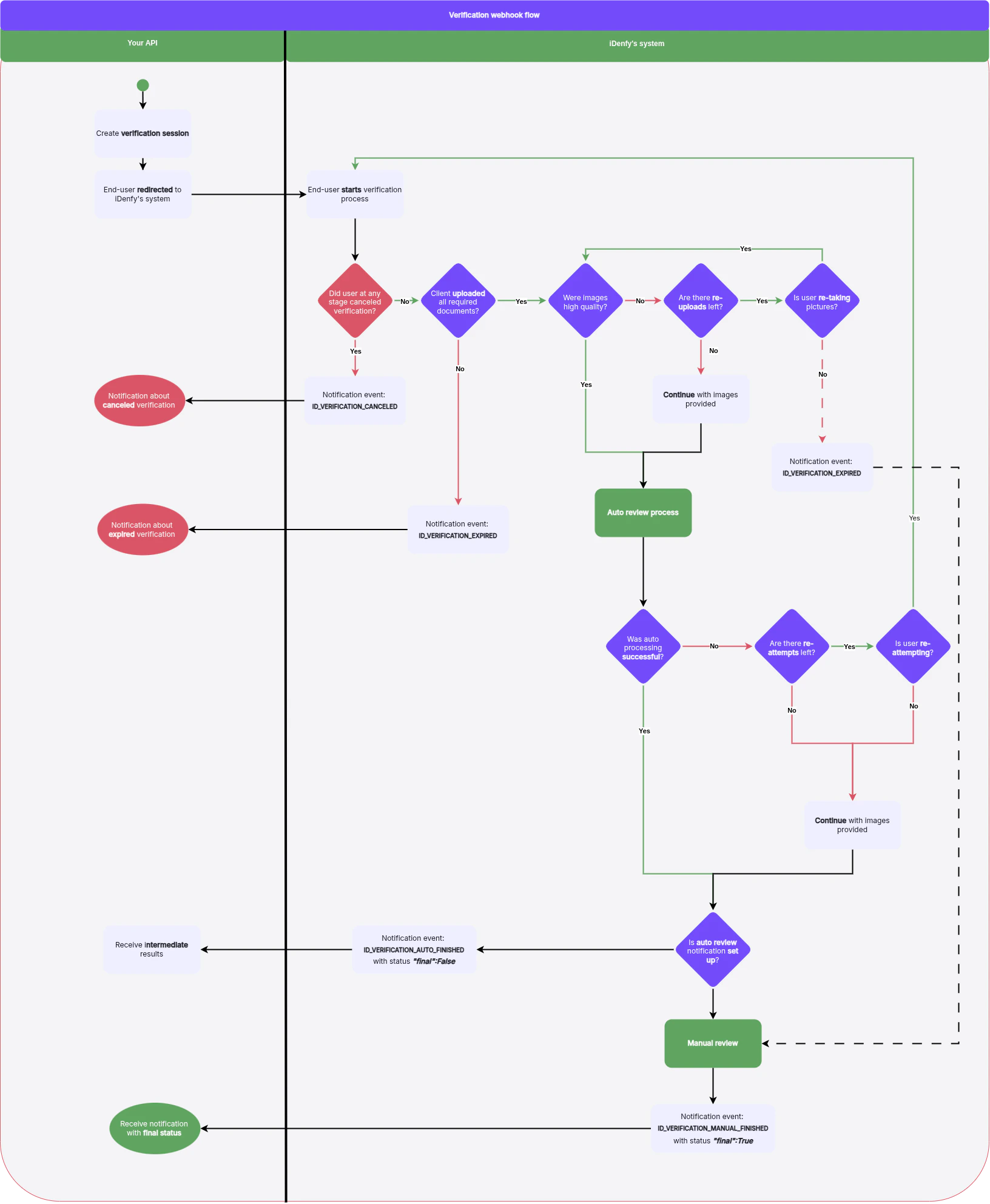
Request Headers
Every webhook delivery includes the following HTTP headers:
Use
Idenfy-Signature to verify that the request genuinely came from iDenfy. Compute the HMAC-SHA256 of the raw request body using your configured signing key and compare it against the header value.
Callback Payload
For the full webhook callback JSON structure and field definitions, see the API Reference tab. The callback body includes overall status, document data, face-match results, fraud indicators, and extracted personal information.
bankCardVerification object on this payload. A standalone card check — one created without a verification session — instead delivers its own BANK_CARD_VERIFICATION_COMPLETED event; see Bank Card Verification Webhooks.
Re-Attempts and Retries
iDenfy gives users a configurable number of chances to submit acceptable documents:- Overall re-attempts — the number of times a user may retry a failed verification with the same token. This defaults to 1 but is configurable per token at generation time.
- Per-step upload attempts — for each individual upload step (e.g. a utility bill), users get up to 3 attempts before the step counts as failed.
Re-attempt limits are configurable per token at generation time. See Create Session for details.
Handling the Result
For what to do with each overall status — including how to inspect and resolve aSUSPECTED result — see Status Handling.
Troubleshooting
If you are not receiving webhooks, work through the following checklist:1
Verify Endpoint URL
Confirm the URL configured in the dashboard is correct, publicly reachable, and not behind a firewall or VPN.
2
Check SSL Certificate
Your certificate must be valid and issued by a trusted CA. Self-signed certificates are rejected.
3
Return a 2xx Response
Your endpoint must respond with a 2xx HTTP status code (e.g.,
200 OK). Any other status triggers retries. The request times out after 10 seconds, so ensure your endpoint responds promptly.4
Review Delivery Logs
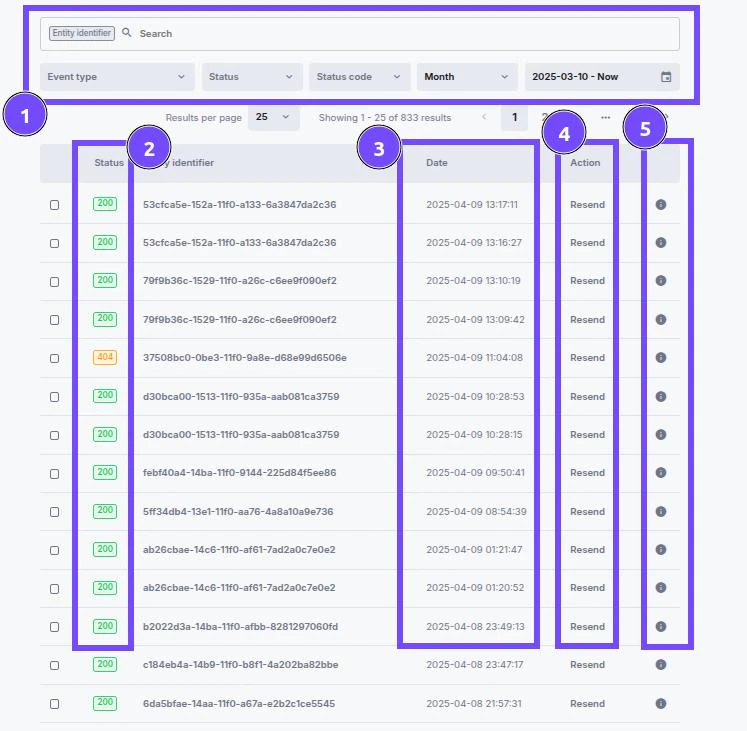
In the iDenfy dashboard, go to Settings → Notifications → Recently sent to inspect delivery attempts, response codes, and payloads.
Dashboard Review
You can inspect all recently sent webhooks directly in the iDenfy dashboard:- Go to Settings → Notifications → Recently sent.
- Review the list of delivered webhooks, including timestamps, HTTP response codes, and payload previews.
- Use this view to debug integration issues or confirm that specific verification results were delivered.
0- No Response: No communication; server unreachable.2xx- Success: Request successful, information returned.3xx- Redirection: Further action needed, request redirected.4xx- Client Errors: Your server could not handle the response.5xx- Server Errors: Request valid, there is a problem with the server.
- Use the Resend button to retry delivery for a specific notification.
- Click Details to see the full JSON payload that was sent.