

Requirements
- API key pair
- A previous AML check that returned profiles
AML Check Flow — Retrieve Profile
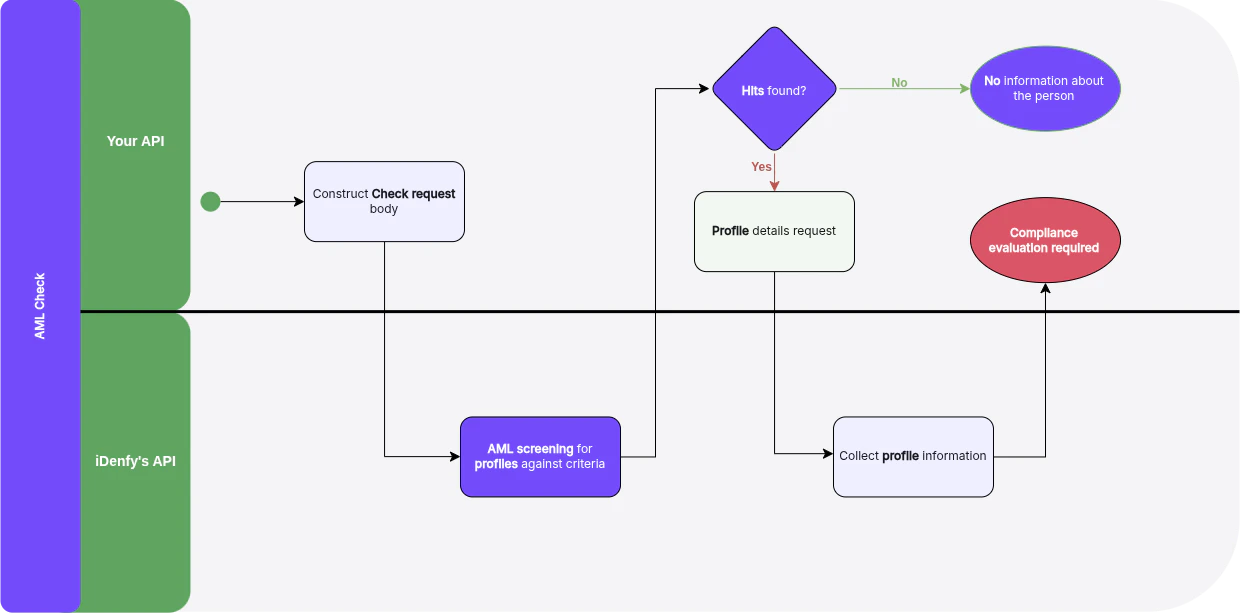
Retrieve Profile
For full request and response schemas, see the API Reference.
Path Parameters
Every match in the check response carries its own
resourceId:
resourceId as an opaque string and copy it verbatim — do not parse or construct it. Matches also appear in the adverseMedia array, and those resourceId values work the same way.
Response
The response shape depends on theuserType of the original check: a person check returns an individual profile, a company check returns a business profile. Both share the following fields.
Individual profiles add
firstName, lastName, datesOfBirth, nationalities, isDeceased, ddEntries (Disqualified Directors), and pepByAssociationEntries. Business profiles add name, businessTypes, activities, and soeEntry (State-Owned Enterprise).
Store
version alongside your review decision. A changed version means the underlying record was updated and the match may need re-review, even if nothing about your own check has changed.Next Steps
Profile PDF
Generate a compliance-ready PDF for a single matched profile.
Ongoing Monitoring
Enroll the subject for daily re-screening with alerts.