

No custom views? If you have not overridden any SDK views or protocols, you typically only need to update the pod/package version. No code changes required.
[9.1.x] -> [9.2.2]
Face Oval View
IdenfyFaceOvalV2 has been removed. IdenfyFaceOvalV3 is now the only face oval class. The deprecated idenfyUIViewFaceOval (typed as IdenfyFaceOvalV2) has been removed from the FaceCameraViewableV2 protocol:
// Before (9.1.x)
public protocol FaceCameraViewableV2: UIView {
    var idenfyUIViewFaceOvalV3: IdenfyFaceOvalV3? { get }
    @available(*, deprecated)
    var idenfyUIViewFaceOval: IdenfyFaceOvalV2 { get }
    // ...
}

// After (9.2.2)
public protocol FaceCameraViewableV2: UIView {
    var idenfyUIViewFaceOvalV3: IdenfyFaceOvalV3? { get }
    // ...
}
If You Already Use IdenfyFaceOvalV3
No changes needed. Just remove the old IdenfyFaceOvalV2 property if you still have it.
If You Still Use IdenfyFaceOvalV2
Replace it with an IdenfyFaceOvalV3 instance under the idenfyUIViewFaceOvalV3 property name:
// Before
public var idenfyUIViewFaceOval: IdenfyFaceOvalV2 = {
    let view = IdenfyFaceOvalV2(frame: .zero)
    view.translatesAutoresizingMaskIntoConstraints = false
    view.isOpaque = true
    view.backgroundColor = UIColor.clear
    return view
}()

// After
public var idenfyUIViewFaceOvalV3: IdenfyFaceOvalV3? = {
    let view = IdenfyFaceOvalV3(frame: .zero)
    view.translatesAutoresizingMaskIntoConstraints = false
    view.isOpaque = false
    return view
}()
Face Detection Progress View
The deprecatedfaceDetectionProgressView has been removed from DrawerContentViewableV2. The remaining faceDetectionProgressViewV2 is the only progress view:
// Before (9.1.x)
public protocol DrawerContentViewableV2: UIView {
    @available(*, deprecated)
    var faceDetectionProgressView: UIProgressView { get }
    var faceDetectionProgressViewV2: UIProgressView? { get }
    // ...
}

// After (9.2.2)
public protocol DrawerContentViewableV2: UIView {
    var faceDetectionProgressViewV2: UIProgressView? { get }
    // ...
}
If You Already Use faceDetectionProgressViewV2
No changes needed. Just remove the old faceDetectionProgressView property if you still have it.
If You Still Use faceDetectionProgressView
Rename it to faceDetectionProgressViewV2:
// Before
public var faceDetectionProgressView: UIProgressView = {
    let progressView = UIProgressView(frame: .zero)
    progressView.translatesAutoresizingMaskIntoConstraints = false
    progressView.isHidden = true
    return progressView
}()

// After
public var faceDetectionProgressViewV2: UIProgressView? = {
    let progressView = UIProgressView(frame: .zero)
    progressView.translatesAutoresizingMaskIntoConstraints = false
    progressView.isHidden = true
    return progressView
}()
[9.0.x] -> [9.1.0]
RTL Layout Support
Arabic locale support has been added. All SDK views now useleading/trailing constraints instead of left/right to properly support right-to-left (RTL) languages.
If you have overridden any SDK views, you must migrate your custom constraints to use leading/trailing instead of left/right, otherwise runtime crashes may occur. For example:
leftAnchor→leadingAnchorrightAnchor→trailingAnchorNSLayoutConstraintwith.left→.leadingNSLayoutConstraintwith.right→.trailingText Alignmentwith.left→.idenfyNaturalTransform DirectionwithHardcoded→idenfyDirectionalTranslation:
  // Before
  textField.layer.sublayerTransform = CATransform3DMakeTranslation(10, 0, 0)
  // After
  textField.layer.sublayerTransform = CALayer.idenfyDirectionalTranslation(10)
[8.x.x] -> [9.0.0]
New iDenfy Privacy Policy View
New privacy policy view is a required step for onboarding users. PrivacyPolicyViewableV2 was completely redone:
@objc open class PrivacyPolicyViewV2: UIView, PrivacyPolicyViewableV2 {
    open weak var delegate: PrivacyPolicyViewButtonActionsDelegate?

    override public init(frame: CGRect) {
        super.init(frame: frame)
        setupConstraints()
    }

    public required convenience init?(coder _: NSCoder) {
        self.init(frame: CGRect.zero)
    }

    public var toolbar: IdenfyToolbarV2WithLanguageSelection = {
        let toolbar = IdenfyToolbarV2WithLanguageSelection(frame: .zero)
        toolbar.translatesAutoresizingMaskIntoConstraints = false
        return toolbar
    }()

    public var scrollView: UIScrollView = {
        let scrollView = UIScrollView()
        scrollView.translatesAutoresizingMaskIntoConstraints = false
        scrollView.showsVerticalScrollIndicator = false
        return scrollView
    }()

    public var contentView: UIView = {
        let view = UIView()
        view.translatesAutoresizingMaskIntoConstraints = false
        return view
    }()

    public var privacyPolicyTitle: UILabel = {
        let label = UILabel(frame: .zero)
        label.translatesAutoresizingMaskIntoConstraints = false
        label.numberOfLines = 0
        label.font = IdenfyPrivacyPolicyViewUISettingsV2.idenfyPrivacyPolicyCommonInformationTitleFont
        label.textAlignment = .center
        label.textColor = IdenfyPrivacyPolicyViewUISettingsV2.idenfyPrivacyPolicyCommonInformationTitleTextColor
        return label
    }()

    public var privacyPolicyDescription: UILabel = {
        let label = UILabel(frame: .zero)
        label.translatesAutoresizingMaskIntoConstraints = false
        label.numberOfLines = 0
        label.font = IdenfyPrivacyPolicyViewUISettingsV2.idenfyPrivacyPolicyCommonInformationDescriptionFont
        label.textAlignment = .center
        label.textColor = IdenfyPrivacyPolicyViewUISettingsV2.idenfyPrivacyPolicyCommonInformationDescriptionTextColor
        return label
    }()

    public var processStackView: UIStackView = {
        let stack = UIStackView()
        stack.axis = .vertical
        stack.backgroundColor = IdenfyPrivacyPolicyViewUISettingsV2.idenfyPrivacyPolicyCardBackgroundColor
        stack.spacing = 0
        stack.translatesAutoresizingMaskIntoConstraints = false
        stack.clipsToBounds = true
        stack.layer.cornerRadius = IdenfyPrivacyPolicyViewUISettingsV2.idenfyPrivacyPolicyCardBorderRadius
        return stack
    }()

    public var processHeaderView: UIView = {
        let view = UIView()
        view.translatesAutoresizingMaskIntoConstraints = false
        return view
    }()

    public var processTitleLabel: UILabel = {
        let label = UILabel()
        label.font = IdenfyPrivacyPolicyViewUISettingsV2.idenfyPrivacyPolicyCardTitleFont
        label.textColor = IdenfyPrivacyPolicyViewUISettingsV2.idenfyPrivacyPolicyCardTitleTextColor
        label.translatesAutoresizingMaskIntoConstraints = false
        return label
    }()

    public var processArrowImageView: UIImageView = {
        let imageView = UIImageView()
        imageView.contentMode = .scaleAspectFit
        imageView.image = UIImage(named: "idenfy_ic_arrow_down", in: Bundle(identifier: "com.idenfy.idenfyviews"), compatibleWith: nil)?.withRenderingMode(.alwaysTemplate)
        imageView.translatesAutoresizingMaskIntoConstraints = false
        imageView.tintColor = IdenfyPrivacyPolicyViewUISettingsV2.idenfyPrivacyPolicyCardItemTextColor
        return imageView
    }()

    public var processContentView: UIStackView = {
        let stack = UIStackView()
        stack.axis = .vertical
        stack.spacing = 16
        stack.isLayoutMarginsRelativeArrangement = true
        stack.layoutMargins = UIEdgeInsets(top: 0, left: 16, bottom: 16, right: 16)
        stack.isHidden = false
        return stack
    }()

    public var photoIdentityStepIcon: UIImageView = {
        let imageView = UIImageView()
        imageView.contentMode = .scaleAspectFit
        imageView.translatesAutoresizingMaskIntoConstraints = false
        imageView.image = UIImage(named: "idenfy_ic_privacy_photo_identity_step", in: Bundle(identifier: "com.idenfy.idenfyviews"), compatibleWith: nil)?.withRenderingMode(.alwaysTemplate)
        imageView.tintColor = IdenfyPrivacyPolicyViewUISettingsV2.idenfyPrivacyPolicyCardItemIconColor
        return imageView
    }()

    public var photoIdentityStepTitle: UILabel = {
        let uilabel = UILabel()
        uilabel.font = IdenfyPrivacyPolicyViewUISettingsV2.idenfyPrivacyPolicyCardItemFont
        uilabel.textColor = IdenfyPrivacyPolicyViewUISettingsV2.idenfyPrivacyPolicyCardItemTextColor
        uilabel.translatesAutoresizingMaskIntoConstraints = false
        uilabel.numberOfLines = 0
        return uilabel
    }()

    public var selfieStepIcon: UIImageView = {
        let imageView = UIImageView()
        imageView.contentMode = .scaleAspectFit
        imageView.translatesAutoresizingMaskIntoConstraints = false
        imageView.image = UIImage(named: "idenfy_ic_privacy_selfie_check_step", in: Bundle(identifier: "com.idenfy.idenfyviews"), compatibleWith: nil)?.withRenderingMode(.alwaysTemplate)
        imageView.tintColor = IdenfyPrivacyPolicyViewUISettingsV2.idenfyPrivacyPolicyCardItemIconColor
        return imageView
    }()

    public var selfieStepTitle: UILabel = {
        let uilabel = UILabel()
        uilabel.font = IdenfyPrivacyPolicyViewUISettingsV2.idenfyPrivacyPolicyCardItemFont
        uilabel.textColor = IdenfyPrivacyPolicyViewUISettingsV2.idenfyPrivacyPolicyCardItemTextColor
        uilabel.translatesAutoresizingMaskIntoConstraints = false
        uilabel.numberOfLines = 0
        return uilabel
    }()

    public var automatedVerificationStepIcon: UIImageView = {
        let imageView = UIImageView()
        imageView.contentMode = .scaleAspectFit
        imageView.translatesAutoresizingMaskIntoConstraints = false
        imageView.image = UIImage(named: "idenfy_ic_privacy_automated_verification_step", in: Bundle(identifier: "com.idenfy.idenfyviews"), compatibleWith: nil)?.withRenderingMode(.alwaysTemplate)
        imageView.tintColor = IdenfyPrivacyPolicyViewUISettingsV2.idenfyPrivacyPolicyCardItemIconColor
        return imageView
    }()

    public var automatedVerificationStepTitle: UILabel = {
        let uilabel = UILabel()
        uilabel.font = IdenfyPrivacyPolicyViewUISettingsV2.idenfyPrivacyPolicyCardItemFont
        uilabel.textColor = IdenfyPrivacyPolicyViewUISettingsV2.idenfyPrivacyPolicyCardItemTextColor
        uilabel.translatesAutoresizingMaskIntoConstraints = false
        uilabel.numberOfLines = 0
        return uilabel
    }()

    public var dataProtectionStackView: UIStackView = {
        let stack = UIStackView()
        stack.axis = .vertical
        stack.backgroundColor = IdenfyPrivacyPolicyViewUISettingsV2.idenfyPrivacyPolicyCardBackgroundColor
        stack.spacing = 0
        stack.translatesAutoresizingMaskIntoConstraints = false
        stack.clipsToBounds = true
        stack.layer.cornerRadius = IdenfyPrivacyPolicyViewUISettingsV2.idenfyPrivacyPolicyCardBorderRadius
        return stack
    }()

    public var dataProtectionHeaderView: UIView = {
        let view = UIView()
        view.translatesAutoresizingMaskIntoConstraints = false
        return view
    }()

    public var dataProtectionTitleLabel: UILabel = {
        let label = UILabel()
        label.font = IdenfyPrivacyPolicyViewUISettingsV2.idenfyPrivacyPolicyCardTitleFont
        label.textColor = IdenfyPrivacyPolicyViewUISettingsV2.idenfyPrivacyPolicyCardTitleTextColor
        label.translatesAutoresizingMaskIntoConstraints = false
        return label
    }()

    public var dataProtectionArrowImageView: UIImageView = {
        let imageView = UIImageView()
        imageView.contentMode = .scaleAspectFit
        imageView.image = UIImage(named: "idenfy_ic_arrow_down", in: Bundle(identifier: "com.idenfy.idenfyviews"), compatibleWith: nil)?.withRenderingMode(.alwaysTemplate)
        imageView.tintColor = IdenfyPrivacyPolicyViewUISettingsV2.idenfyPrivacyPolicyCardItemTextColor
        imageView.translatesAutoresizingMaskIntoConstraints = false
        return imageView
    }()

    public var dataProtectionContentView: UIStackView = {
        let stack = UIStackView()
        stack.axis = .vertical
        stack.spacing = 16
        stack.isLayoutMarginsRelativeArrangement = true
        stack.layoutMargins = UIEdgeInsets(top: 0, left: 16, bottom: 16, right: 16)
        stack.isHidden = false
        return stack
    }()

    public var secureEncryptionIcon: UIImageView = {
        let imageView = UIImageView()
        imageView.contentMode = .scaleAspectFit
        imageView.translatesAutoresizingMaskIntoConstraints = false
        imageView.image = UIImage(named: "idenfy_ic_privacy_lock", in: Bundle(identifier: "com.idenfy.idenfyviews"), compatibleWith: nil)?.withRenderingMode(.alwaysTemplate)
        imageView.tintColor = IdenfyPrivacyPolicyViewUISettingsV2.idenfyPrivacyPolicyCardItemIconColor
        return imageView
    }()

    public var secureEncryptionTitle: UILabel = {
        let uilabel = UILabel()
        uilabel.font = IdenfyPrivacyPolicyViewUISettingsV2.idenfyPrivacyPolicyCardItemFont
        uilabel.textColor = IdenfyPrivacyPolicyViewUISettingsV2.idenfyPrivacyPolicyCardItemTextColor
        uilabel.translatesAutoresizingMaskIntoConstraints = false
        uilabel.numberOfLines = 0
        return uilabel
    }()

    public var limitedAccessIcon: UIImageView = {
        let imageView = UIImageView()
        imageView.contentMode = .scaleAspectFit
        imageView.translatesAutoresizingMaskIntoConstraints = false
        imageView.image = UIImage(named: "idenfy_ic_privacy_access", in: Bundle(identifier: "com.idenfy.idenfyviews"), compatibleWith: nil)?.withRenderingMode(.alwaysTemplate)
        imageView.tintColor = IdenfyPrivacyPolicyViewUISettingsV2.idenfyPrivacyPolicyCardItemIconColor
        return imageView
    }()

    public var limitedAccessTitle: UILabel = {
        let uilabel = UILabel()
        uilabel.font = IdenfyPrivacyPolicyViewUISettingsV2.idenfyPrivacyPolicyCardItemFont
        uilabel.textColor = IdenfyPrivacyPolicyViewUISettingsV2.idenfyPrivacyPolicyCardItemTextColor
        uilabel.translatesAutoresizingMaskIntoConstraints = false
        uilabel.numberOfLines = 0
        return uilabel
    }()

    public var neverSoldIcon: UIImageView = {
        let imageView = UIImageView()
        imageView.contentMode = .scaleAspectFit
        imageView.translatesAutoresizingMaskIntoConstraints = false
        imageView.image = UIImage(named: "idenfy_ic_privacy_block_share", in: Bundle(identifier: "com.idenfy.idenfyviews"), compatibleWith: nil)?.withRenderingMode(.alwaysTemplate)
        imageView.tintColor = IdenfyPrivacyPolicyViewUISettingsV2.idenfyPrivacyPolicyCardItemIconColor
        return imageView
    }()

    public var neverSoldTitle: UILabel = {
        let uilabel = UILabel()
        uilabel.font = IdenfyPrivacyPolicyViewUISettingsV2.idenfyPrivacyPolicyCardItemFont
        uilabel.textColor = IdenfyPrivacyPolicyViewUISettingsV2.idenfyPrivacyPolicyCardItemTextColor
        uilabel.translatesAutoresizingMaskIntoConstraints = false
        uilabel.numberOfLines = 0
        return uilabel
    }()

    public var usedForVerificationIcon: UIImageView = {
        let imageView = UIImageView()
        imageView.contentMode = .scaleAspectFit
        imageView.translatesAutoresizingMaskIntoConstraints = false
        imageView.image = UIImage(named: "idenfy_ic_privacy_security", in: Bundle(identifier: "com.idenfy.idenfyviews"), compatibleWith: nil)?.withRenderingMode(.alwaysTemplate)
        imageView.tintColor = IdenfyPrivacyPolicyViewUISettingsV2.idenfyPrivacyPolicyCardItemIconColor
        return imageView
    }()

    public var usedForVerificationTitle: UILabel = {
        let uilabel = UILabel()
        uilabel.font = IdenfyPrivacyPolicyViewUISettingsV2.idenfyPrivacyPolicyCardItemFont
        uilabel.textColor = IdenfyPrivacyPolicyViewUISettingsV2.idenfyPrivacyPolicyCardItemTextColor
        uilabel.translatesAutoresizingMaskIntoConstraints = false
        uilabel.numberOfLines = 0
        return uilabel
    }()

    public var complianceStackView: UIStackView = {
        let stack = UIStackView()
        stack.axis = .vertical
        stack.backgroundColor = IdenfyPrivacyPolicyViewUISettingsV2.idenfyPrivacyPolicyCardBackgroundColor
        stack.spacing = 0
        stack.translatesAutoresizingMaskIntoConstraints = false
        stack.clipsToBounds = true
        stack.layer.cornerRadius = IdenfyPrivacyPolicyViewUISettingsV2.idenfyPrivacyPolicyCardBorderRadius
        return stack
    }()

    public var complianceHeaderView: UIView = {
        let view = UIView()
        view.translatesAutoresizingMaskIntoConstraints = false
        return view
    }()

    public var complianceTitleLabel: UILabel = {
        let label = UILabel()
        label.font = IdenfyPrivacyPolicyViewUISettingsV2.idenfyPrivacyPolicyCardTitleFont
        label.textColor = IdenfyPrivacyPolicyViewUISettingsV2.idenfyPrivacyPolicyCardTitleTextColor
        label.translatesAutoresizingMaskIntoConstraints = false
        return label
    }()

    public var complianceArrowImageView: UIImageView = {
        let imageView = UIImageView()
        imageView.contentMode = .scaleAspectFit
        imageView.image = UIImage(named: "idenfy_ic_arrow_down", in: Bundle(identifier: "com.idenfy.idenfyviews"), compatibleWith: nil)?.withRenderingMode(.alwaysTemplate)
        imageView.tintColor = IdenfyPrivacyPolicyViewUISettingsV2.idenfyPrivacyPolicyCardItemTextColor
        imageView.translatesAutoresizingMaskIntoConstraints = false
        return imageView
    }()

    public var complianceContentView: UIStackView = {
        let stack = UIStackView()
        stack.axis = .vertical
        stack.spacing = 16
        stack.isLayoutMarginsRelativeArrangement = true
        stack.layoutMargins = UIEdgeInsets(top: 0, left: 16, bottom: 16, right: 16)
        stack.isHidden = false
        return stack
    }()

    public var complianceDescription: UILabel = {
        let uilabel = UILabel()
        uilabel.font = IdenfyPrivacyPolicyViewUISettingsV2.idenfyPrivacyPolicyCardItemFont
        uilabel.textColor = IdenfyPrivacyPolicyViewUISettingsV2.idenfyPrivacyPolicyCardItemTextColor
        uilabel.translatesAutoresizingMaskIntoConstraints = false
        uilabel.numberOfLines = 0
        return uilabel
    }()

    public var privacyPolicyText: UILabel = {
        let uilabel = UILabel()
        uilabel.font = IdenfyPrivacyPolicyViewUISettingsV2.idenfyPrivacyPolicyCardItemFont
        uilabel.textColor = IdenfyPrivacyPolicyViewUISettingsV2.idenfyPrivacyPolicyCardItemTextColor
        uilabel.translatesAutoresizingMaskIntoConstraints = false
        uilabel.numberOfLines = 0
        uilabel.textAlignment = .center
        uilabel.isUserInteractionEnabled = true
        return uilabel
    }()

    public var partnerPrivacyPolicyText: UILabel = {
        let uilabel = UILabel()
        uilabel.font = IdenfyPrivacyPolicyViewUISettingsV2.idenfyPrivacyPolicyCardItemFont
        uilabel.textColor = IdenfyPrivacyPolicyViewUISettingsV2.idenfyPrivacyPolicyCardItemTextColor
        uilabel.translatesAutoresizingMaskIntoConstraints = false
        uilabel.numberOfLines = 0
        uilabel.textAlignment = .center
        uilabel.isUserInteractionEnabled = true
        return uilabel
    }()

    public var privacyPolicyAgreeButton: UIButton = {
        let button = UIButton(frame: .zero)
        button.translatesAutoresizingMaskIntoConstraints = false
        button.contentMode = .scaleToFill
        button.isUserInteractionEnabled = true
        button.contentHorizontalAlignment = .center
        button.layer.cornerRadius = IdenfyButtonsUISettingsV2.idenfyButtonCorderRadius
        button.layer.masksToBounds = true
        button.titleLabel?.font = IdenfyButtonsUISettingsV2.idenfyButtonFont
        return button
    }()

    public var loadingSpinner: LottieAnimationView = {
        let lottieView = LottieAnimationView(frame: .zero)
        lottieView.translatesAutoresizingMaskIntoConstraints = false
        if let path = Bundle(identifier: "com.idenfy.idenfyviews")?.path(forResource: "idenfy_custom_country_loader", ofType: "json") {
            lottieView.animation = LottieAnimation.filepath(path)
        }
        lottieView.contentMode = .scaleAspectFit
        lottieView.play()
        lottieView.backgroundBehavior = .pauseAndRestore
        lottieView.loopMode = .loop
        lottieView.isHidden = true
        return lottieView
    }()

    open func setupConstraints() {
        backgroundColor = IdenfyPrivacyPolicyViewUISettingsV2.idenfyPrivacyPolicyViewBackgroundColor
        setupToolbar()
        setupContinueButton()
        setupScrollView()
        setupCenterView()
        setupDataProtectionCard()
        setupProcessCard()
        setupComplianceCard()
        setupPrivacyPolicyTexts()
        setupButtonActions()
    }

    private func setupButtonActions() {
        privacyPolicyAgreeButton.addTarget(self, action: #selector(agreeButtonPressed), for: .touchUpInside)
        dataProtectionHeaderView.addGestureRecognizer(UITapGestureRecognizer(target: self, action: #selector(dataProtectionHeaderViewPressed)))
        processHeaderView.addGestureRecognizer(UITapGestureRecognizer(target: self, action: #selector(processHeaderViewPressed)))
        complianceHeaderView.addGestureRecognizer(UITapGestureRecognizer(target: self, action: #selector(complianceHeaderViewPressed)))
        privacyPolicyText.addGestureRecognizer(UITapGestureRecognizer(target: self, action: #selector(privacyPolicyTextViewPressed)))
        partnerPrivacyPolicyText.addGestureRecognizer(UITapGestureRecognizer(target: self, action: #selector(partnerPrivacyPolicyTextViewPressed)))
    }

    @objc func processHeaderViewPressed() {
        delegate?.processHeaderViewPressed()
    }

    @objc func dataProtectionHeaderViewPressed() {
        delegate?.dataProtectionHeaderViewPressed()
    }

    @objc func complianceHeaderViewPressed() {
        delegate?.complianceHeaderViewPressed()
    }

    @objc func privacyPolicyTextViewPressed() {
        delegate?.privacyPolicyTextViewPressed()
    }

    @objc func partnerPrivacyPolicyTextViewPressed() {
        delegate?.partnerPrivacyPolicyTextViewPressed()
    }

    @objc func agreeButtonPressed() {
        delegate?.agreeButtonPressed()
    }

    open func setupToolbar() {
        addSubview(toolbar)
        toolbar.leftAnchor.constraint(equalTo: safeLeftAnchor).isActive = true
        toolbar.rightAnchor.constraint(equalTo: safeRightAnchor).isActive = true
        toolbar.topAnchor.constraint(equalTo: self.safeTopAnchor).isActive = true
        toolbar.heightAnchor.constraint(equalToConstant: IdenfyToolbarUISettingsV2.idenfyToolbarHeight).isActive = true
    }

    open func setupScrollView() {
        addSubview(scrollView)
        scrollView.topAnchor.constraint(equalTo: toolbar.bottomAnchor).isActive = true
        scrollView.leftAnchor.constraint(equalTo: safeLeftAnchor).isActive = true
        scrollView.rightAnchor.constraint(equalTo: safeRightAnchor).isActive = true
        scrollView.bottomAnchor.constraint(equalTo: privacyPolicyAgreeButton.topAnchor, constant: -8).isActive = true

        scrollView.addSubview(contentView)
        contentView.topAnchor.constraint(equalTo: scrollView.topAnchor).isActive = true
        contentView.leftAnchor.constraint(equalTo: scrollView.leftAnchor).isActive = true
        contentView.rightAnchor.constraint(equalTo: scrollView.rightAnchor).isActive = true
        contentView.bottomAnchor.constraint(equalTo: scrollView.bottomAnchor).isActive = true
        contentView.widthAnchor.constraint(equalTo: scrollView.widthAnchor).isActive = true
    }

    open func setupCenterView() {
        contentView.addSubview(privacyPolicyTitle)
        privacyPolicyTitle.rightAnchor.constraint(equalTo: contentView.rightAnchor, constant: -16).isActive = true
        privacyPolicyTitle.leftAnchor.constraint(equalTo: contentView.leftAnchor, constant: 16).isActive = true
        privacyPolicyTitle.topAnchor.constraint(equalTo: contentView.topAnchor, constant: 24).isActive = true

        contentView.addSubview(privacyPolicyDescription)
        privacyPolicyDescription.rightAnchor.constraint(equalTo: contentView.rightAnchor, constant: -16).isActive = true
        privacyPolicyDescription.leftAnchor.constraint(equalTo: contentView.leftAnchor, constant: 16).isActive = true
        privacyPolicyDescription.topAnchor.constraint(equalTo: privacyPolicyTitle.bottomAnchor, constant: 24).isActive = true
    }

    open func setupProcessCard() {
        contentView.addSubview(processStackView)
        processStackView.topAnchor.constraint(equalTo: dataProtectionStackView.bottomAnchor, constant: 12).isActive = true
        processStackView.leftAnchor.constraint(equalTo: contentView.leftAnchor, constant: 16).isActive = true
        processStackView.rightAnchor.constraint(equalTo: contentView.rightAnchor, constant: -16).isActive = true

        processStackView.addArrangedSubview(processHeaderView)
        processStackView.addArrangedSubview(processContentView)

        processHeaderView.heightAnchor.constraint(equalToConstant: 50).isActive = true

        processHeaderView.addSubview(processTitleLabel)
        processHeaderView.addSubview(processArrowImageView)

        processArrowImageView.centerYAnchor.constraint(equalTo: processHeaderView.centerYAnchor).isActive = true
        processArrowImageView.trailingAnchor.constraint(equalTo: processHeaderView.trailingAnchor, constant: -16).isActive = true
        processArrowImageView.widthAnchor.constraint(equalToConstant: 20).isActive = true
        processTitleLabel.centerYAnchor.constraint(equalTo: processArrowImageView.centerYAnchor).isActive = true
        processTitleLabel.leadingAnchor.constraint(equalTo: processHeaderView.leadingAnchor, constant: 16).isActive = true
        processTitleLabel.trailingAnchor.constraint(equalTo: processArrowImageView.leadingAnchor, constant: -16).isActive = true

        processContentView.addArrangedSubview(createRow(icon: photoIdentityStepIcon, label: photoIdentityStepTitle))
        processContentView.addArrangedSubview(createRow(icon: selfieStepIcon, label: selfieStepTitle))
        processContentView.addArrangedSubview(createRow(icon: automatedVerificationStepIcon, label: automatedVerificationStepTitle))
    }

    open func setupDataProtectionCard() {
        contentView.addSubview(dataProtectionStackView)
        dataProtectionStackView.topAnchor.constraint(equalTo: privacyPolicyDescription.bottomAnchor, constant: 24).isActive = true
        dataProtectionStackView.leftAnchor.constraint(equalTo: contentView.leftAnchor, constant: 16).isActive = true
        dataProtectionStackView.rightAnchor.constraint(equalTo: contentView.rightAnchor, constant: -16).isActive = true

        dataProtectionStackView.addArrangedSubview(dataProtectionHeaderView)
        dataProtectionStackView.addArrangedSubview(dataProtectionContentView)

        dataProtectionHeaderView.heightAnchor.constraint(equalToConstant: 50).isActive = true

        dataProtectionHeaderView.addSubview(dataProtectionTitleLabel)
        dataProtectionHeaderView.addSubview(dataProtectionArrowImageView)

        dataProtectionArrowImageView.centerYAnchor.constraint(equalTo: dataProtectionHeaderView.centerYAnchor).isActive = true
        dataProtectionArrowImageView.trailingAnchor.constraint(equalTo: dataProtectionHeaderView.trailingAnchor, constant: -16).isActive = true
        dataProtectionArrowImageView.widthAnchor.constraint(equalToConstant: 20).isActive = true
        dataProtectionTitleLabel.centerYAnchor.constraint(equalTo: dataProtectionArrowImageView.centerYAnchor).isActive = true
        dataProtectionTitleLabel.leadingAnchor.constraint(equalTo: dataProtectionHeaderView.leadingAnchor, constant: 16).isActive = true
        dataProtectionTitleLabel.trailingAnchor.constraint(equalTo: dataProtectionArrowImageView.leadingAnchor, constant: -16).isActive = true

        dataProtectionContentView.addArrangedSubview(createRow(icon: secureEncryptionIcon, label: secureEncryptionTitle))
        dataProtectionContentView.addArrangedSubview(createRow(icon: limitedAccessIcon, label: limitedAccessTitle))
        dataProtectionContentView.addArrangedSubview(createRow(icon: neverSoldIcon, label: neverSoldTitle))
        dataProtectionContentView.addArrangedSubview(createRow(icon: usedForVerificationIcon, label: usedForVerificationTitle))
    }

    open func setupComplianceCard() {
        contentView.addSubview(complianceStackView)
        complianceStackView.topAnchor.constraint(equalTo: processStackView.bottomAnchor, constant: 12).isActive = true
        complianceStackView.leftAnchor.constraint(equalTo: contentView.leftAnchor, constant: 16).isActive = true
        complianceStackView.rightAnchor.constraint(equalTo: contentView.rightAnchor, constant: -16).isActive = true

        complianceStackView.addArrangedSubview(complianceHeaderView)
        complianceStackView.addArrangedSubview(complianceContentView)

        complianceHeaderView.heightAnchor.constraint(equalToConstant: 50).isActive = true

        complianceHeaderView.addSubview(complianceTitleLabel)
        complianceHeaderView.addSubview(complianceArrowImageView)

        complianceArrowImageView.centerYAnchor.constraint(equalTo: complianceHeaderView.centerYAnchor).isActive = true
        complianceArrowImageView.trailingAnchor.constraint(equalTo: complianceHeaderView.trailingAnchor, constant: -16).isActive = true
        complianceArrowImageView.widthAnchor.constraint(equalToConstant: 20).isActive = true
        complianceTitleLabel.centerYAnchor.constraint(equalTo: complianceArrowImageView.centerYAnchor).isActive = true
        complianceTitleLabel.leadingAnchor.constraint(equalTo: processHeaderView.leadingAnchor, constant: 16).isActive = true
        complianceTitleLabel.trailingAnchor.constraint(equalTo: complianceArrowImageView.leadingAnchor, constant: -16).isActive = true

        complianceContentView.addArrangedSubview(complianceDescription)
    }

    private func setupPrivacyPolicyTexts() {
        contentView.addSubview(privacyPolicyText)
        privacyPolicyText.topAnchor.constraint(equalTo: complianceStackView.bottomAnchor, constant: 24).isActive = true
        privacyPolicyText.leftAnchor.constraint(equalTo: contentView.leftAnchor, constant: 16).isActive = true
        privacyPolicyText.rightAnchor.constraint(equalTo: contentView.rightAnchor, constant: -16).isActive = true

        contentView.addSubview(partnerPrivacyPolicyText)
        partnerPrivacyPolicyText.topAnchor.constraint(equalTo: privacyPolicyText.bottomAnchor, constant: 24).isActive = true
        partnerPrivacyPolicyText.leftAnchor.constraint(equalTo: contentView.leftAnchor, constant: 16).isActive = true
        partnerPrivacyPolicyText.rightAnchor.constraint(equalTo: contentView.rightAnchor, constant: -16).isActive = true
        partnerPrivacyPolicyText.bottomAnchor.constraint(equalTo: contentView.bottomAnchor, constant: -24).isActive = true
    }

    open func setupContinueButton() {
        addSubview(privacyPolicyAgreeButton)
        privacyPolicyAgreeButton.rightAnchor.constraint(equalTo: safeRightAnchor, constant: -32).isActive = true
        privacyPolicyAgreeButton.leftAnchor.constraint(equalTo: safeLeftAnchor, constant: 32).isActive = true
        privacyPolicyAgreeButton.bottomAnchor.constraint(equalTo: safeBottomAnchor, constant: -16).isActive = true
        privacyPolicyAgreeButton.heightAnchor.constraint(equalToConstant: 42).isActive = true

        addSubview(loadingSpinner)
        loadingSpinner.centerYAnchor.constraint(equalTo: privacyPolicyAgreeButton.centerYAnchor).isActive = true
        loadingSpinner.leftAnchor.constraint(equalTo: privacyPolicyAgreeButton.safeLeftAnchor, constant: 16).isActive = true
        loadingSpinner.widthAnchor.constraint(equalToConstant: 25).isActive = true
        loadingSpinner.heightAnchor.constraint(equalToConstant: 25).isActive = true
    }

    private func createRow(icon: UIImageView, label: UILabel) -> UIStackView {
        let row = UIStackView(arrangedSubviews: [icon, label])
        row.axis = .horizontal
        row.spacing = 8
        row.alignment = .center
        icon.widthAnchor.constraint(equalToConstant: 22).isActive = true
        icon.heightAnchor.constraint(equalToConstant: 22).isActive = true
        return row
    }

    open func applyGradients() {
        privacyPolicyAgreeButton.applyButtonGradient(colors: [IdenfyButtonsUISettingsV2.idenfyGradientButtonColorStart.cgColor, IdenfyButtonsUISettingsV2.idenfyGradientButtonColorEnd.cgColor])
    }
}
@MainActor @objc public static var idenfyLightGrayColor = UIColor(hexString: "#F2F4F8")
Country and Document Selection Steps Combined Into One View
A new Country & Document selection view was added, which combines the old two views into one. The new CountryAndDocumentSelectionViewable is added: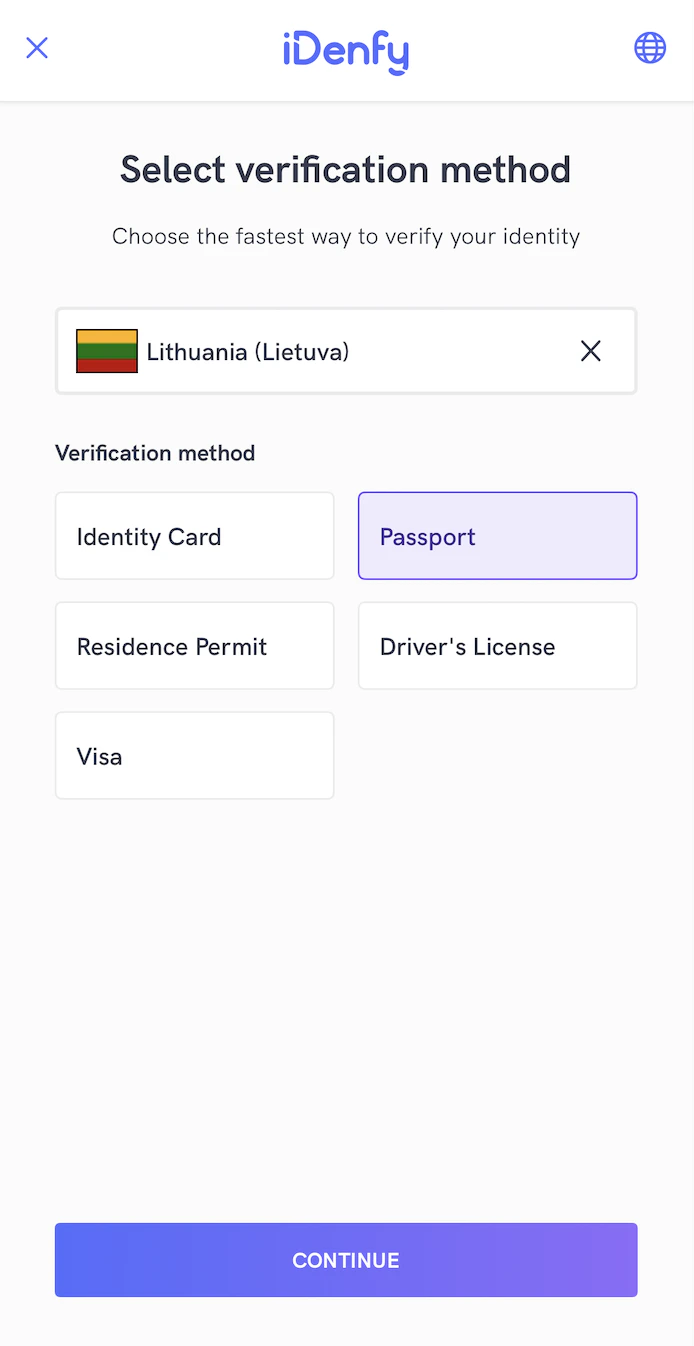
@objc open class CountryAndDocumentSelectionView: UIView, CountryAndDocumentSelectionViewable {
    open weak var delegate: CountryAndDocumentSelectionViewButtonActionsDelegate?

    override public init(frame: CGRect) {
        super.init(frame: frame)
        setupConstraints()
    }

    public required convenience init?(coder _: NSCoder) {
        self.init(frame: CGRect.zero)
    }

    public var toolbar: IdenfyToolbarV2WithLanguageSelection = {
        let toolbar = IdenfyToolbarV2WithLanguageSelection(frame: .zero)
        toolbar.translatesAutoresizingMaskIntoConstraints = false
        return toolbar
    }()

    private var scrollView: UIScrollView = {
        let scrollView = UIScrollView(frame: .zero)
        scrollView.translatesAutoresizingMaskIntoConstraints = false
        scrollView.showsVerticalScrollIndicator = false
        scrollView.showsHorizontalScrollIndicator = false
        scrollView.alwaysBounceVertical = false
        return scrollView
    }()

    private var contentView: UIView = {
        let view = UIView(frame: .zero)
        view.translatesAutoresizingMaskIntoConstraints = false
        return view
    }()

    public var countryAndDocumentSelectionTitle: UILabel = {
        let label = UILabel(frame: .zero)
        label.translatesAutoresizingMaskIntoConstraints = false
        label.numberOfLines = 0
        label.font = IdenfyCountryAndDocumentSelectionViewUISettingsV2.idenfyCountryAndDocumentSelectionViewTitleFont
        label.textAlignment = .center
        label.textColor = IdenfyCountryAndDocumentSelectionViewUISettingsV2.idenfyCountryAndDocumentSelectionViewTitleTextColor
        return label
    }()

    public var countryAndDocumentSelectionDescription: UILabel = {
        let label = UILabel(frame: .zero)
        label.numberOfLines = 0
        label.translatesAutoresizingMaskIntoConstraints = false
        label.font = IdenfyCountryAndDocumentSelectionViewUISettingsV2.idenfyCountryAndDocumentSelectionViewDescriptionFont
        label.textAlignment = .center
        label.textColor = IdenfyCountryAndDocumentSelectionViewUISettingsV2.idenfyCountryAndDocumentSelectionViewDescriptionTextColor
        return label
    }()

    public var countrySelectionInputView: UIView = {
        let view = UIView(frame: .zero)
        view.translatesAutoresizingMaskIntoConstraints = false
        view.backgroundColor = IdenfyCountryAndDocumentSelectionViewUISettingsV2.idenfyCountryAndDocumentSelectionViewItemSelectionBackgroundColor
        view.layer.cornerRadius = IdenfyCountryAndDocumentSelectionViewUISettingsV2.idenfyCountryAndDocumentSelectionViewItemSelectionCornerRadius
        view.layer.borderWidth = IdenfyCountryAndDocumentSelectionViewUISettingsV2.idenfyCountryAndDocumentSelectionViewItemSelectionBorderWidth
        view.layer.borderColor = IdenfyCountryAndDocumentSelectionViewUISettingsV2.idenfyCountryAndDocumentSelectionViewItemSelectionBorderColor.cgColor
        view.layer.masksToBounds = true
        view.layer.sublayerTransform = CATransform3DMakeTranslation(10, 0, 0)
        view.isUserInteractionEnabled = true
        return view
    }()

    public var countrySelectionFlagImageView: UIImageView = {
        let imageView = UIImageView()
        imageView.translatesAutoresizingMaskIntoConstraints = false
        imageView.contentMode = .scaleAspectFill
        imageView.isOpaque = true
        imageView.layer.masksToBounds = true
        imageView.layer.borderWidth = IdenfyCountryAndDocumentSelectionViewUISettingsV2.idenfyCountryAndDocumentSelectionViewCountryFlagBorderWidth
        imageView.layer.borderColor = UIColor.black.cgColor
        return imageView
    }()

    public var countrySelectionUILabel: UILabel = {
        let label = UILabel(frame: .zero)
        label.numberOfLines = 0
        label.translatesAutoresizingMaskIntoConstraints = false
        label.font = IdenfyCountryAndDocumentSelectionViewUISettingsV2.idenfyCountryAndDocumentSelectionViewItemSelectionFont
        label.textAlignment = .left
        label.textColor = IdenfyCountryAndDocumentSelectionViewUISettingsV2.idenfyCountryAndDocumentSelectionViewItemSelectionTextColor
        return label
    }()

    public var countrySelectionCancelButton: UIButton = {
        let button = UIButton(frame: .zero)
        button.translatesAutoresizingMaskIntoConstraints = false
        button.isOpaque = true
        button.isHidden = true
        button.isUserInteractionEnabled = true
        button.imageEdgeInsets = UIEdgeInsets(top: 4, left: 4, bottom: 4, right: 5)
        button.tintColor = IdenfyCountryAndDocumentSelectionViewUISettingsV2.idenfyCountryAndDocumentSelectionViewItemSelectionTextColor
        button.setImage(UIImage(named: "idenfy_ic_language_selection_close_button", in: Bundle(identifier: "com.idenfy.idenfyviews"), compatibleWith: nil)?.withRenderingMode(.alwaysTemplate), for: .normal)
        return button
    }()

    public var countrySelectionArrowIcon: UIImageView = {
        let imageView = UIImageView(frame: .zero)
        imageView.translatesAutoresizingMaskIntoConstraints = false
        imageView.isOpaque = true
        imageView.tintColor = IdenfyCountryAndDocumentSelectionViewUISettingsV2.idenfyCountryAndDocumentSelectionViewItemSelectionTextColor
        imageView.image = UIImage(named: "idenfy_ic_arrow_down", in: Bundle(identifier: "com.idenfy.idenfyviews"), compatibleWith: nil)?.withRenderingMode(.alwaysTemplate)
        return imageView
    }()

    private var documentSelectionStackView: UIStackView = {
        let stackView = UIStackView(frame: .zero)
        stackView.translatesAutoresizingMaskIntoConstraints = false
        stackView.axis = .vertical
        stackView.spacing = 8
        stackView.alignment = .fill
        stackView.distribution = .fill
        return stackView
    }()

    public var verificationMethodTitle: UILabel = {
        let label = UILabel(frame: .zero)
        label.translatesAutoresizingMaskIntoConstraints = false
        label.numberOfLines = 0
        label.font = IdenfyCountryAndDocumentSelectionViewUISettingsV2.idenfyCountryAndDocumentSelectionViewVerificationMethodTitleFont
        label.textAlignment = .left
        label.textColor = IdenfyCountryAndDocumentSelectionViewUISettingsV2.idenfyCountryAndDocumentSelectionViewDocumentSelectionTitleTextColor
        return label
    }()

    public var digitalIdTableView: UITableView = {
        let tableView = UITableView(frame: .zero)
        tableView.translatesAutoresizingMaskIntoConstraints = false
        tableView.backgroundColor = .clear
        tableView.separatorStyle = .none
        tableView.showsVerticalScrollIndicator = false
        tableView.allowsMultipleSelection = false
        tableView.isScrollEnabled = false
        tableView.contentInset = UIEdgeInsets.zero
        tableView.contentInsetAdjustmentBehavior = .never
        tableView.sectionHeaderHeight = 0
        tableView.sectionFooterHeight = 0
        tableView.tableHeaderView = UIView(frame: CGRect(x: 0, y: 0, width: 0, height: CGFloat.leastNormalMagnitude))
        tableView.tableFooterView = UIView(frame: CGRect(x: 0, y: 0, width: 0, height: CGFloat.leastNormalMagnitude))
        return tableView
    }()

    public var documentSelectionTitleContainer: UIView = {
        let view = UIView(frame: .zero)
        view.translatesAutoresizingMaskIntoConstraints = false
        return view
    }()

    public var documentSelectionTitle: UILabel = {
        let label = UILabel(frame: .zero)
        label.translatesAutoresizingMaskIntoConstraints = false
        label.numberOfLines = 0
        label.font = IdenfyCountryAndDocumentSelectionViewUISettingsV2.idenfyCountryAndDocumentSelectionViewPhysicalDocumentTitleFont
        label.textAlignment = .center
        label.textColor = IdenfyCountryAndDocumentSelectionViewUISettingsV2.idenfyCountryAndDocumentSelectionViewDocumentSelectionTitleTextColor
        return label
    }()

    private var documentSelectionLeftLine: UIView = {
        let view = UIView(frame: .zero)
        view.translatesAutoresizingMaskIntoConstraints = false
        view.backgroundColor = IdenfyCountryAndDocumentSelectionViewUISettingsV2.idenfyCountryAndDocumentSelectionViewItemSelectionBorderColor
        return view
    }()

    private var documentSelectionRightLine: UIView = {
        let view = UIView(frame: .zero)
        view.translatesAutoresizingMaskIntoConstraints = false
        view.backgroundColor = IdenfyCountryAndDocumentSelectionViewUISettingsV2.idenfyCountryAndDocumentSelectionViewItemSelectionBorderColor
        return view
    }()

    public var documentTableView: UITableView = {
        let tableView = UITableView(frame: .zero)
        tableView.translatesAutoresizingMaskIntoConstraints = false
        tableView.backgroundColor = .clear
        tableView.separatorStyle = .none
        tableView.showsVerticalScrollIndicator = false
        tableView.allowsMultipleSelection = false
        tableView.isScrollEnabled = false
        tableView.contentInset = UIEdgeInsets.zero
        tableView.contentInsetAdjustmentBehavior = .never
        tableView.sectionHeaderHeight = 0
        tableView.sectionFooterHeight = 0
        tableView.tableHeaderView = UIView(frame: CGRect(x: 0, y: 0, width: 0, height: CGFloat.leastNormalMagnitude))
        tableView.tableFooterView = UIView(frame: CGRect(x: 0, y: 0, width: 0, height: CGFloat.leastNormalMagnitude))
        return tableView
    }()

    public var continueDisabledButton: UIButton = {
        let button = UIButton(frame: .zero)
        button.translatesAutoresizingMaskIntoConstraints = false
        button.contentMode = .scaleToFill
        button.isUserInteractionEnabled = true
        button.setTitleColor(IdenfyCountryAndDocumentSelectionViewUISettingsV2.idenfyCountryAndDocumentSelectionViewContinueButtonDisabledTextColor, for: .normal)
        button.backgroundColor = IdenfyCountryAndDocumentSelectionViewUISettingsV2.idenfyCountryAndDocumentSelectionViewContinueButtonDisabledBackgroundColor
        button.contentHorizontalAlignment = .center
        button.layer.cornerRadius = IdenfyButtonsUISettingsV2.idenfyButtonCorderRadius
        button.layer.masksToBounds = true
        button.titleLabel?.font = IdenfyButtonsUISettingsV2.idenfyButtonFont
        button.isUserInteractionEnabled = false
        button.alpha = 0.4
        button.isHidden = false
        return button
    }()

    public var continueEnabledButton: UIButton = {
        let button = UIButton(frame: .zero)
        button.translatesAutoresizingMaskIntoConstraints = false
        button.contentMode = .scaleToFill
        button.isUserInteractionEnabled = true
        button.setTitleColor(IdenfyCountryAndDocumentSelectionViewUISettingsV2.idenfyCountryAndDocumentSelectionViewContinueButtonEnabledTextColor, for: .normal)
        button.contentHorizontalAlignment = .center
        button.layer.cornerRadius = IdenfyButtonsUISettingsV2.idenfyButtonCorderRadius
        button.layer.masksToBounds = true
        button.titleLabel?.font = IdenfyButtonsUISettingsV2.idenfyButtonFont
        button.isUserInteractionEnabled = true
        button.isHidden = true
        return button
    }()

    public var continueButtonSpinner: LottieAnimationView = {
        let lottieView = LottieAnimationView(frame: .zero)
        lottieView.translatesAutoresizingMaskIntoConstraints = false
        if let path = Bundle(identifier: "com.idenfy.idenfyviews")?.path(forResource: "idenfy_custom_country_loader", ofType: "json") {
            lottieView.animation = LottieAnimation.filepath(path)
        }
        lottieView.contentMode = .scaleAspectFit
        lottieView.play()
        lottieView.loopMode = .loop
        lottieView.backgroundBehavior = .pauseAndRestore
        lottieView.isHidden = true
        lottieView.applyColorTint(IdenfyCountryAndDocumentSelectionViewUISettingsV2.idenfyCountryAndDocumentSelectionViewCountryLoadingSpinnerTintColor)
        return lottieView
    }()

    open func setupConstraints() {
        backgroundColor = IdenfyCountryAndDocumentSelectionViewUISettingsV2.idenfyCountryAndDocumentSelectionViewBackgroundColor
        setupToolbar()
        setupContinueButton()
        setupScrollView()
        setupTopTitle()
        setupCountrySelectionPicker()
        setupDocumentSelection()
        setupButtonActions()
    }

    private func setupButtonActions() {
        continueEnabledButton.addTarget(self, action: #selector(continueButtonPressed), for: .touchUpInside)
    }

    @objc func continueButtonPressed() {
        delegate?.continueButtonPressed()
    }

    private func setupToolbar() {
        addSubview(toolbar)
        toolbar.leftAnchor.constraint(equalTo: safeLeftAnchor).isActive = true
        toolbar.rightAnchor.constraint(equalTo: safeRightAnchor).isActive = true
        toolbar.topAnchor.constraint(equalTo: self.safeTopAnchor).isActive = true
        toolbar.heightAnchor.constraint(equalToConstant: IdenfyToolbarUISettingsV2.idenfyToolbarHeight).isActive = true
    }

    private func setupScrollView() {
        addSubview(scrollView)
        scrollView.leftAnchor.constraint(equalTo: leftAnchor).isActive = true
        scrollView.rightAnchor.constraint(equalTo: rightAnchor).isActive = true
        scrollView.topAnchor.constraint(equalTo: toolbar.bottomAnchor).isActive = true
        scrollView.bottomAnchor.constraint(equalTo: continueEnabledButton.topAnchor, constant: -16).isActive = true

        scrollView.addSubview(contentView)
        contentView.leftAnchor.constraint(equalTo: scrollView.leftAnchor).isActive = true
        contentView.rightAnchor.constraint(equalTo: scrollView.rightAnchor).isActive = true
        contentView.topAnchor.constraint(equalTo: scrollView.topAnchor).isActive = true
        contentView.bottomAnchor.constraint(equalTo: scrollView.bottomAnchor).isActive = true
        contentView.widthAnchor.constraint(equalTo: scrollView.widthAnchor).isActive = true
    }

    open func setupTopTitle() {
        contentView.addSubview(countryAndDocumentSelectionTitle)
        countryAndDocumentSelectionTitle.rightAnchor.constraint(equalTo: contentView.rightAnchor, constant: -16).isActive = true
        countryAndDocumentSelectionTitle.leftAnchor.constraint(equalTo: contentView.leftAnchor, constant: 16).isActive = true
        countryAndDocumentSelectionTitle.topAnchor.constraint(equalTo: contentView.topAnchor, constant: 24).isActive = true

        contentView.addSubview(countryAndDocumentSelectionDescription)
        countryAndDocumentSelectionDescription.widthAnchor.constraint(equalTo: countryAndDocumentSelectionTitle.widthAnchor, multiplier: 0.8).isActive = true
        countryAndDocumentSelectionDescription.centerXAnchor.constraint(equalTo: contentView.centerXAnchor).isActive = true
        countryAndDocumentSelectionDescription.topAnchor.constraint(equalTo: countryAndDocumentSelectionTitle.bottomAnchor, constant: 16).isActive = true
    }

    open func setupCountrySelectionPicker() {
        contentView.addSubview(countrySelectionInputView)
        countrySelectionInputView.leftAnchor.constraint(equalTo: contentView.leftAnchor, constant: 32).isActive = true
        countrySelectionInputView.rightAnchor.constraint(equalTo: contentView.rightAnchor, constant: -32).isActive = true
        countrySelectionInputView.heightAnchor.constraint(equalToConstant: 50).isActive = true
        countrySelectionInputView.topAnchor.constraint(equalTo: countryAndDocumentSelectionDescription.bottomAnchor, constant: 32).isActive = true

        contentView.addSubview(countrySelectionFlagImageView)
        countrySelectionFlagImageView.leftAnchor.constraint(equalTo: countrySelectionInputView.leftAnchor, constant: 12).isActive = true
        countrySelectionFlagImageView.centerYAnchor.constraint(equalTo: countrySelectionInputView.centerYAnchor).isActive = true
        countrySelectionFlagImageView.heightAnchor.constraint(equalToConstant: 25).isActive = true
        countrySelectionFlagImageView.widthAnchor.constraint(equalToConstant: 35).isActive = true

        contentView.addSubview(countrySelectionUILabel)
        countrySelectionUILabel.leftAnchor.constraint(equalTo: countrySelectionInputView.leftAnchor, constant: 16).isActive = true
        countrySelectionUILabel.centerYAnchor.constraint(equalTo: countrySelectionInputView.centerYAnchor).isActive = true
        countrySelectionUILabel.rightAnchor.constraint(equalTo: countrySelectionInputView.rightAnchor, constant: -16).isActive = true

        contentView.addSubview(countrySelectionCancelButton)
        countrySelectionCancelButton.heightAnchor.constraint(equalToConstant: 20).isActive = true
        countrySelectionCancelButton.widthAnchor.constraint(equalToConstant: 20).isActive = true
        countrySelectionCancelButton.rightAnchor.constraint(equalTo: countrySelectionInputView.rightAnchor, constant: -16).isActive = true
        countrySelectionCancelButton.centerYAnchor.constraint(equalTo: countrySelectionInputView.centerYAnchor).isActive = true

        contentView.addSubview(countrySelectionArrowIcon)
        countrySelectionArrowIcon.heightAnchor.constraint(equalToConstant: 25).isActive = true
        countrySelectionArrowIcon.widthAnchor.constraint(equalToConstant: 25).isActive = true
        countrySelectionArrowIcon.rightAnchor.constraint(equalTo: countrySelectionInputView.rightAnchor, constant: -16).isActive = true
        countrySelectionArrowIcon.centerYAnchor.constraint(equalTo: countrySelectionInputView.centerYAnchor).isActive = true
    }

    open func setupDocumentSelection() {
        contentView.addSubview(documentSelectionStackView)
        documentSelectionStackView.leftAnchor.constraint(equalTo: contentView.leftAnchor, constant: 32).isActive = true
        documentSelectionStackView.rightAnchor.constraint(equalTo: contentView.rightAnchor, constant: -32).isActive = true
        documentSelectionStackView.topAnchor.constraint(equalTo: countrySelectionInputView.bottomAnchor, constant: 24).isActive = true
        documentSelectionStackView.bottomAnchor.constraint(equalTo: contentView.bottomAnchor).isActive = true

        documentSelectionStackView.addArrangedSubview(verificationMethodTitle)
        documentSelectionStackView.addArrangedSubview(digitalIdTableView)
        documentSelectionStackView.addArrangedSubview(documentSelectionTitleContainer)
        documentSelectionStackView.addArrangedSubview(documentTableView)

        setupDocumentSelectionTitleWithLines()

        let heightConstraintDigital = digitalIdTableView.heightAnchor.constraint(greaterThanOrEqualToConstant: 56)
        heightConstraintDigital.priority = .defaultLow
        heightConstraintDigital.isActive = true

        let heightConstraint = documentTableView.heightAnchor.constraint(greaterThanOrEqualToConstant: 56)
        heightConstraint.priority = .defaultLow
        heightConstraint.isActive = true
    }

    private func setupDocumentSelectionTitleWithLines() {
        documentSelectionTitleContainer.addSubview(documentSelectionLeftLine)
        documentSelectionTitleContainer.addSubview(documentSelectionTitle)
        documentSelectionTitleContainer.addSubview(documentSelectionRightLine)

        documentSelectionLeftLine.leftAnchor.constraint(equalTo: documentSelectionTitleContainer.leftAnchor).isActive = true
        documentSelectionLeftLine.centerYAnchor.constraint(equalTo: documentSelectionTitle.centerYAnchor).isActive = true
        documentSelectionLeftLine.heightAnchor.constraint(equalToConstant: 1).isActive = true
        documentSelectionLeftLine.rightAnchor.constraint(equalTo: documentSelectionTitle.leftAnchor, constant: -8).isActive = true

        documentSelectionTitle.centerXAnchor.constraint(equalTo: documentSelectionTitleContainer.centerXAnchor).isActive = true
        documentSelectionTitle.topAnchor.constraint(equalTo: documentSelectionTitleContainer.topAnchor).isActive = true
        documentSelectionTitle.bottomAnchor.constraint(equalTo: documentSelectionTitleContainer.bottomAnchor).isActive = true

        documentSelectionRightLine.rightAnchor.constraint(equalTo: documentSelectionTitleContainer.rightAnchor).isActive = true
        documentSelectionRightLine.centerYAnchor.constraint(equalTo: documentSelectionTitle.centerYAnchor).isActive = true
        documentSelectionRightLine.heightAnchor.constraint(equalToConstant: 1).isActive = true
        documentSelectionRightLine.leftAnchor.constraint(equalTo: documentSelectionTitle.rightAnchor, constant: 8).isActive = true
    }

    open func setupContinueButton() {
        addSubview(continueEnabledButton)
        continueEnabledButton.rightAnchor.constraint(equalTo: safeRightAnchor, constant: -32).isActive = true
        continueEnabledButton.leftAnchor.constraint(equalTo: safeLeftAnchor, constant: 32).isActive = true
        continueEnabledButton.bottomAnchor.constraint(equalTo: safeBottomAnchor, constant: -24).isActive = true
        continueEnabledButton.heightAnchor.constraint(equalToConstant: 42).isActive = true

        addSubview(continueDisabledButton)
        continueDisabledButton.rightAnchor.constraint(equalTo: safeRightAnchor, constant: -32).isActive = true
        continueDisabledButton.leftAnchor.constraint(equalTo: safeLeftAnchor, constant: 32).isActive = true
        continueDisabledButton.bottomAnchor.constraint(equalTo: safeBottomAnchor, constant: -24).isActive = true
        continueDisabledButton.heightAnchor.constraint(equalToConstant: 42).isActive = true

        addSubview(continueButtonSpinner)
        continueButtonSpinner.centerYAnchor.constraint(equalTo: continueEnabledButton.centerYAnchor).isActive = true
        continueButtonSpinner.leftAnchor.constraint(equalTo: continueEnabledButton.safeLeftAnchor, constant: 16).isActive = true
        continueButtonSpinner.widthAnchor.constraint(equalToConstant: 25).isActive = true
        continueButtonSpinner.heightAnchor.constraint(equalToConstant: 25).isActive = true
    }

    open func applyGradients() {
        continueEnabledButton.applyButtonGradient(colors: [IdenfyButtonsUISettingsV2.idenfyGradientButtonColorStart.cgColor, IdenfyButtonsUISettingsV2.idenfyGradientButtonColorEnd.cgColor])
    }
}

@objc open class DocumentTypeWithCountryCell: UITableViewCell, DocumentTypeWithCountryCellViewable {

    public let leftContainerView: UIView = {
        let view = UIView()
        view.translatesAutoresizingMaskIntoConstraints = false
        view.backgroundColor = IdenfyCountryAndDocumentSelectionViewUISettingsV2.idenfyCountryAndDocumentSelectionViewItemSelectionBackgroundColor
        view.layer.borderColor = IdenfyCountryAndDocumentSelectionViewUISettingsV2.idenfyCountryAndDocumentSelectionViewItemSelectionBorderColor.cgColor
        view.layer.borderWidth = 1
        view.layer.cornerRadius = 4
        view.layer.masksToBounds = true
        return view
    }()

    public let rightContainerView: UIView = {
        let view = UIView()
        view.translatesAutoresizingMaskIntoConstraints = false
        view.backgroundColor = IdenfyCountryAndDocumentSelectionViewUISettingsV2.idenfyCountryAndDocumentSelectionViewItemSelectionBackgroundColor
        view.layer.borderColor = IdenfyCountryAndDocumentSelectionViewUISettingsV2.idenfyCountryAndDocumentSelectionViewItemSelectionBorderColor.cgColor
        view.layer.borderWidth = 1
        view.layer.cornerRadius = 4
        view.layer.masksToBounds = true
        return view
    }()

    private let leftStackView: UIStackView = {
        let stackView = UIStackView()
        stackView.translatesAutoresizingMaskIntoConstraints = false
        stackView.axis = .horizontal
        stackView.spacing = 8
        stackView.alignment = .center
        stackView.distribution = .fill
        return stackView
    }()

    private let rightStackView: UIStackView = {
        let stackView = UIStackView()
        stackView.translatesAutoresizingMaskIntoConstraints = false
        stackView.axis = .horizontal
        stackView.spacing = 8
        stackView.alignment = .center
        stackView.distribution = .fill
        return stackView
    }()

    public let leftIcon: UIImageView = {
        let imageView = UIImageView()
        imageView.translatesAutoresizingMaskIntoConstraints = false
        imageView.contentMode = .scaleAspectFit
        return imageView
    }()

    public let rightIcon: UIImageView = {
        let imageView = UIImageView()
        imageView.translatesAutoresizingMaskIntoConstraints = false
        imageView.contentMode = .scaleAspectFit
        return imageView
    }()

    public let leftLabel: UILabel = {
        let label = UILabel()
        label.translatesAutoresizingMaskIntoConstraints = false
        label.numberOfLines = 0
        label.font = IdenfyCountryAndDocumentSelectionViewUISettingsV2.idenfyCountryAndDocumentSelectionViewItemSelectionFont
        label.textAlignment = .left
        label.textColor = IdenfyCountryAndDocumentSelectionViewUISettingsV2.idenfyCountryAndDocumentSelectionViewItemSelectionTextColor
        return label
    }()

    public let rightLabel: UILabel = {
        let label = UILabel()
        label.translatesAutoresizingMaskIntoConstraints = false
        label.numberOfLines = 0
        label.font = IdenfyCountryAndDocumentSelectionViewUISettingsV2.idenfyCountryAndDocumentSelectionViewItemSelectionFont
        label.textAlignment = .left
        label.textColor = IdenfyCountryAndDocumentSelectionViewUISettingsV2.idenfyCountryAndDocumentSelectionViewItemSelectionTextColor
        return label
    }()

    public var documentLabel: UILabel {
        return leftLabel
    }

    override public init(style: UITableViewCell.CellStyle, reuseIdentifier: String?) {
        super.init(style: style, reuseIdentifier: reuseIdentifier)
        setupView()
    }

    public required init?(coder: NSCoder) {
        super.init(coder: coder)
        setupView()
    }

    open func setupView() {
        backgroundColor = .clear

        contentView.addSubview(leftContainerView)
        leftContainerView.leftAnchor.constraint(equalTo: contentView.leftAnchor).isActive = true
        leftContainerView.topAnchor.constraint(equalTo: contentView.topAnchor, constant: 6).isActive = true
        leftContainerView.bottomAnchor.constraint(equalTo: contentView.bottomAnchor, constant: -6).isActive = true
        leftContainerView.widthAnchor.constraint(equalTo: contentView.widthAnchor, multiplier: 0.48).isActive = true

        contentView.addSubview(rightContainerView)
        rightContainerView.rightAnchor.constraint(equalTo: contentView.rightAnchor).isActive = true
        rightContainerView.topAnchor.constraint(equalTo: contentView.topAnchor, constant: 6).isActive = true
        rightContainerView.bottomAnchor.constraint(equalTo: contentView.bottomAnchor, constant: -6).isActive = true
        rightContainerView.widthAnchor.constraint(equalTo: contentView.widthAnchor, multiplier: 0.48).isActive = true

        // Setup left container with stack view
        leftContainerView.addSubview(leftStackView)
        leftStackView.leftAnchor.constraint(equalTo: leftContainerView.leftAnchor, constant: 12).isActive = true
        leftStackView.rightAnchor.constraint(equalTo: leftContainerView.rightAnchor, constant: -12).isActive = true
        leftStackView.topAnchor.constraint(equalTo: leftContainerView.topAnchor, constant: 8).isActive = true
        leftStackView.bottomAnchor.constraint(equalTo: leftContainerView.bottomAnchor, constant: -8).isActive = true

        let leftHeightConstraint = leftStackView.heightAnchor.constraint(greaterThanOrEqualToConstant: 34)
        leftHeightConstraint.priority = .defaultHigh
        leftHeightConstraint.isActive = true

        // Add icon and label to left stack view
        leftStackView.addArrangedSubview(leftIcon)
        leftStackView.addArrangedSubview(leftLabel)

        leftIcon.widthAnchor.constraint(equalToConstant: 24).isActive = true
        leftIcon.heightAnchor.constraint(equalToConstant: 24).isActive = true

        // Setup right container with stack view
        rightContainerView.addSubview(rightStackView)
        rightStackView.leftAnchor.constraint(equalTo: rightContainerView.leftAnchor, constant: 12).isActive = true
        rightStackView.rightAnchor.constraint(equalTo: rightContainerView.rightAnchor, constant: -12).isActive = true
        rightStackView.topAnchor.constraint(equalTo: rightContainerView.topAnchor, constant: 8).isActive = true
        rightStackView.bottomAnchor.constraint(equalTo: rightContainerView.bottomAnchor, constant: -8).isActive = true

        let rightHeightConstraint = rightStackView.heightAnchor.constraint(greaterThanOrEqualToConstant: 34)
        rightHeightConstraint.priority = .defaultHigh
        rightHeightConstraint.isActive = true

        // Add icon and label to right stack view
        rightStackView.addArrangedSubview(rightIcon)
        rightStackView.addArrangedSubview(rightLabel)

        rightIcon.widthAnchor.constraint(equalToConstant: 24).isActive = true
        rightIcon.heightAnchor.constraint(equalToConstant: 24).isActive = true
    }
}
    @MainActor @objc public static var idenfyPurpleV2 = UIColor(hexString: "#734BFB")
    @MainActor @objc public static var idenfyPurpleTextV2 = UIColor(hexString: "#452D97")
    @MainActor @objc public static var idenfyBackgroundPurpleV2 = UIColor(hexString: "#EFEBFF")
Auto Country and Document Detection Feature
Along with this feature, a new card is presented in DocumentCameraViewableV2 to show detected country and supported documents for it. An updated view looks like this: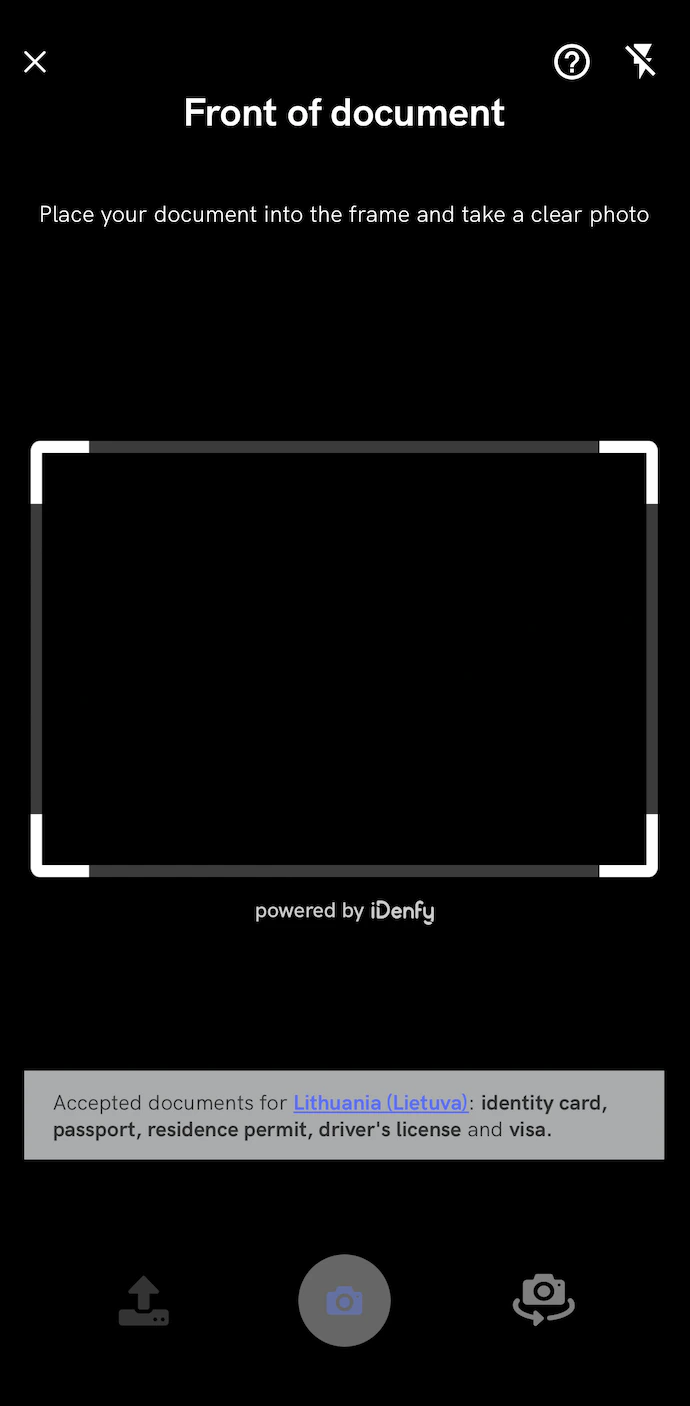
@objc open class DocumentCameraViewV2: UIView, DocumentCameraViewableV2 {
    override public init(frame: CGRect) {
        super.init(frame: frame)
        setupConstraints()
    }

    public convenience init() {
        self.init(frame: CGRect.zero)
    }

    public required convenience init?(coder _: NSCoder) {
        self.init(frame: CGRect.zero)
    }

    public lazy var cameraView: UIView = {
        let view = UIView(frame: .zero)
        view.translatesAutoresizingMaskIntoConstraints = false
        view.isOpaque = true
        view.backgroundColor = IdenfyDocumentCameraSessionUISettingsV2.idenfyDocumentCameraPreviewSessionBackgroundColor
        return view
    }()

    public var photoImageView: UIImageView = {
        let imageView = UIImageView(frame: .zero)
        imageView.translatesAutoresizingMaskIntoConstraints = false
        imageView.isOpaque = true
        return imageView
    }()

    public var rectangleView: IdenfyRectangleViewV2 = {
        let view = IdenfyRectangleViewV2(frame: .zero)
        view.translatesAutoresizingMaskIntoConstraints = false
        view.backgroundColor = UIColor.clear
        view.tintColor = UIColor.clear
        view.isOpaque = true
        return view
    }()

    public var rectanglePathView: IdenfyRectanglePathViewV2 = {
        let imageView = IdenfyRectanglePathViewV2(frame: .zero)
        imageView.isOpaque = true
        imageView.contentMode = .scaleToFill
        return imageView
    }()

    public var cameraSessionsButtons: CameraSessionsButtonsViewableV2 = {
        let view = CameraSessionsButtonsViewV2(frame: .zero)
        view.translatesAutoresizingMaskIntoConstraints = false
        view.isOpaque = true
        return view
    }()

    public var drawerContentView: DrawerContentViewableV2 = {
        let view = DrawerContentViewV2(frame: .zero)
        view.translatesAutoresizingMaskIntoConstraints = false
        return view
    }()

    public var documentCameraAlertCard: UIView = {
        let view = UIView(frame: .zero)
        view.translatesAutoresizingMaskIntoConstraints = false
        view.backgroundColor = IdenfyDocumentCameraSessionUISettingsV2.idenfyDocumentCameraAlertCardBackgroundColor
        view.isHidden = true
        return view
    }()

    public var documentCameraAlertCardImage: UIImageView = {
        let imageView = UIImageView()
        imageView.translatesAutoresizingMaskIntoConstraints = false
        imageView.layer.masksToBounds = true
        imageView.image = UIImage(named: "idenfy_ic_warning_alert", in: Bundle(identifier: "com.idenfy.idenfyviews"), compatibleWith: nil)?.withRenderingMode(.alwaysTemplate)
        imageView.contentMode = .scaleAspectFit
        imageView.tintColor = IdenfyDocumentCameraSessionUISettingsV2.idenfyDocumentCameraAlertCardImageTintColor
        return imageView
    }()

    public var documentCameraAlertCardTitle: UILabel = {
        let label = UILabel(frame: .zero)
        label.translatesAutoresizingMaskIntoConstraints = false
        label.numberOfLines = 0
        label.font = IdenfyDocumentCameraSessionUISettingsV2.idenfyDocumentCameraAlertCardTitleFont
        label.textAlignment = .left
        label.textColor = IdenfyDocumentCameraSessionUISettingsV2.idenfyDocumentCameraAlertCardTitleColor
        return label
    }()

    public var documentCameraAcceptedDocumentsAlertCard: UIView = {
        let view = UIView(frame: .zero)
        view.translatesAutoresizingMaskIntoConstraints = false
        view.backgroundColor = IdenfyDocumentCameraSessionUISettingsV2.idenfyDocumentCameraAcceptedDocumentsAlertCardBackgroundColor
        view.isHidden = true
        return view
    }()

    public var documentCameraAcceptedDocumentsAlertCardTitle: UILabel = {
        let label = UILabel(frame: .zero)
        label.translatesAutoresizingMaskIntoConstraints = false
        label.numberOfLines = 0
        label.font = IdenfyDocumentCameraSessionUISettingsV2.idenfyDocumentCameraAcceptedDocumentsAlertCardTitleFont
        label.textAlignment = .left
        label.textColor = IdenfyDocumentCameraSessionUISettingsV2.idenfyDocumentCameraAcceptedDocumentsAlertCardTitleColor
        return label
    }()

    public var alertCardsStackView: UIStackView = {
        let stack = UIStackView(frame: .zero)
        stack.axis = .vertical
        stack.distribution = .fill
        stack.alignment = .fill
        stack.translatesAutoresizingMaskIntoConstraints = false
        return stack
    }()

    @objc private func setupConstraints() {
        setupCameraView()
        setupPhotoView()
        setupRectangleView()
        setupCameraSessionsButtons()
        setupDrawerView()
        setupAcceptedDocumentsCard()
        setupDocumentWarningCard()
        setupAlertCardsStackView()
    }

    func setupAcceptedDocumentsCard() {
        documentCameraAcceptedDocumentsAlertCard.heightAnchor.constraint(greaterThanOrEqualToConstant: 50).isActive = true

        documentCameraAcceptedDocumentsAlertCard.addSubview(documentCameraAcceptedDocumentsAlertCardTitle)
        documentCameraAcceptedDocumentsAlertCardTitle.leftAnchor.constraint(equalTo: documentCameraAcceptedDocumentsAlertCard.safeLeftAnchor, constant: 16).isActive = true
        documentCameraAcceptedDocumentsAlertCardTitle.rightAnchor.constraint(equalTo: documentCameraAcceptedDocumentsAlertCard.safeRightAnchor, constant: -24).isActive = true
        documentCameraAcceptedDocumentsAlertCardTitle.topAnchor.constraint(equalTo: documentCameraAcceptedDocumentsAlertCard.safeTopAnchor, constant: 8).isActive = true
        documentCameraAcceptedDocumentsAlertCardTitle.bottomAnchor.constraint(equalTo: documentCameraAcceptedDocumentsAlertCard.safeBottomAnchor, constant: -8).isActive = true
    }

    func setupDocumentWarningCard() {
        documentCameraAlertCard.heightAnchor.constraint(greaterThanOrEqualToConstant: 50).isActive = true

        documentCameraAlertCard.addSubview(documentCameraAlertCardImage)
        documentCameraAlertCardImage.leftAnchor.constraint(equalTo: documentCameraAlertCard.safeLeftAnchor, constant: 16).isActive = true
        documentCameraAlertCardImage.topAnchor.constraint(equalTo: documentCameraAlertCard.safeTopAnchor).isActive = true
        documentCameraAlertCardImage.bottomAnchor.constraint(equalTo: documentCameraAlertCard.safeBottomAnchor).isActive = true

        documentCameraAlertCard.addSubview(documentCameraAlertCardTitle)
        documentCameraAlertCardTitle.leftAnchor.constraint(equalTo: documentCameraAlertCard.safeLeftAnchor, constant: 50).isActive = true
        documentCameraAlertCardTitle.rightAnchor.constraint(equalTo: documentCameraAlertCard.safeRightAnchor, constant: -24).isActive = true
        documentCameraAlertCardTitle.topAnchor.constraint(equalTo: documentCameraAlertCard.safeTopAnchor, constant: 8).isActive = true
        documentCameraAlertCardTitle.bottomAnchor.constraint(equalTo: documentCameraAlertCard.safeBottomAnchor, constant: -8).isActive = true
    }

    func setupAlertCardsStackView() {
        addSubview(alertCardsStackView)
        alertCardsStackView.centerXAnchor.constraint(equalTo: centerXAnchor).isActive = true
        alertCardsStackView.bottomAnchor.constraint(equalTo: bottomAnchor, constant: -(UIScreen.main.bounds.height * ConstsIdenfyUI.idenfyCameraBottomControlsHeightMultiplier + 16)).isActive = true
        alertCardsStackView.leftAnchor.constraint(equalTo: leftAnchor, constant: 16).isActive = true
        alertCardsStackView.rightAnchor.constraint(equalTo: rightAnchor, constant: -16).isActive = true
        alertCardsStackView.spacing = 16

        alertCardsStackView.addArrangedSubview(documentCameraAlertCard)
        alertCardsStackView.addArrangedSubview(documentCameraAcceptedDocumentsAlertCard)
    }

    func setupDrawerView() {
        addSubview(drawerContentView)
        drawerContentView.topAnchor.constraint(equalTo: topAnchor).isActive = true
        drawerContentView.leftAnchor.constraint(equalTo: leftAnchor).isActive = true
        drawerContentView.rightAnchor.constraint(equalTo: rightAnchor).isActive = true
        drawerContentView.heightAnchor.constraint(equalToConstant: CameraSessionUIHelper.getDrawerHeight()).isActive = true
    }

    func setupCameraSessionsButtons() {
        addSubview(cameraSessionsButtons)
        cameraSessionsButtons.leadingAnchor.constraint(equalTo: leadingAnchor).isActive = true
        cameraSessionsButtons.trailingAnchor.constraint(equalTo: trailingAnchor).isActive = true
        cameraSessionsButtons.topAnchor.constraint(equalTo: topAnchor).isActive = true
        cameraSessionsButtons.bottomAnchor.constraint(equalTo: bottomAnchor).isActive = true
    }

    func setupCameraView() {
        addSubview(cameraView)
        cameraView.leadingAnchor.constraint(equalTo: leadingAnchor).isActive = true
        cameraView.trailingAnchor.constraint(equalTo: trailingAnchor).isActive = true
        cameraView.topAnchor.constraint(equalTo: topAnchor).isActive = true
        cameraView.bottomAnchor.constraint(equalTo: bottomAnchor).isActive = true
    }

    func setupPhotoView() {
        cameraView.addSubview(photoImageView)
        photoImageView.topAnchor.constraint(equalTo: cameraView.topAnchor).isActive = true
        photoImageView.bottomAnchor.constraint(equalTo: cameraView.bottomAnchor).isActive = true
        photoImageView.leadingAnchor.constraint(equalTo: cameraView.leadingAnchor).isActive = true
        photoImageView.trailingAnchor.constraint(equalTo: cameraView.trailingAnchor).isActive = true
    }

    func setupRectangleView() {
        cameraView.addSubview(rectangleView)
        cameraView.addSubview(rectanglePathView)
        rectangleView.topAnchor.constraint(equalTo: cameraView.topAnchor).isActive = true
        rectangleView.bottomAnchor.constraint(equalTo: cameraView.bottomAnchor).isActive = true
        rectangleView.leadingAnchor.constraint(equalTo: cameraView.leadingAnchor).isActive = true
        rectangleView.trailingAnchor.constraint(equalTo: cameraView.trailingAnchor).isActive = true
    }
}
Updated UI for iDenfy Splash Screen
Both SplashScreenV2View and FaceAuthenticationSplashScreenV2View were redone, we use simple white and black colors without complicated iDenfy gradients: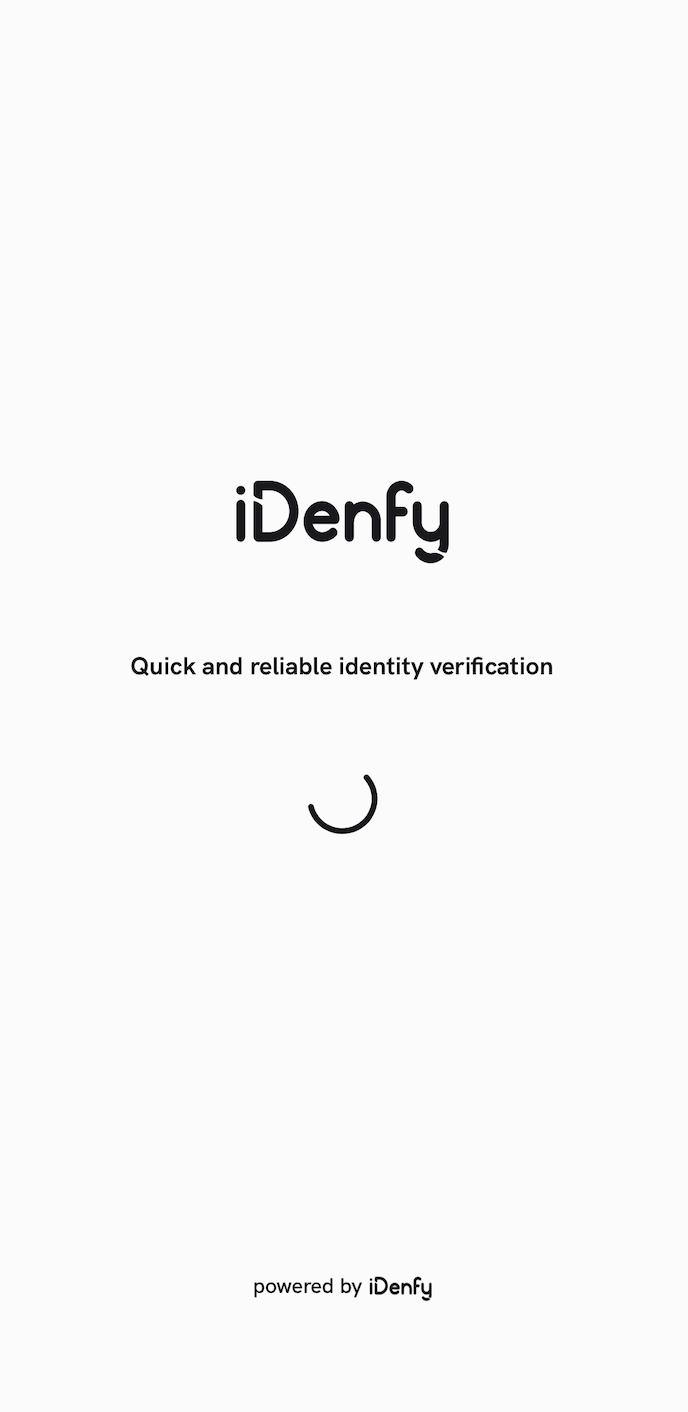
@objc open class SplashScreenV2View: UIView, SplashScreenV2Viewable {
    override public init(frame: CGRect) {
        super.init(frame: frame)
        setupConstraints()
        backgroundColor = IdenfySplashScreenViewUISettingsV2.idenfySplashScreenViewBackgroundColor
    }

    public required convenience init?(coder _: NSCoder) {
        self.init(frame: CGRect.zero)
    }

    public var idenfyLogo: UIImageView = {
        let imageView = UIImageView()
        imageView.translatesAutoresizingMaskIntoConstraints = false
        imageView.isOpaque = true
        imageView.image = UIImage(named: "idenfy_ic_splash_screen_logo", in: Bundle(identifier: "com.idenfy.idenfyviews"), compatibleWith: nil)
        imageView.contentMode = .scaleAspectFit
        return imageView
    }()

    var loadingSpinner: LottieAnimationView = {
        let lottieView = LottieAnimationView(frame: .zero)
        lottieView.translatesAutoresizingMaskIntoConstraints = false
        if let path = Bundle(identifier: "com.idenfy.idenfyviews")?.path(forResource: "idenfy_custom_file_loader", ofType: "json") {
            lottieView.animation = LottieAnimation.filepath(path)
        }
        lottieView.contentMode = .scaleAspectFit
        lottieView.play()
        lottieView.loopMode = .loop
        lottieView.backgroundBehavior = .pauseAndRestore
        lottieView.applyColorTint(IdenfySplashScreenViewUISettingsV2.idenfySplashScreenViewSpinnerTintColor)
        return lottieView
    }()

    public var splashScreenTitle: UILabel = {
        let label = UILabel(frame: .zero)
        label.translatesAutoresizingMaskIntoConstraints = false
        label.textColor = IdenfySplashScreenViewUISettingsV2.idenfySplashScreenViewTitleTextColor
        label.numberOfLines = 0
        label.font = IdenfySplashScreenViewUISettingsV2.idenfySplashScreenViewTitleFont
        label.textAlignment = .center
        return label
    }()

    public var splashScreenDescription: UILabel = {
        let label = UILabel(frame: .zero)
        label.translatesAutoresizingMaskIntoConstraints = false
        label.textColor = IdenfySplashScreenViewUISettingsV2.idenfySplashScreenViewDescriptionTextColor
        label.numberOfLines = 0
        label.font = IdenfySplashScreenViewUISettingsV2.idenfySplashScreenViewDescriptionFont
        label.textAlignment = .center
        return label
    }()

    public var idenfyImageViewPowered: UIImageView = {
        let imageView = UIImageView()
        imageView.translatesAutoresizingMaskIntoConstraints = false
        imageView.isOpaque = true
        imageView.image = UIImage(named: "idenfy_ic_powered_by_idenfy_v2", in: Bundle(identifier: "com.idenfy.idenfyviews"), compatibleWith: nil)
        imageView.contentMode = .scaleAspectFit
        return imageView
    }()

    public var bottomStackView: UIStackView = {
        let stackView = UIStackView()
        stackView.translatesAutoresizingMaskIntoConstraints = false
        stackView.axis = .horizontal
        stackView.distribution = .fill
        stackView.alignment = .center
        stackView.spacing = 4
        return stackView
    }()

    open func setupConstraints() {
        setupViews()
    }

    @objc open func setupViews() {
        addSubview(splashScreenTitle)
        splashScreenTitle.centerYAnchor.constraint(equalTo: centerYAnchor).isActive = true
        splashScreenTitle.widthAnchor.constraint(equalToConstant: frame.width * 0.8).isActive = true
        splashScreenTitle.centerXAnchor.constraint(equalTo: centerXAnchor).isActive = true

        addSubview(idenfyLogo)
        idenfyLogo.centerXAnchor.constraint(equalTo: centerXAnchor).isActive = true
        idenfyLogo.bottomAnchor.constraint(equalTo: splashScreenTitle.topAnchor, constant: -12).isActive = true
        idenfyLogo.heightAnchor.constraint(equalToConstant: IdenfySplashScreenViewUISettingsV2.idenfySplashScreenLogoSize).isActive = true

        addSubview(loadingSpinner)
        loadingSpinner.topAnchor.constraint(equalTo: splashScreenTitle.bottomAnchor, constant: 40).isActive = true
        loadingSpinner.centerXAnchor.constraint(equalTo: centerXAnchor).isActive = true
        loadingSpinner.widthAnchor.constraint(equalToConstant: 53).isActive = true
        loadingSpinner.heightAnchor.constraint(equalToConstant: 53).isActive = true

        bottomStackView.addArrangedSubview(splashScreenDescription)
        bottomStackView.addArrangedSubview(idenfyImageViewPowered)

        addSubview(bottomStackView)
        bottomStackView.bottomAnchor.constraint(equalTo: bottomAnchor, constant: -16).isActive = true
        bottomStackView.centerXAnchor.constraint(equalTo: centerXAnchor).isActive = true

        idenfyImageViewPowered.widthAnchor.constraint(equalToConstant: 35).isActive = true
        idenfyImageViewPowered.heightAnchor.constraint(equalToConstant: 120).isActive = true
        idenfyImageViewPowered.transform = CGAffineTransform(translationX: 0, y: 2)
    }
}
@MainActor @objc public static var idenfyBlackV2 = UIColor(hexString: "#19181D")
[8.6.x] to [8.7.5]
Updated Country Selection UISearchBar to Support iOS 26
Follow this migration guide point if you have implemented custom views of CountrySelectionViewableV2.
    public var countrySearchBar: UISearchBar = {
        let searchBar = UISearchBar()
        searchBar.translatesAutoresizingMaskIntoConstraints = false
        searchBar.setImage(UIImage(), for: .search, state: .normal)
        searchBar.setPositionAdjustment(UIOffset(horizontal: -10, vertical: 0), for: .search)
        searchBar.semanticContentAttribute = .forceLeftToRight
        searchBar.barTintColor = IdenfyCountrySelectionViewUISettingsV2.idenfyCountrySelectionViewCountrySearchBarBackgroundColor
        searchBar.backgroundColor = IdenfyCountrySelectionViewUISettingsV2.idenfyCountrySelectionViewCountrySearchBarBackgroundColor
        searchBar.backgroundImage = UIImage()
        searchBar.layer.cornerRadius = IdenfyCountrySelectionViewUISettingsV2.idenfyCountrySelectionViewCountrySearchBarCorderRadius
        searchBar.layer.borderWidth = IdenfyCountrySelectionViewUISettingsV2.idenfyCountrySelectionViewCountrySearchBarBorderWidth
        searchBar.layer.borderColor = IdenfyCountrySelectionViewUISettingsV2.idenfyCountrySelectionViewCountrySearchBarBorderColor.cgColor
        let textField = searchBar.searchTextField
        textField.backgroundColor = IdenfyCountrySelectionViewUISettingsV2.idenfyCountrySelectionViewCountrySearchBarBackgroundColor
        textField.textColor = IdenfyCountrySelectionViewUISettingsV2.idenfyCountrySelectionViewCountrySearchBarTextColor
        textField.borderStyle = .none
        textField.clearButtonMode = .never
        textField.font = IdenfyCountrySelectionViewUISettingsV2.idenfyCountrySelectionViewSearchBarFont
        if #available(iOS 26.0, *) {
            textField.layer.cornerRadius = 0
            textField.layer.borderWidth = 0
            textField.layer.masksToBounds = true
        }
        return searchBar
    }()
[8.6.2] to [8.6.3]
Updated Face Capture Oval Design
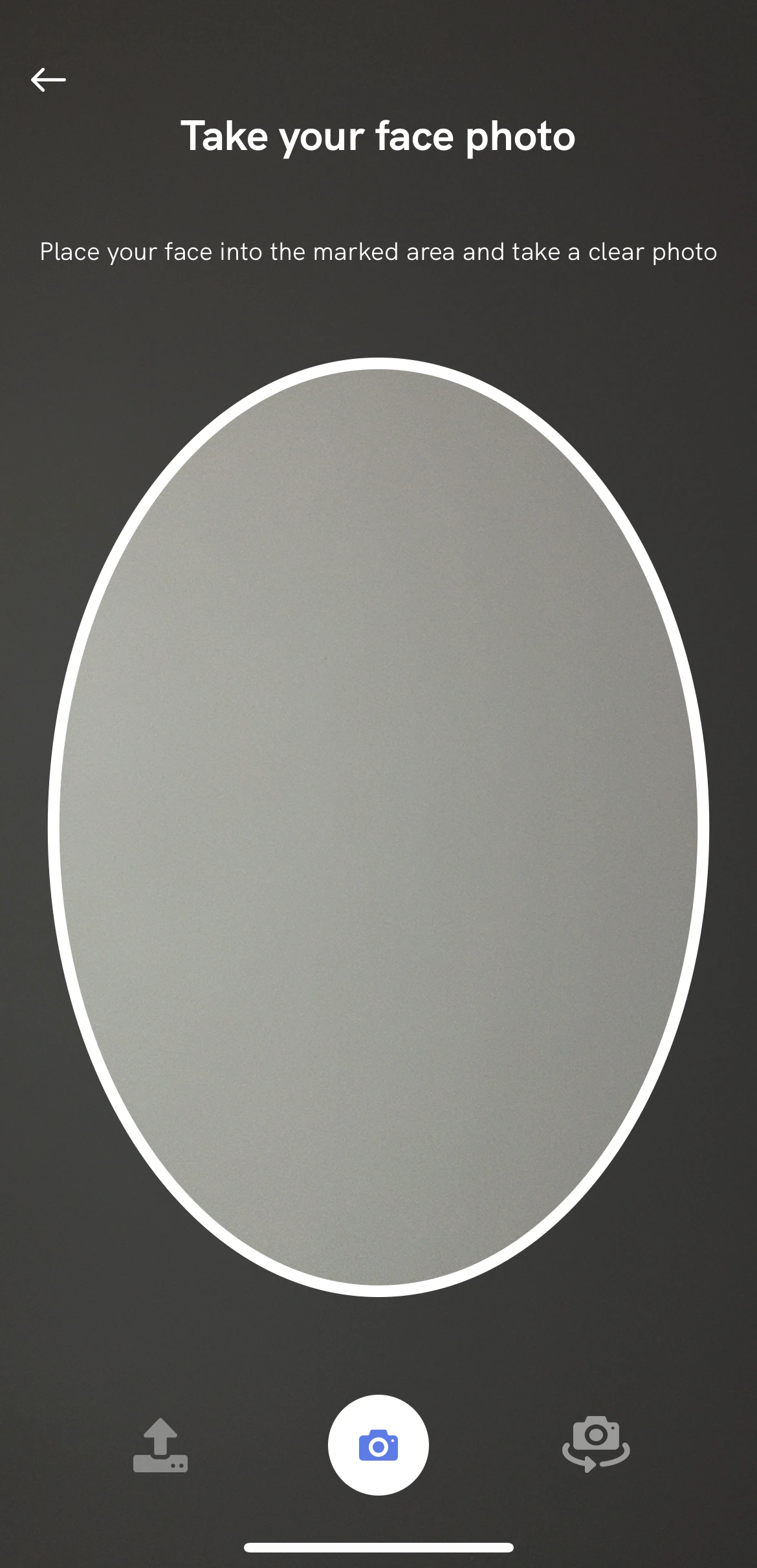
Follow this migration guide point if you have implemented custom views of FaceCameraViewableV2.
    public var idenfyUIViewFaceOvalV3: IdenfyFaceOvalV3? = {
        let view = IdenfyFaceOvalV3(frame: .zero)
        view.translatesAutoresizingMaskIntoConstraints = false
        view.isOpaque = false
        return view
    }()

    func setupUIViewFaceOval() {
        if let unwrappedIdenfyUIViewFaceOvalV3 = idenfyUIViewFaceOvalV3 {
            addSubview(unwrappedIdenfyUIViewFaceOvalV3)
            unwrappedIdenfyUIViewFaceOvalV3.centerXAnchor.constraint(equalTo: centerXAnchor).isActive = true
            unwrappedIdenfyUIViewFaceOvalV3.bottomAnchor.constraint(equalTo: cameraSessionsButtons.idenfyUIViewContainerOfButtons.topAnchor).isActive = true
            let top = CameraSessionUIHelper.getDrawerHeight()
            unwrappedIdenfyUIViewFaceOvalV3.topAnchor.constraint(equalTo: topAnchor, constant: top).isActive = true
            unwrappedIdenfyUIViewFaceOvalV3.leftAnchor.constraint(equalTo: leftAnchor).isActive = true
            unwrappedIdenfyUIViewFaceOvalV3.rightAnchor.constraint(equalTo: rightAnchor).isActive = true
            unwrappedIdenfyUIViewFaceOvalV3.setNeedsDisplay()
        }
    }
idenfyUIViewFaceOval is still available but deprecated and will be removed in the future.
[8.5.x] to [8.6.0]
Added Realtime Blur Glare Detection in Document Capture
Follow this migration guide point if you have implemented custom views of DocumentCameraViewableV2.
    public var documentCameraAlertCard: UIView = {
        let view = UIView(frame: .zero)
        view.translatesAutoresizingMaskIntoConstraints = false
        view.backgroundColor = IdenfyDocumentCameraSessionUISettingsV2.idenfyDocumentCameraAlertCardBackgroundColor
        view.isHidden = true
        return view
    }()

    public var documentCameraAlertCardImage: UIImageView = {
        let imageView = UIImageView()
        imageView.translatesAutoresizingMaskIntoConstraints = false
        imageView.layer.masksToBounds = true
        imageView.image = UIImage(named: "idenfy_ic_warning_alert", in: Bundle(identifier: "com.idenfy.idenfyviews"), compatibleWith: nil)?.withRenderingMode(.alwaysTemplate)
        imageView.contentMode = .scaleAspectFit
        imageView.tintColor = IdenfyDocumentCameraSessionUISettingsV2.idenfyDocumentCameraAlertCardImageTintColor
        return imageView
    }()

    public var documentCameraAlertCardTitle: UILabel = {
        let label = UILabel(frame: .zero)
        label.translatesAutoresizingMaskIntoConstraints = false
        label.numberOfLines = 0
        label.font = IdenfyDocumentCameraSessionUISettingsV2.idenfyDocumentCameraAlertCardTitleFont
        label.textAlignment = .left
        label.textColor = IdenfyDocumentCameraSessionUISettingsV2.idenfyDocumentCameraAlertCardTitleColor
        return label
    }()
[8.5.x] to [8.5.7]
KYC Questionnaire FILE and IMAGE Questions Merged
ImageQuestionCell has been removed:
.withImageQuestionCellView(ImageQuestionCell.self)
[8.4.x] to [8.5.0]
Added Face Detection Progress View to the Camera Drawer
Follow this migration guide point if you have implemented custom views of DrawerContentViewableV2.
    public var faceDetectionProgressView: UIProgressView = {
        let progressView = UIProgressView(frame: .zero)
        progressView.translatesAutoresizingMaskIntoConstraints = false
        progressView.progressTintColor = IdenfyInstructionAlertUISettigsV2.idenfyInstructionAlertProgressBarFillColor
        progressView.trackTintColor = UIColor.clear
        progressView.isHidden = true
        return progressView
    }()

    ...

    open func setupProgressView() {
        addSubview(faceDetectionProgressView)
        faceDetectionProgressView.leftAnchor.constraint(equalTo: leftAnchor).isActive = true
        faceDetectionProgressView.bottomAnchor.constraint(equalTo: bottomAnchor).isActive = true
        faceDetectionProgressView.rightAnchor.constraint(equalTo: rightAnchor).isActive = true
        faceDetectionProgressView.heightAnchor.constraint(equalToConstant: 3).isActive = true
    }
[8.3.x] to [8.4.0]
Removed Dynamic OnBoarding View
.withOnBoardingViewType(.multipleDynamic) option is no longer available in IdenfyUISettingsV2.
Follow this migration guide point if you have implemented custom views of DynamicCameraOnBoardingViewableV2.
.withDynamicCameraOnBoardingView option. Use .withStaticCameraOnBoardingView viewable instead.
You can check new, fully implemented views in the sample application.
The IdenfyDynamicCameraOnBoardingViewUISettingsV2 class has been removed. The static onBoarding view has its own IdenfyStaticCameraOnBoardingViewUISettingsV2 class.
[8.2.x] to [8.3.0]
Removed Instructions Drawer Option from Camera View
The instructions drawer has been removed. The top drawer will remain static as if instructions were disabled, and will only hold camera descriptions and the app bar..withInstructions(IdenfyInstructionsType.drawer) option is no longer available in IdenfyUIBuilderV2.
Follow this migration guide point if you have implemented custom views of DrawerContentViewableV2, DocumentCameraViewableV2 or FaceCameraViewableV2.
.withDrawerContentView option. However, DocumentCameraViewableV2 and FaceCameraViewableV2 now include the DrawerContentViewableV2 view, which you can easily override:
    public var drawerContentView: DrawerContentViewableV2 = {
        let view = DrawerContentViewV2(frame: .zero)
        view.translatesAutoresizingMaskIntoConstraints = false
        return view
    }()

    @objc private func setupConstraints() {
        ...
        setupDrawerView()
    }

    func setupDrawerView() {
        addSubview(drawerContentView)
        drawerContentView.topAnchor.constraint(equalTo: topAnchor).isActive = true
        drawerContentView.leftAnchor.constraint(equalTo: leftAnchor).isActive = true
        drawerContentView.rightAnchor.constraint(equalTo: rightAnchor).isActive = true
        drawerContentView.heightAnchor.constraint(equalToConstant: CameraSessionUIHelper.getDrawerHeight()).isActive = true
    }
setupUIViewFaceOval() function of FaceCameraViewV2 has been refactored with a helper function to get the drawer height:
    func setupUIViewFaceOval() {
        addSubview(idenfyUIViewFaceOval)
        idenfyUIViewFaceOval.centerXAnchor.constraint(equalTo: centerXAnchor).isActive = true
        idenfyUIViewFaceOval.bottomAnchor.constraint(equalTo: cameraSessionsButtons.idenfyUIViewContainerOfButtons.topAnchor, constant: -16).isActive = true
        var top = CameraSessionUIHelper.getDrawerHeight()
        // adding more for better margin
        top += 16
        idenfyUIViewFaceOval.topAnchor.constraint(equalTo: topAnchor, constant: top).isActive = true
        idenfyUIViewFaceOval.widthAnchor.constraint(equalTo: idenfyUIViewFaceOval.heightAnchor, multiplier: 0.7).isActive = true
    }
public protocol DrawerContentViewableV2: UIView {
    var delegate: CameraSessionDrawerDelegate? { get set }
    var toolbar: IdenfyToolbarV2CameraSession { get }
    var infoLabel: UILabel { get }
    var descriptionLabelV2: UILabel { get }
    var faceDetectionAlertImage: UIImageView { get }
}
public protocol CameraSessionDrawerDelegate: AnyObject {
    func backButtonPressedAction()
    func toggleFlashButtonPressedAction()
    func instructionDialogButtonPressedAction()
}
After Capturing Photos, Camera Results View Will Appear Instantly
Since the camera results view will appear instantly, it will show a loading spinner while the photo loads.Follow this migration guide point if you have implemented custom views of CameraResultViewableV2.
    public var photoResultDetailsSpinner: LottieAnimationView = {
        let lottieView = LottieAnimationView(frame: .zero)
        lottieView.translatesAutoresizingMaskIntoConstraints = false
        if let path = Bundle(identifier: "com.idenfy.idenfyviews")?.path(forResource: "idenfy_custom_animation_photo_result_loading_indicator", ofType: "json") {
            lottieView.animation = LottieAnimation.filepath(path)
        }
        lottieView.contentMode = .scaleAspectFit
        lottieView.play()
        lottieView.loopMode = .loop
        lottieView.backgroundBehavior = .pauseAndRestore
        lottieView.alpha = 0.6
        lottieView.isHidden = true
        return lottieView
    }()
Changed Photo Cropping to Preserve Higher Resolution
The position of the document camera rectangle has been changed to match the logic of the Android SDK. Now the x position will be 0.05 * screen width. The CameraSessionsButtonsViewV2 height multiplier has been moved to a constant. It affects picture cropping. Make sure you change the height of idenfyUIViewContainerOfButtons by changing the idenfyCameraBottomControlsHeightMultiplier constant: /**
idenfyCameraBottomControlsHeightMultiplier is used in photo cropping,
make sure you change the height of idenfyUIViewContainerOfButtons by changing the idenfyCameraBottomControlsHeightMultiplier constant
*/
open func setupUIViewContainerOfButtons() {
addSubview(idenfyUIViewContainerOfButtons)
idenfyUIViewContainerOfButtons.leadingAnchor.constraint(equalTo: leadingAnchor).isActive = true
idenfyUIViewContainerOfButtons.trailingAnchor.constraint(equalTo: trailingAnchor).isActive = true
idenfyUIViewContainerOfButtons.heightAnchor.constraint(equalTo: heightAnchor, multiplier: ConstsIdenfyUI.idenfyCameraBottomControlsHeightMultiplier).isActive = true
idenfyUIViewContainerOfButtons.bottomAnchor.constraint(equalTo: bottomAnchor).isActive = true
}