

Requirements
- API key pair
- Custom flow created via dashboard
- Session creation via API enabled (done by iDenfy staff)
- Finances
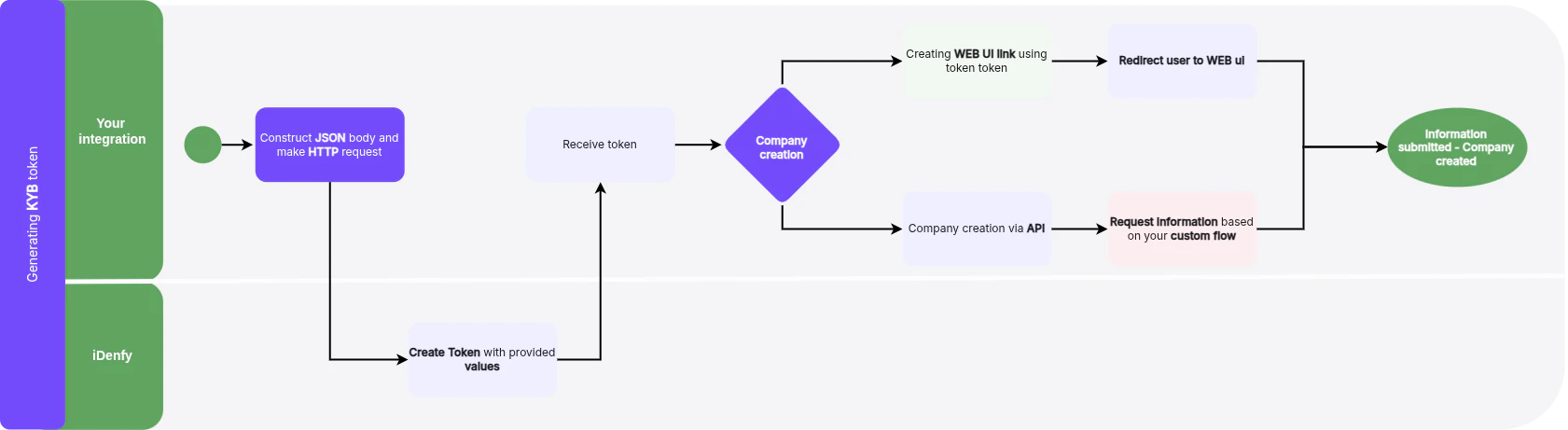
Step 1: Create Business Verification Form Session
For full request and response details, see the API Reference tab for the
kybTokensCreate endpoint.- If you omit
flow, iDenfy uses your account’s default KYB flow. - iDenfy refuses token creation if your account lacks finances for the flow.
tokenString for the client’s link and the companyId used in every form endpoint. It also includes the session settings: expiration, isValid, clientId, externalRef, locale, flow, theme, tags and scanRefs.
Step 2: Create Company
After you generate the token, you can:- Create a company via API
- Pre-fill the data you already hold, then hand the form to the client
- Create a redirection link to the Web UI
Create Redirection Link to Web UI
To redirect the user to the iDenfy Business verification UI, construct the redirect URL as follows:- Start with the base URL
- Obtain the
tokenStringvalue from the new Business verification token response - Append this
tokenStringvalue directly to the end of the base URL:https://kyb.ui.idenfy.com/?authToken=
tokenString received from the API is 9TIMoX4oSVmWDJ8qS7zeFUMTh5hi1EcqqLTrPR9r, the complete redirect URL will be:tokenString goes where your URL has the {{token_string}} placeholder.The token response contains no ready-made link. Build it from the
tokenString as shown above. A /welcome path is not needed.