

Once the Check is done, it may return profiles that match your search criteria.Documentation Index
Fetch the complete documentation index at: https://documentation.idenfy.com/llms.txt
Use this file to discover all available pages before exploring further.
Check Results
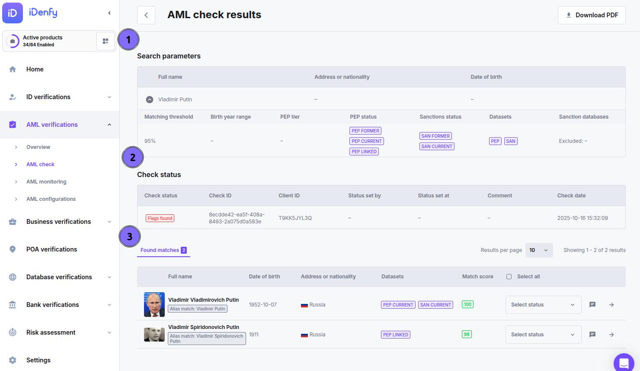
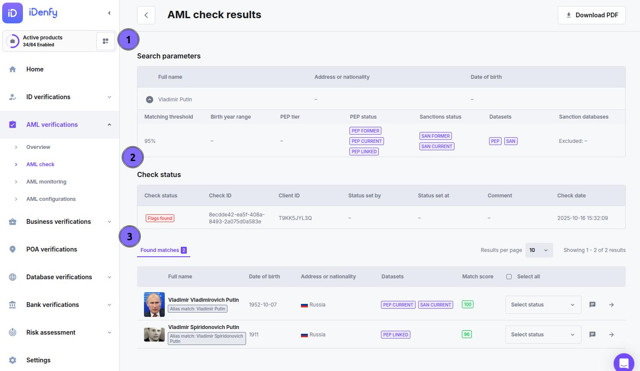
1. Search Parameters
This section displays the details used in the check — it’s your reference to what was searched. You’ll see:- Full name — the entered name of the person or company.
- Address or nationality — country or region used in the search.
- Date of birth — full or partial, if provided.
- Matching threshold — how strict the matching level was (e.g., 95%).
- PEP tier / status — whether you searched for current, former, or linked PEPs.
- Sanctions status — whether current or former sanctions were included.
- Datasets — which databases were used in the check (e.g., PEP, SAN).
- Sanction databases — if any specific lists were excluded or targeted.
2. Check Status
This block summarizes the outcome of the AML check itself.- Check status — shows whether any matches (flags) were found.
- Flags found: at least one record matched your input.
- Clear: no relevant results were detected.
- Check ID — a unique identifier for audit or tracking.
- Client ID — your internal customer reference.
- Status set by / at — who and when the current status was applied.
- Comment — optional notes or review summary.
- Check date — when the screening was performed.
3. Found Matches
When matches exist, this table lists all potential profiles identified during screening. Each entry contains key information to help you decide whether it’s your subject. For each match, you’ll see:- Full name — as listed in the dataset.
- Date of birth — if available in the source.
- Address or nationality — country or region linked to the record.
- Datasets — which databases triggered the match (e.g., PEP CURRENT, SAN CURRENT).
- Match score — confidence level (0–100%) showing how close the match is to your subject.
- Select status — allows you to mark the match as Confirmed, False positive, or Under review.
- Comment icon — lets you add context or reasoning for future reference.
Profiles
Information inside profiles is not filtered by check filters, so profile information will contain all conditions and information.
- Profile details: General identity overview.
- Sanctions: Lists restrictions, issuing bodies, and reasons.
- PEPs: Shows political roles, positions, or affiliations.
- Associations: Displays related individuals or entities.
- Other datasets: Includes additional regulatory or risk-related sources.