

Profile data is not filtered by the check or monitoring filters. All conditions and information from the screening provider are shown regardless of what datasets were selected.
Profile Header
The top of the profile shows the matched entity’s name, a row of dataset badge chips indicating which screening databases flagged them (for exampleSAN CURRENT, PEP CURRENT, POI). It also includes a Download PDF button to export the full profile.
Profile Details
The default tab. Contains three cards:Core Details
Main identifying information:- First name / Middle name / Surname — name components as listed in the dataset
- Gender
- Photo — if available in the source
- Aliases — alternate spellings and translations that may appear on official lists
Personal Details
Supporting data to confirm identity:- Nationality
- Date of birth
- Addresses — known addresses with a type label (for example,
Registered,Business)
Identifiers
Official IDs and references from international sanctions or regulatory bodies. Examples include:- UK Sanctions reference
- EU reference number
- OFAC SDN ID
- HM Treasury reference
- UN reference
Sanctions
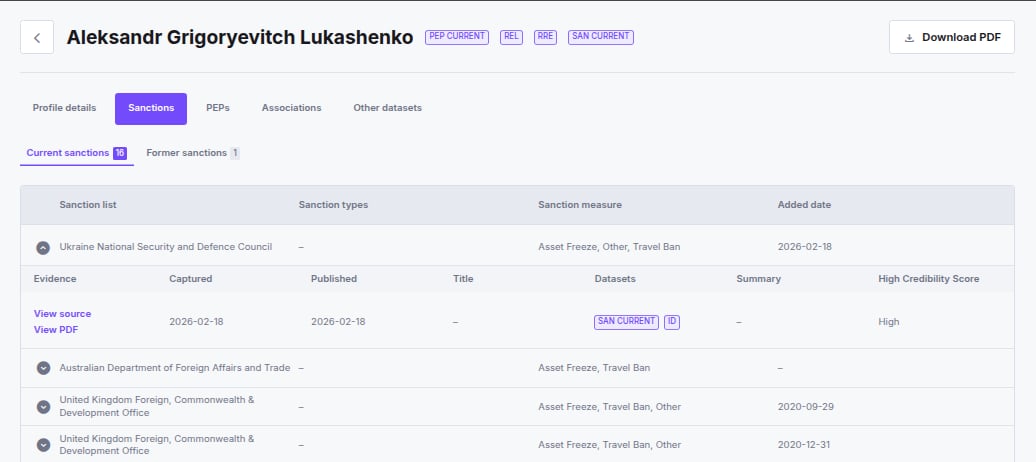
Lists all sanctions restrictions associated with this profile, split into Current and Former sub-tabs. Each row in the table shows:
Expand any row to see the underlying evidence:
- View source — opens the original source document URL in a new tab.
- View PDF — opens an Acuris-generated PDF containing the source record. Shown only when an Acuris PDF is available; serves as a fallback when the original source URL is broken or unavailable.
- Captured — when iDenfy captured this data
- Published — the official publication date
- Title — the document or order title
- Datasets — which screening databases include this evidence
- Summary — a plain-text description of the sanction
- High Credibility Score — indicates the evidence comes from an authoritative primary source
PEPs
Lists politically exposed person classifications, split into Current, Former, and PEP by association sub-tabs. Each row shows:
Expand any row to view evidence and source details, following the same structure as the Sanctions tab.
Associations
Related individuals and entities connected to this profile, split into three sub-tabs:- Relatives & close associations — family members and personal associates
- Business associates — professional connections
- Associated businesses — companies or organizations linked to this profile
Other Datasets
Additional risk and regulatory data, split into sub-tabs:- Reputation Risk Exposure (RRE) — adverse media entries tied to official action. Each entry carries a category, a snippet, a source link, and (where copyright allows) a PDF of the evidence. See RRE Dataset Overview
- Regulatory Enforcement List (REL) — regulatory enforcement actions
- Profile of Interest (POI) — persons or entities flagged for heightened scrutiny
- Gambling Risk Intelligence — risk data specific to gambling-related exposure