

Invoice Management
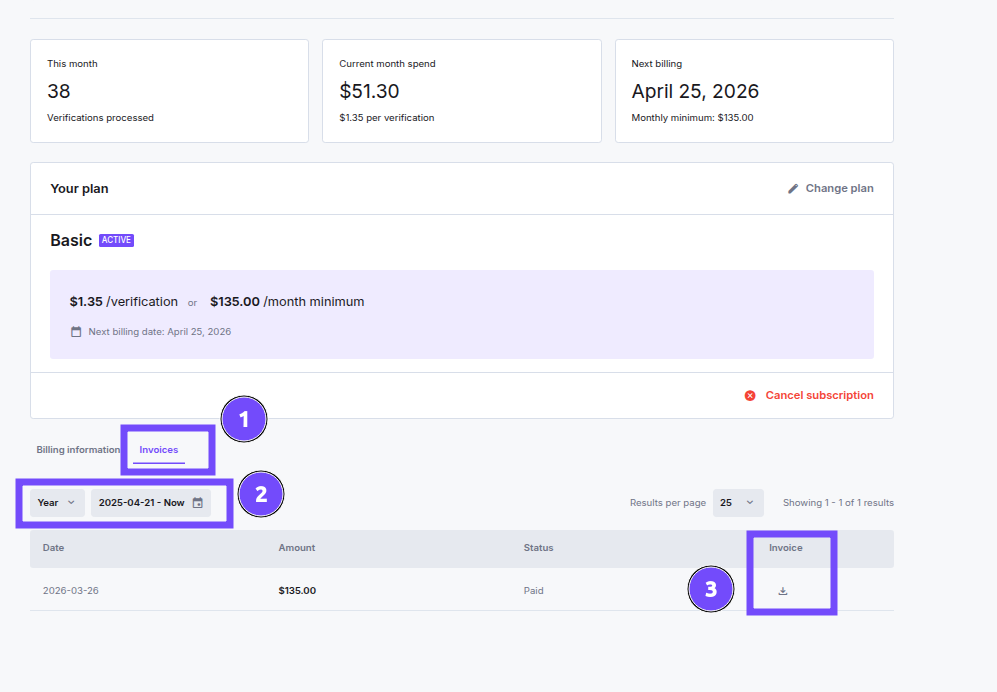
You can find all your invoices by going to the dashboard → selecting Settings → Plan- Select the Invoices tab
- Select the date you want to view the invoice for
- Click Download for the invoice
Accounting Email
Pay-As-You-Go partners can send billing communications to a dedicated address instead of the main account contact. Set it under Settings → Company details → General information → Accounting email.- The field is optional. While it’s empty, invoices and payment receipts continue to go to your contact email.
- When set, it receives only invoices and payment receipts. Notification emails, contact email, and every other system message are unaffected.
- You can set one accounting email per partner, and the address format is validated.