

Location: Settings → Business Verifications (KYB) → Configurations → KYB UI Custom themes let you personalize the look and feel of the KYB verification form to match your company’s brand identity — including your logo, fonts, and color palette.Documentation Index
Fetch the complete documentation index at: https://documentation.idenfy.com/llms.txt
Use this file to discover all available pages before exploring further.
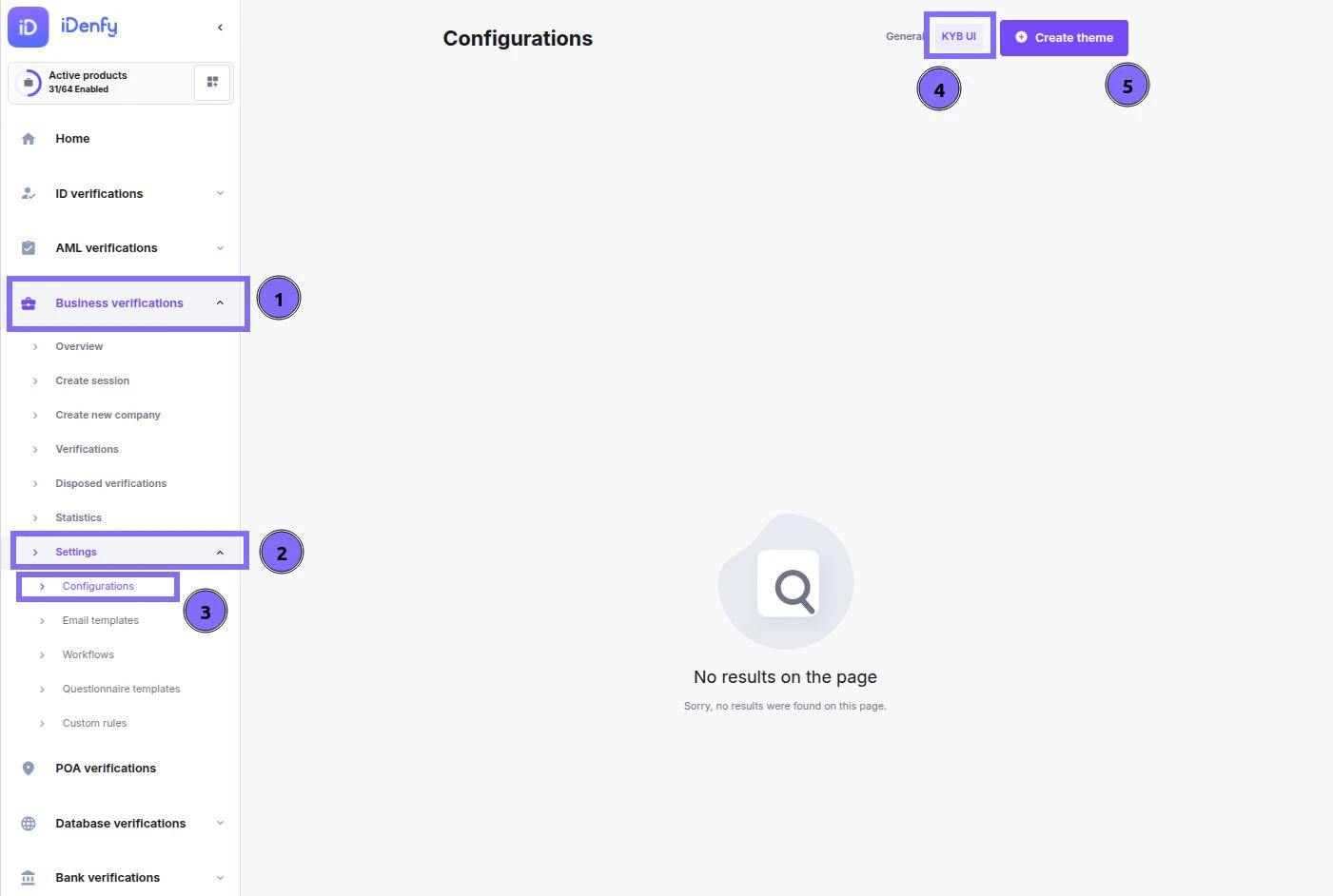
Managing Themes
This tab shows an overview of all your configured themes. Use the Create theme button to start a new design from scratch. For existing themes, click the more options menu (...) on the right side of a theme row to access:
| Action | Description |
|---|---|
| Edit | Opens the configuration window to modify settings, colors, and assets. |
| Create a copy | Duplicates the theme so you can create a variation without starting over. |
| Delete | Permanently removes the theme from your list. |
Creating or Editing a Theme
When you open the theme configuration window — either by clicking Create theme or Edit — you will work through the following sections:General Configuration
Set the basic identity of the theme.
| Field | Description |
|---|---|
| Theme name | Internal label to identify the theme in your list (e.g., “KYB Primary Theme”). |
| Theme description | Optional note for team context (e.g., “Theme version 1”). |
| Company name | Public-facing name shown to clients during the verification process. |
| Support email address | Contact email displayed on the KYB form for client inquiries. |
Interface Colors
Click Select colors to open the color picker. Use the two tabs — Main UI colors and Other UI colors — and enter hexadecimal color codes for exact brand matching. Click Save colors when done.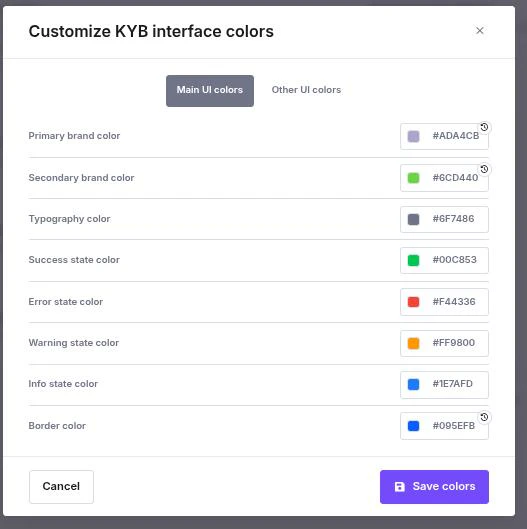
- Primary & Secondary brand colors — Core colors used for buttons, highlights, and navigation elements.
- Typography color — Default text color for readability and brand alignment.
| State | Purpose | Example |
|---|---|---|
| Success | Approved actions or completed steps | Green |
| Error | Failed checks or validation errors | Red |
| Warning | Alerts requiring user attention | Orange |
| Info | Neutral informational messages | Blue |
| Border | Input field borders and dividers | — |
Assets (Files)
Upload your brand assets to white-label the interface completely.Click Upload font or Upload logo, select the file in the pop-up, then click Save.
Company Logo
Format: SVGSize limit: Max 5 MBUpload the full-sized version of your logo for the best display quality in the header.
Company Font
Format:
.otf or .ttfSize limit: Max 5 MBEnsures all text within the KYB UI matches your corporate typography for a consistent experience.