

- Check is only performed for approved verifications
- If a USA DL is used as a verification document
Supported states (42). An AAMVA check is performed when the DL was issued by one of these states:Alabama (AL), Arizona (AZ), Arkansas (AR), Colorado (CO), Connecticut (CT), Florida (FL), Georgia (GA), Hawaii (HI), Idaho (ID), Illinois (IL), Indiana (IN), Iowa (IA), Kansas (KS), Kentucky (KY), Maine (ME), Maryland (MD), Massachusetts (MA), Michigan (MI), Mississippi (MS), Missouri (MO), Montana (MT), Nebraska (NE), Nevada (NV), New Hampshire (NH), New Jersey (NJ), New Mexico (NM), North Carolina (NC), North Dakota (ND), Ohio (OH), Oklahoma (OK), Oregon (OR), Rhode Island (RI), South Carolina (SC), South Dakota (SD), Tennessee (TN), Texas (TX), Vermont (VT), Virginia (VA), Washington (WA), West Virginia (WV), Wisconsin (WI), Wyoming (WY).
How Are the Results Returned?
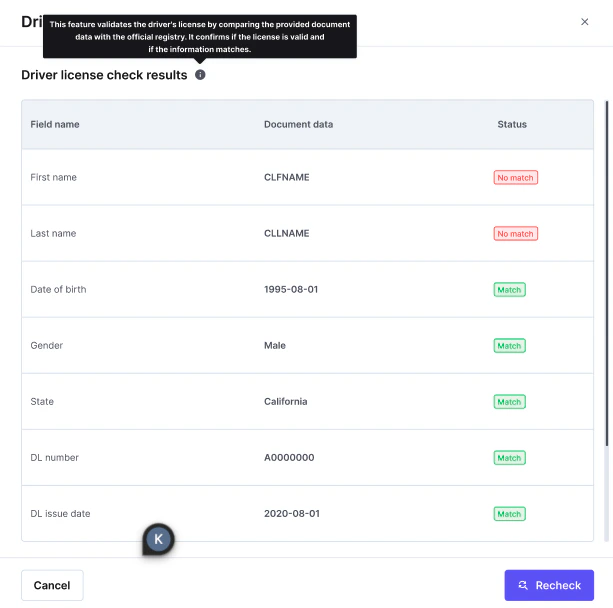
Once the verification is performed and the driver’s license checked, the user’s information is cross-checked against the DMV record and each of the following fields is returned:
Each field returns one of three results:
What Is the Data Checked Against?
The check is performed in real time, directly against the issuing state’s DMV records.- iDenfy does not maintain a separate copy of DMV data, and does not rely on third-party aggregators or independent knowledge bases.
- Every verification request queries the latest records held by the DMV at the time of the request.
- Each state manages and updates its own DMV records on its own schedule. Because the check is real-time, the most current record available at the DMV is always used.
How Does the Matching Work?
1
Locate the Record
The document (driver’s license) number is used to locate the corresponding record at the DMV.
2
Normalize the Name
Name suffixes are removed from the first and last name before the check runs. JR, SR, II, III, and IV are supported, in any capitalization or format (
JR, Jr, Jr.). A suffix is only removed when it stands alone as the final element of a name, so names that merely contain those letter sequences — Sriubas, Junior — are left untouched.3
Compare Each Field
The remaining fields are then compared individually against the values associated with that record. Each field returns Match, No match, or Not evaluated.
Fuzzy matching for name fieldsFuzzy and alternative matching is supported for the first name, middle name, and last name fields. An exact match is attempted first:
- If the exact match succeeds, the fuzzy/alternative match is not evaluated and returns Not evaluated.
- If the exact match fails, a fuzzy/alternative match is automatically attempted as a fallback.
Interpreting the Results
- Document number is the primary field. If it does not match, the DMV could not locate a record for the provided license number.
- If the document number matches but the core identity fields (name, date of birth) do not, this may indicate that a valid license number was submitted with incorrect or unrelated personal information.
- Isolated mismatches can be benign. Address-related fields, in particular, may not match due to a recent address change, formatting differences, or delays in DMV record updates. Name suffixes are no longer a cause: they’re normalized away before the check runs, so a name mismatch reflects a real difference in the name itself.
- When most or all core identity fields fail to match, it is a strong, high-confidence indicator of a genuine discrepancy rather than a formatting issue or missing DMV data. A fully non-matching response is uncommon.