

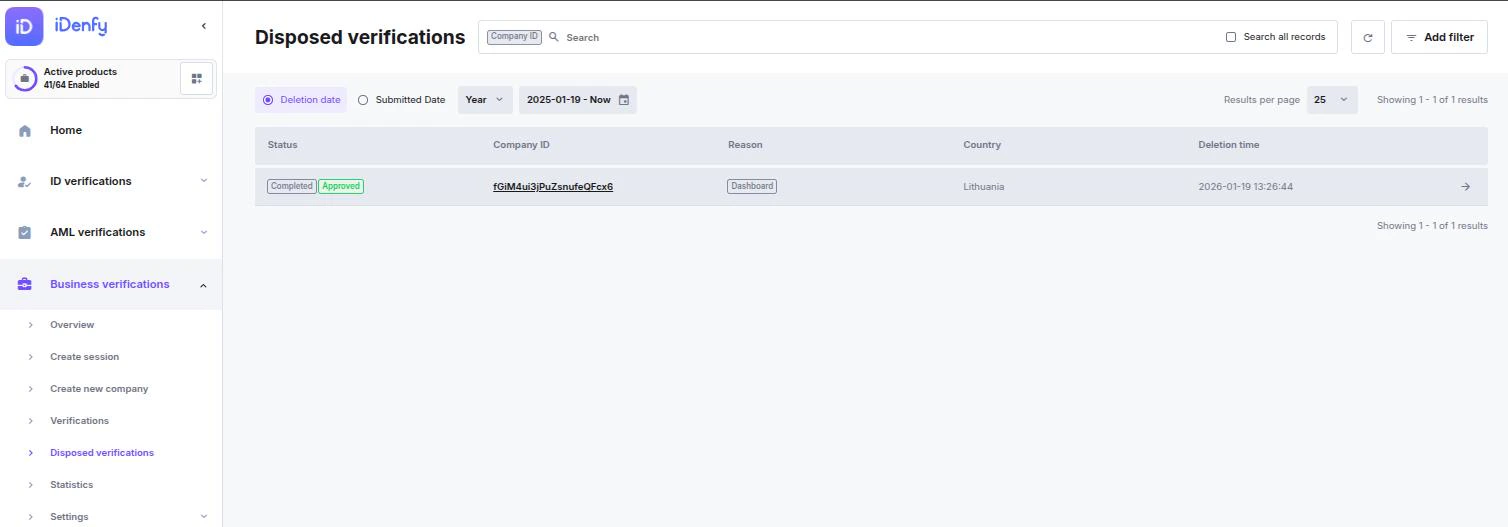
Search and Audit Tools
Use these tools to track down specific deleted records:Search
Locate a record using the specific Company ID.
Time Filtering
Toggle between Deletion Date (when it was removed) and Submitted Date (when the verification originally started).
Add Filter
Narrow results by Reason, Status, or Result — the audit metadata recorded at disposal.
Disposal Reasons
Records are typically moved to this list for one of the following reasons:Dashboard
A manager manually deleted the record from the platform.
Automated Deletion
The record was removed based on your company’s automated data retention or cleanup settings.
Partner Request
Deletion was triggered via an API request or a direct partner instruction.
Viewing Disposed Data
The main table provides a high-level overview of the audit trail. To view the full context of a deletion, click the Company ID link or the Arrow Icon to open the Disposed Verification Info card.Information Available in the Details View
Disposed records are kept for compliance and auditing purposes. Depending on your data retention policy, these logs may be permanently removed after a set period.