

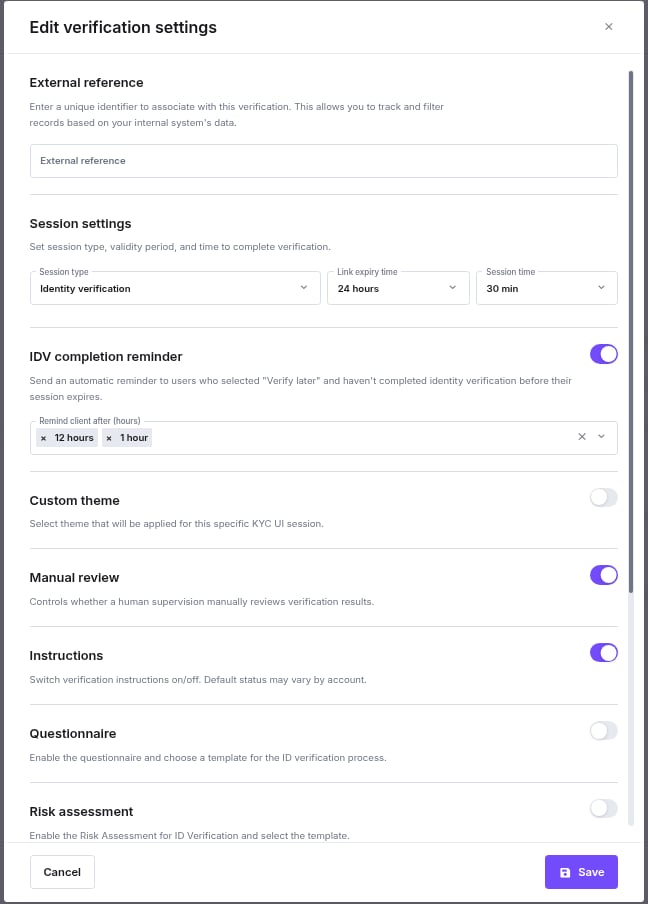
External Reference
Enter a unique identifier to associate with this verification. This allows you to track and filter records based on your internal system’s data.Session Settings
Control the timing and validity of the verification link sent to the individual.- Session type: Define the specific verification flow type.
- Link expiry time: How long the verification link remains valid before it expires (e.g., 24 hours).
- Session time: How much time the user has to complete the process once they open the link (e.g., 30 min).
IDV Completion Reminder
Send an automatic reminder to users who selected “Verify Later” and have not completed identity verification before their session expires. When enabled, select one or more intervals from the Remind client after (hours) dropdown. iDenfy sends a reminder email at each selected time only if the user has not yet completed verification.Custom Theme
When enabled, select a theme from the dropdown to apply custom branding to this specific KYC UI session, overriding the default account theme for this individual’s verification. The theme marked as default is pre-selected when you turn the option on. See Setting a Default Theme.Supervision and Guidance
- Manual review: Toggle this On if you want a human agent to manually review the verification results before approval.
- Instructions: Toggle On to display helper text and instructions to the user during the verification process.
Data Collection and Risk
- Questionnaire: Enable this to require the user to answer a specific set of questions. You can select a pre-made template from the dropdown menu.
- Risk assessment: Enable automated risk scoring for the individual. You must select a specific risk assessment template from the dropdown.
- Additional step (POA): Enable this to require a Proof of Address document upload (or other required files) as part of the flow.
Bank Verification
- Bank verification: Toggle this to require your client (specifically for EU countries) to verify their personal bank details.
- Bank name and country are retrieved by default.
- Additional Data: If enabled, you can request:
- Account IBANs data: IBANs and owner name.
- Account Balances: Current balance details.
- Transactions List: History of transactions (usually 1 year) including amounts, creditors, and receivers.
Contact Verification
Ensure the individual’s contact details are valid by requiring a code confirmation.- Email verification: Requires the user to verify their email address.
- SMS verification: Requires the user to verify their mobile phone number via SMS code.